Deleting Facebook

Recently as I go deeper into the academic rabbit hole, I have found the need to revive my blog just a bit. Many class assignments require writing up discussion points, so why not do it here?

Also, if I am to eventually obtain a PHD, it is important to build a body of work. Some of the none of you reading this may have noticed an influx of posts about various functions, database manifests, and so on. These are partially just notes so I can remember what I was doing five minutes ago – but eventually along with my OpenBOR work I am hoping to have a nice collection to organize and publish.

So what does this have to do with Facebook? Simple, part of reviving the blog sphere means reorganizing – switching to hashtags vs. loads of categories, revamping some old code, all that good business.

As it happens, Facebook is chained to this thing like Stevie Nicks, ergo my account needs cleaning just as bad. Fixing the albums, categorizing posts so I can find them, and frankly, removing a few faux pas. Not personal stuff – I was always pretty careful about that. I’m talking posts about code work that looking back now I must wonder what sick malaise struck me when crafting them! 🙂

Problem is have you SEEN what a pain it is to clean FB profiles?! Mine has been active since 2008, and I no doubt averaged ~1.5 posts a day. That’s a lot of extraneous excrement to sift through. It’s certainly doable, just not worth the time. Instead let’s go the way of a rookie call center tech: Format and recover!

Within the next week I am going to perform a full delete on my account. Afterwards I will restart fresh, though it might be a while since FB can take up to 90 days before a profile is truly cleared.

There you have it – sorry if I carried on like an Allen Collins solo. If you see me show up as a friend request in the next month or two, it’s really me and I hope you’ll accept. In the meantime, both of you who wish to keep up with me may do so here or through my other social venues. You shouldn’t have trouble finding them.

See you soon!

DC

PHP Directory Scan

PHP

Introduction

This function will scan directories and return keyed arrays of file attributes matching a user provided filter string. Perfect for image, documents, and other sorts of content delivery where a naming convention is known but the directory contents are often appended or otherwise in flux.

Example

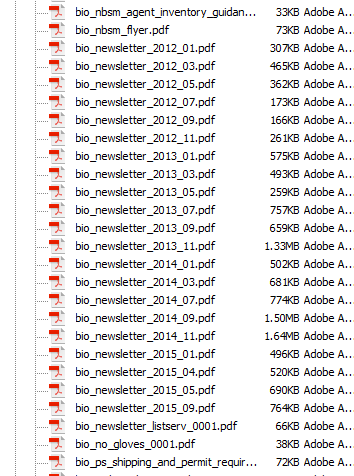
Let’s assume we need to locate a series of .pdf newsletters. Occasionally these letters are uploaded to the web server with a big endian date based naming convention.

The documents we need might be part of a larger container with many other items.

Since we know each file begins with “bio_newsletter_”, we can use that as our search string, like this:

$directory 			= '/docs/pdf/';
$filter				= 'bio_newsletter*/';
$attribute			= 'name';
$descending_order 	= TRUE;

$files = directory_scan($directory, $filter, $attribute, $descending_order);

The function will then rummage through our target directory, and return an array with any matched files, giving you an output that looks something like this:

 
Key Value
/docs/pdf/bio_newsletter_2015_09.pdf /docs/pdf/bio_newsletter_2015_09.pdf
/docs/pdf/bio_newsletter_2015_05.pdf /docs/pdf/bio_newsletter_2015_05.pdf
/docs/pdf/bio_newsletter_2015_04.pdf /docs/pdf/bio_newsletter_2015_04.pdf


This might look redundant, but that’s because keys are always populated with file name to allow extraction of values by name later, and in this case we are looking specifically for the file name. There is an option of returning one of several attributes, which are reflected in the value.

If the directory does not exist or isn’t readable, the function will return NULL.

Source

// Caskey, Damon V.
// 2012-03-19
//
// Scan a directory for files matching filter
// and return an array of matches.
//
// $directory: 		Directory to scan.
// $filter:		Filter string.
// $attribute:		File attribute to acquire. See here for 
// 			list of available attributes: http://php.net/manual/en/function.stat.php
// $order_descending:	FALSE (default) = Order by file name ascending. 
//			TRUE = Order by file name descending. 
function directory_scan($directory, $filter, $attribute = 'name', $order_descending = FALSE)
{	
    $result 			= NULL;	// Final result.
    $directory_handle 	= NULL; 	// Directory object handle.
	$directory_valid	= FALSE;	// If directory is accessible.
	$stat				= array();	// Attribute array.
	
	// Validate directory.
	$directory_valid = is_readable($directory);
	
	// If the directory is valid, open it
	// and get the object handle.
	if($directory_valid)
	{
		$directory_handle = opendir($directory);
	}
	
	// Do we have a directory handle?
	if($directory_handle) 
	{
		// Scan all items in directory
		// and populate result array with 
		// the attribute of those with
		// names matching our search pattern.
        do 
		{
			// Get first/next item name in the 
			// directory handle.
			$file_name = readdir($directory_handle);
			
			
            if (preg_match($filter, $file_name)) 
			{
                $stat = stat($directory.'/'.$file_name);
				
				// If requested attribute is name, then
				// just pass on the name with directory.
				// Otherwise, pass the requested attribute.
				if($attribute == 'name')
				{
					$result[$file_name] = $file_name;
				}
				else
				{
					$result[$file_name] = $stat[$attribute];
				}
            }
			
        }
		while($file_name !== FALSE);
        
		// Close the directory object.
		closedir($directory_handle);
        
		// Sort the array as requested.
		if ($order_descending)
		{
            arsort($result);
        }
        else
		{
            asort($result);
        }
    }
	
	// Return resulting array.
    return $result;
}


A word of caution – directory scanning is simple and effective, but doesn’t scale so well. A few hundred files is fine, but once you start breaching the thousands it’s probably time to break your directory structure down a bit, or consider a RDMS solution.

Until next time!

DC