
PHP Chronofix

PHP

Contents

Introduction

This self-contained library is intended to aid in parsing dates and time values regardless of incoming format, and output the result to a uniform format of choice.

The simple fact is that client side inputs are notoriously unreliable. Even when enforcing inputs to choose or sanitize dates, you may not end up with uniform results across browsers. Or even the SAME browser. Google Chrome for instance, will send a different format depending upon seconds input. Even if you enforce seconds using the step attribute, Chrome will not send seconds as part of the date time string if the user chooses a seconds value of 00.
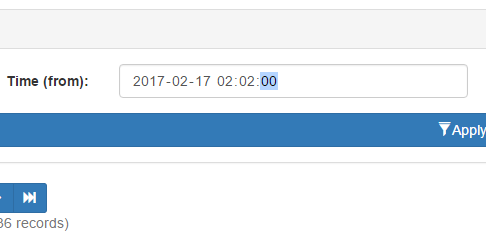
Unless you choose a value of 01 or greater, Chrome simply won’t include seconds.

However, should you choose a seconds value of 01 or more, then Chrome WILL include the seconds when posting. Same browser. Same version. Same field attributes. Yet entirely different formats depending on perfectly valid user inputs.

You could choose to use text fields and invoke heavy JavaScript date/time pickers, but then you harm the mobile experience, where seamless date choosing is already implemented. If you choose a dynamic solution that looks for support of date time fields, then you regain the mobile experience, but you’re right back to dealing with unreliable formatting.

In a nutshell, if you don’t perform server side validation, you may wind up with undefined behavior from whatever code relies on the input. Databases are particularly finicky. Go ahead and send client side dates directly to an RDMS. Your results will be the same as Forrest Gump’s chocolate box.

Unfortunately, most forms of server side validation are themselves rather persnickety. In the above example, a validator expecting seconds will reject input from Chrome, and several mobile browsers as well. This is where my date and time library comes into play. By leveraging a layered approach and PHP’s string to time, we can accept most any valid time string, verify it, and output in a single uniform format for use.

Use

Simple – Object is initialized with default settings:

// Initialize object with default settings.
$dc_time 		= new dc\Chronofix();

Advanced – Initializing a settings object first, and applying it to the main object.

// Initialize settings object, and use it
// to set date format to Year-Month-Day only.
$dc_time_settings = new dc\Config()
(); $dc_time_settings->set_format('Y-m-d'); // Initialize time library with settings. $dc_time = new dc\Chronofix($dc_time_settings); 

Once initialized the following functions are exposed. All examples assume default settings.

Settings Object

Again be aware settings are entirely optional.

echo $settings->get_format();
// Outputs Y-m-d H:i:s

Returns the format string currently in use.

$string = 'Y-m-d H:i:s';

$settings->set_format($string);

Replaces format in use with $string.

Time Object

$object = $time->get_settings();

Returns a reference to settings object in use by time object. By accessing the current settings object, you can modify settings at runtime.

echo $time->get_time();

// Outputs 2017-02-15 12:00:00

Returns the current date/time value as a string.

$string = '2017-02-15 12:00:00';

echo $time->is_valid($string);

// Outputs TRUE if valid, or FALSE.

For internal use, but exposed for possible utility purposes. Evaluates $string against current date/time format. If the formats match, TRUE is returned. Otherwise FALSE is returned.

echo $time->sanitize();

// Outputs 2017-02-15 12:00:00

Evaluates the current date/time value and attempts to convert its format to the current format setting. Leverages a combination of php’s strtotime and date object to handle nearly any format of dates and times. Outputs newly formatted date/time string, or NULL on failure.

$object = new dc\Config();

$time->set_settings($object);

Replaces current settings object with $object.

$string = '2017-02-15 12:00:00';

$time->set_time($string);

Replaces the current date/time string with $string. You will need to do this before performing any other operations.

Source

Full source available on Github.
PHP Directory Scan

PHP

Introduction

This function will scan directories and return keyed arrays of file attributes matching a user provided filter string. Perfect for image, documents, and other sorts of content delivery where a naming convention is known but the directory contents are often appended or otherwise in flux.

Example

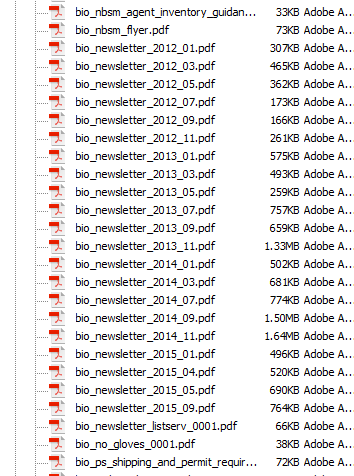
Let’s assume we need to locate a series of .pdf newsletters. Occasionally these letters are uploaded to the web server with a big endian date based naming convention.

The documents we need might be part of a larger container with many other items.

Since we know each file begins with “bio_newsletter_”, we can use that as our search string, like this:

$directory 			= '/docs/pdf/';
$filter				= 'bio_newsletter*/';
$attribute			= 'name';
$descending_order 	= TRUE;

$files = directory_scan($directory, $filter, $attribute, $descending_order);

The function will then rummage through our target directory, and return an array with any matched files, giving you an output that looks something like this:

 
Key Value
/docs/pdf/bio_newsletter_2015_09.pdf /docs/pdf/bio_newsletter_2015_09.pdf
/docs/pdf/bio_newsletter_2015_05.pdf /docs/pdf/bio_newsletter_2015_05.pdf
/docs/pdf/bio_newsletter_2015_04.pdf /docs/pdf/bio_newsletter_2015_04.pdf


This might look redundant, but that’s because keys are always populated with file name to allow extraction of values by name later, and in this case we are looking specifically for the file name. There is an option of returning one of several attributes, which are reflected in the value.

If the directory does not exist or isn’t readable, the function will return NULL.

Source

// Caskey, Damon V.
// 2012-03-19
//
// Scan a directory for files matching filter
// and return an array of matches.
//
// $directory: 		Directory to scan.
// $filter:		Filter string.
// $attribute:		File attribute to acquire. See here for 
// 			list of available attributes: http://php.net/manual/en/function.stat.php
// $order_descending:	FALSE (default) = Order by file name ascending. 
//			TRUE = Order by file name descending. 
function directory_scan($directory, $filter, $attribute = 'name', $order_descending = FALSE)
{	
    $result 			= NULL;	// Final result.
    $directory_handle 	= NULL; 	// Directory object handle.
	$directory_valid	= FALSE;	// If directory is accessible.
	$stat				= array();	// Attribute array.
	
	// Validate directory.
	$directory_valid = is_readable($directory);
	
	// If the directory is valid, open it
	// and get the object handle.
	if($directory_valid)
	{
		$directory_handle = opendir($directory);
	}
	
	// Do we have a directory handle?
	if($directory_handle) 
	{
		// Scan all items in directory
		// and populate result array with 
		// the attribute of those with
		// names matching our search pattern.
        do 
		{
			// Get first/next item name in the 
			// directory handle.
			$file_name = readdir($directory_handle);
			
			
            if (preg_match($filter, $file_name)) 
			{
                $stat = stat($directory.'/'.$file_name);
				
				// If requested attribute is name, then
				// just pass on the name with directory.
				// Otherwise, pass the requested attribute.
				if($attribute == 'name')
				{
					$result[$file_name] = $file_name;
				}
				else
				{
					$result[$file_name] = $stat[$attribute];
				}
            }
			
        }
		while($file_name !== FALSE);
        
		// Close the directory object.
		closedir($directory_handle);
        
		// Sort the array as requested.
		if ($order_descending)
		{
            arsort($result);
        }
        else
		{
            asort($result);
        }
    }
	
	// Return resulting array.
    return $result;
}


A word of caution – directory scanning is simple and effective, but doesn’t scale so well. A few hundred files is fine, but once you start breaching the thousands it’s probably time to break your directory structure down a bit, or consider a RDMS solution.

Until next time!

DC

Bootstrap Remote File Models

Introduction

Opening a model is well documented for the bootstrap framework, assuming the model’s contents are located within the same document. However, if the model target is a remote file the process becomes slightly more nebulous. After some experimenting and Stack Overflow research I have compiled the following steps to do so.

Link

The link for opening a model must still target a container element of some sort, typically a DIV id. You may also choose to target the container by class. For remote files, you need to include a href as well, targeting the remote file location.

<a href="model_document.php" data-target="#model_div_container_id" data-toggle="modal">Open Model</a>

Model Container

Next you need to prepare the calling document (the same document that contains model link) with a model container. This is exactly the same as with a normal model, except you are only adding the model’s container elements, not its content.

<div class="modal fade" id="#model_div_container_id">
    <div class="modal-dialog">
        <div class="modal-content">
        	<!-- Model content area - leave this empty.-->
        </div>
    </div>
</div>

Model Document (Content)

The last step is to prepare your remote document. Add whatever content you wish. The only special caveat to consider is you do NOT add the model container elements to this document. You only add the content. The content itself may include its own container elements, formatting, and so forth. In the example below, the model is a simple list, and therefore only the markup for the list is included.

<ul>	
    <li>Item 1</li>
    <li>Item 2</li>
    <li>Item 3</li>
</ul>

You’ve probably already guessed what’s going on here. When the model link is clicked, the remote document’s contents are inserted into the calling document’s target element. Bootstrap Model Documentation (extracted 2017-01-23):

If a remote URL is provided, content will be loaded one time via jQuery’s load method and injected into the .modal-content div. If you’re using the data-api, you may alternatively use the href attribute to specify the remote source.

This is why you must include a target element in the calling document, and conversely NOT include model containers in the remote document. Hope this helps. Special thanks to Buzinas from Stack Overflow.

Until next time!

DC

Lists and PHP Range

PHP

This article assumes LAMP or other PHP based web layout, and basic proficiency with PHP scripting.

Imagine you’ve just finished one of those simple but massive and often tedious alphabetical link lists or tables all of us in the web business are called upon to assemble at some point. You know the customer will appreciate the convenience of anchors and bookmark links. On the surface it would appear you have the less than fun choices of cobbling together a cumbersome loop to generate your links, or to type and double check each one by hand. Fortunately as of PHP version 4.0 there is a better option: Range.

Range is an oft overlooked and very useful function that will accept two bookends and return an array containing the in between values in order (bookends included).

For an example, to get the set of letter bookmark links at the top of this page, we could do it the hard way:

<a href="#A">A</a>
<a href="#B">B</a>
<a href="#C">C</a>

We could also write some home grown functions, probably involving a nested loop or two. But why do either when we could get the same result like this?

$markup = NULL;     // List markup.
$letter = NULL;     // Letter placeholder.
$range  = array();  // Range array.
 
// Get range array, A to Z.
$range = range('A', 'Z');
 
// Loop range array.
foreach ($range as $letter)
{
    // Build link list markup.
    $markup .= '<a href="#'.$letter.'">'.$letter.'</a> '; 
} 
// Output markup 
echo $list; 

Simple, elegant, reusable, and best of all it’s far less prone to human error. Either the whole list works or none of it will, in which case you will know right away without the need to check each link individually.

Try your own experiments with range; it is quite versatile and extremely powerful in the right hands. It’s nothing you couldn’t do piecemeal or with custom solutions, but will most certainly simplify the process – freeing up your efforts for far more worthy causes.

Until next time!
DC