PHP Chronofix

PHP

Contents

Introduction

This self-contained library is intended to aid in parsing dates and time values regardless of incoming format, and output the result to a uniform format of choice.

The simple fact is that client side inputs are notoriously unreliable. Even when enforcing inputs to choose or sanitize dates, you may not end up with uniform results across browsers. Or even the SAME browser. Google Chrome for instance, will send a different format depending upon seconds input. Even if you enforce seconds using the step attribute, Chrome will not send seconds as part of the date time string if the user chooses a seconds value of 00.
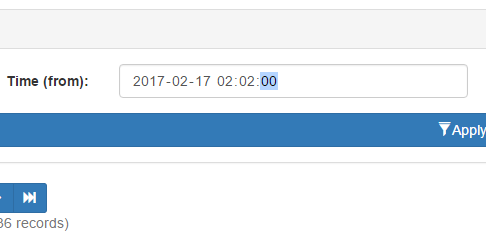
Unless you choose a value of 01 or greater, Chrome simply won’t include seconds.

However, should you choose a seconds value of 01 or more, then Chrome WILL include the seconds when posting. Same browser. Same version. Same field attributes. Yet entirely different formats depending on perfectly valid user inputs.

You could choose to use text fields and invoke heavy JavaScript date/time pickers, but then you harm the mobile experience, where seamless date choosing is already implemented. If you choose a dynamic solution that looks for support of date time fields, then you regain the mobile experience, but you’re right back to dealing with unreliable formatting.

In a nutshell, if you don’t perform server side validation, you may wind up with undefined behavior from whatever code relies on the input. Databases are particularly finicky. Go ahead and send client side dates directly to an RDMS. Your results will be the same as Forrest Gump’s chocolate box.

Unfortunately, most forms of server side validation are themselves rather persnickety. In the above example, a validator expecting seconds will reject input from Chrome, and several mobile browsers as well. This is where my date and time library comes into play. By leveraging a layered approach and PHP’s string to time, we can accept most any valid time string, verify it, and output in a single uniform format for use.

Use

Simple – Object is initialized with default settings:

// Initialize object with default settings.
$dc_time 		= new dc\Chronofix();

Advanced – Initializing a settings object first, and applying it to the main object.

// Initialize settings object, and use it
// to set date format to Year-Month-Day only.
$dc_time_settings = new dc\Config()
(); $dc_time_settings->set_format('Y-m-d'); // Initialize time library with settings. $dc_time = new dc\Chronofix($dc_time_settings); 

Once initialized the following functions are exposed. All examples assume default settings.

Settings Object

Again be aware settings are entirely optional.

echo $settings->get_format();
// Outputs Y-m-d H:i:s

Returns the format string currently in use.

$string = 'Y-m-d H:i:s';

$settings->set_format($string);

Replaces format in use with $string.

Time Object

$object = $time->get_settings();

Returns a reference to settings object in use by time object. By accessing the current settings object, you can modify settings at runtime.

echo $time->get_time();

// Outputs 2017-02-15 12:00:00

Returns the current date/time value as a string.

$string = '2017-02-15 12:00:00';

echo $time->is_valid($string);

// Outputs TRUE if valid, or FALSE.

For internal use, but exposed for possible utility purposes. Evaluates $string against current date/time format. If the formats match, TRUE is returned. Otherwise FALSE is returned.

echo $time->sanitize();

// Outputs 2017-02-15 12:00:00

Evaluates the current date/time value and attempts to convert its format to the current format setting. Leverages a combination of php’s strtotime and date object to handle nearly any format of dates and times. Outputs newly formatted date/time string, or NULL on failure.

$object = new dc\Config();

$time->set_settings($object);

Replaces current settings object with $object.

$string = '2017-02-15 12:00:00';

$time->set_time($string);

Replaces the current date/time string with $string. You will need to do this before performing any other operations.

Source

Full source available on Github.
Dynamic Stored Procedure Call Generation

PHP

Scripting experiment. Inspector Blair page layout is currently static code. I would like to upgrade to a content managed layout. One of the first challenges is overcoming the diverse array of forms and subsequent data calls. Dynamic queries are NOT acceptable. Instead I’ll need to find a way to create dynamic inputs for stored procedures that can be driven from a forms database.

This experiment was to test a simple array generator. Normally saving to the database is handled by a set of class calls as in this excerpt:

case RECORD_NAV_COMMANDS::SAVE:
	
	// Stop errors in case someone tries a direct command link.
	if($obj_navigation_rec->get_command() != RECORD_NAV_COMMANDS::SAVE) break;
							
	// Save the record. Saving main record is straight forward. We’ll run the populate method on our 
	// main data object which will gather up post values. Then we can run a query to merge the values into 
	// database table. We’ll then get the id from saved record (since we are using a surrogate key, the ID
	// should remain static unless this is a brand new record). 
	
	// If necessary we will then save any sub records (see each for details).
	
	// Finally, we redirect to the current page using the freshly acquired id. That will ensure we have 
	// always an up to date ID for our forms and navigation system.			

	// Populate the object from post values.			
	$_main_data->populate_from_request();
	
	// --Sub data: Role.
	$_obj_data_sub_request = new class_account_role_data();
	$_obj_data_sub_request->populate_from_request();

	// Let's get account info from the active directory system. We'll need to put
	// names int our own database so we can control ordering of output.
	$account_lookup = new class_access_lookup();
	$account_lookup->lookup($_main_data->get_account());

	// Call update stored procedure.
	$query->set_sql('{call account_update(@id			= ?,
											@log_update_by	= ?, 
											@log_update_ip 	= ?,										 
											@account 		= ?,
											@department 	= ?,
											@details		= ?,
											@name_f			= ?,
											@name_l			= ?,
											@name_m			= ?,
											@sub_role_xml	= ?)}');
											
	$params = array(array('<root><row id="'.$_main_data->get_id().'"/></root>', 		SQLSRV_PARAM_IN),
				array($access_obj->get_id(), 				SQLSRV_PARAM_IN),
				array($access_obj->get_ip(), 			SQLSRV_PARAM_IN),
				array($_main_data->get_account(), 		SQLSRV_PARAM_IN),						
				array($_main_data->get_department(),	SQLSRV_PARAM_IN),						
				array($_main_data->get_details(), 		SQLSRV_PARAM_IN),
				array($account_lookup->get_account_data()->get_name_f(), SQLSRV_PARAM_IN),
				array($account_lookup->get_account_data()->get_name_l(), SQLSRV_PARAM_IN),
				array($account_lookup->get_account_data()->get_name_m(), SQLSRV_PARAM_IN),
				array($_obj_data_sub_request->xml(), 	SQLSRV_PARAM_IN));
	
	//var_dump($params);
	//exit;
	
	$query->set_params($params);			
	$query->query();
	
	// Repopulate main data object with results from merge query.
	$query->get_line_params()->set_class_name('blair_class_account_data');
	$_main_data = $query->get_line_object();
	
	// Now that save operation has completed, reload page using ID from
	// database. This ensures the ID is always up to date, even with a new
	// or copied record.
	header('Location: '.$_SERVER['PHP_SELF'].'?id='.$_main_data->get_id());
	
	break;


Before we can begin to control the above calls dynamically, we’ll need to break the call down and see if we can assemble the sql string. Here we will concentrate on building the SQL string.

The form parts and column names they send data too will likely be stored in a sub-table of the forms database, and output as a linked list. We need to use those column names in a call string for sending or retrieving data. This simple experiment uses a keyed array to simulate the list we might get and see if we can concatenate a usable stored procedure call string.

$_main_data->populate_from_request();
            
// --Sub data: Role.
$_obj_data_sub_request = new class_account_role_data();
$_obj_data_sub_request->populate_from_request();

// Let's get account info from the active directory system. We'll need to put
// names int our own database so we can control ordering of output.
$account_lookup = new class_access_lookup();
$account_lookup->lookup($_main_data->get_account());

$save_row['id']                = '<root><row id="'.$_main_data->get_id().'"/></root>';
$save_row['log_update_by']    = $access_obj->get_id();
$save_row['log_update_ip']     = $access_obj->get_ip();
$save_row['account']         = $_main_data->get_account();
$save_row['department']        = $_main_data->get_department();
$save_row['name_f']         = $account_lookup->get_account_data()->get_name_f();
$save_row['name_l']         = $account_lookup->get_account_data()->get_name_l();
$save_row['name_m']         = $account_lookup->get_account_data()->get_name_m();    
$save_row['sub_role_xml']     = $_obj_data_sub_request->xml();        

$sql_str = '{call account_update(@';
$sql_str .= implode(' = ?, @', array_keys($save_row));
$sql_str .= ')}';
echo $sql_str;

//

Obviously this alone won’t be enough, but the resulting output looks quite promising:

{call account_update(@id = ?, @log_update_by = ?, @log_update_ip = ?, @account = ?, @department = ?, @name_f = ?, @name_l = ?, @name_m = ?, @sub_role_xml)}


PHP Directory Scan

PHP

Introduction

This function will scan directories and return keyed arrays of file attributes matching a user provided filter string. Perfect for image, documents, and other sorts of content delivery where a naming convention is known but the directory contents are often appended or otherwise in flux.

Example

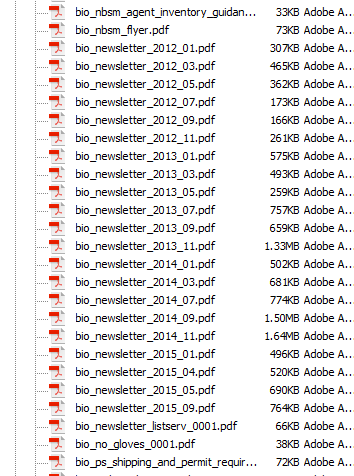
Let’s assume we need to locate a series of .pdf newsletters. Occasionally these letters are uploaded to the web server with a big endian date based naming convention.

The documents we need might be part of a larger container with many other items.

Since we know each file begins with “bio_newsletter_”, we can use that as our search string, like this:

$directory 			= '/docs/pdf/';
$filter				= 'bio_newsletter*/';
$attribute			= 'name';
$descending_order 	= TRUE;

$files = directory_scan($directory, $filter, $attribute, $descending_order);

The function will then rummage through our target directory, and return an array with any matched files, giving you an output that looks something like this:

 
Key Value
/docs/pdf/bio_newsletter_2015_09.pdf /docs/pdf/bio_newsletter_2015_09.pdf
/docs/pdf/bio_newsletter_2015_05.pdf /docs/pdf/bio_newsletter_2015_05.pdf
/docs/pdf/bio_newsletter_2015_04.pdf /docs/pdf/bio_newsletter_2015_04.pdf


This might look redundant, but that’s because keys are always populated with file name to allow extraction of values by name later, and in this case we are looking specifically for the file name. There is an option of returning one of several attributes, which are reflected in the value.

If the directory does not exist or isn’t readable, the function will return NULL.

Source

// Caskey, Damon V.
// 2012-03-19
//
// Scan a directory for files matching filter
// and return an array of matches.
//
// $directory: 		Directory to scan.
// $filter:		Filter string.
// $attribute:		File attribute to acquire. See here for 
// 			list of available attributes: http://php.net/manual/en/function.stat.php
// $order_descending:	FALSE (default) = Order by file name ascending. 
//			TRUE = Order by file name descending. 
function directory_scan($directory, $filter, $attribute = 'name', $order_descending = FALSE)
{	
    $result 			= NULL;	// Final result.
    $directory_handle 	= NULL; 	// Directory object handle.
	$directory_valid	= FALSE;	// If directory is accessible.
	$stat				= array();	// Attribute array.
	
	// Validate directory.
	$directory_valid = is_readable($directory);
	
	// If the directory is valid, open it
	// and get the object handle.
	if($directory_valid)
	{
		$directory_handle = opendir($directory);
	}
	
	// Do we have a directory handle?
	if($directory_handle) 
	{
		// Scan all items in directory
		// and populate result array with 
		// the attribute of those with
		// names matching our search pattern.
        do 
		{
			// Get first/next item name in the 
			// directory handle.
			$file_name = readdir($directory_handle);
			
			
            if (preg_match($filter, $file_name)) 
			{
                $stat = stat($directory.'/'.$file_name);
				
				// If requested attribute is name, then
				// just pass on the name with directory.
				// Otherwise, pass the requested attribute.
				if($attribute == 'name')
				{
					$result[$file_name] = $file_name;
				}
				else
				{
					$result[$file_name] = $stat[$attribute];
				}
            }
			
        }
		while($file_name !== FALSE);
        
		// Close the directory object.
		closedir($directory_handle);
        
		// Sort the array as requested.
		if ($order_descending)
		{
            arsort($result);
        }
        else
		{
            asort($result);
        }
    }
	
	// Return resulting array.
    return $result;
}


A word of caution – directory scanning is simple and effective, but doesn’t scale so well. A few hundred files is fine, but once you start breaching the thousands it’s probably time to break your directory structure down a bit, or consider a RDMS solution.

Until next time!

DC

Server Side Paging – MSSQL 2008

SQL

Introduction

Paging is almost perfunctory when dealing with large lists of online data. Problem is, most paging solutions out there (at least those I’ve seen) perform this vital function on the client side – either through dangerous dynamic SQL or even worse – pulling the entire record set down and disseminating pages for the user afterward.

You wouldn’t (I hope) trust the client to put data into your tables, so why trust it to filter and page? That’s what your database engine was specifically designed to do! Server side paging gives you a couple of big advantages:

  • Security – See above. I would never, and will never trust a client generated SQL. You’re just asking for it.
  • Scaling – Client side record processing may seem faster at first because of the instant response. Then your record count passes the VERY modest six digit mark, and suddenly you’re looking for ways to mediate ten minute load times.

The only real downsides to sever side paging are reloading and complexity of initial setup. The former can be dealt with using an AJAX or similar solution. The later is where I come in. The following stored procedure completely encapsulates paging, all of any other data extraction.

Implementation

Execute within data procedure after all other record processing is complete on the primary data table. Assumes primary data is in temp table #cache_primary. Pass following arguments:

  • page_current – Current record page to view as requested by control code.
  • page_rows (optional, uses default value if NULL) – Number of rows (records) to output per page.


Outputs following record set for use by control code:

Column Type Description
row_count_total int Total number of rows in the paged record set.
page_rows int Maximum number of rows per page. Will be same as the maximum row argument passed form control code unless that argument was null, in which case this will reflect the default maximum rows.
page_last int Last page number / total number of pages.
row_first int ID of first record in requested page.
row_last int ID of last record in requested page.


SQL

-- Master Paging
-- Caskey, Damon V.
-- 2016-07-08
--
-- Output recordset in divided pages. Also creates and outputs
-- a recordset of paging data for  control code. Execute in another 
-- stored procedure after all other record work (filters, sorting, joins, etc.) 
-- is complete. Make sure final table variable name is #cache_primary.

-- Set standard ISO behavior for handling NULL 
-- comparisons and quotations.
ALTER PROCEDURE [dbo].[master_paging]
    
    -- Parameters. 
        @param_page_current    int            = 1,    -- Current page of records to display.
        @param_page_rows    smallint    = 25    -- (optional) max number of records to display in a page.
            
AS
BEGIN
    
    -- If non paged layout is requested (current = -1), then just
    -- get all records and exit the procedure immediately.
        IF @param_page_current = -1
            BEGIN
                SELECT *
                    FROM #cache_primary
                    RETURN
            END 

    -- Verify arguments from control code. If something
    -- goes out of bounds we'll use stand in values. This
    -- also lets the paging &quot;jumpstart&quot; itself without
    -- needing input from the control code.
                
        -- Current page default.
        IF    @param_page_current IS NULL OR @param_page_current &lt; 1
            SET @param_page_current = 1
            
        -- Rows per page default.
        IF    @param_page_rows IS NULL OR @param_page_rows &lt; 1 SET @param_page_rows = 10 -- Declare the working variables we'll need. DECLARE @row_count_total int, -- Total row count of primary table. @page_last float, -- Number of the last page of records. @row_first int, -- Row ID of first record. @row_last int -- Row ID of last record. -- Set up table var so we can reuse results. CREATE TABLE #cache_paging ( id_row int, id_paging int ) -- Populate paging cache. This is to add an -- ordered row number column we can use to -- do paging math. INSERT INTO #cache_paging (id_row, id_paging) (SELECT ROW_NUMBER() OVER(ORDER BY @@rowcount) AS id_row, id FROM #cache_primary _main) -- Get total count of records. SET @row_count_total = (SELECT COUNT(id_row) FROM #cache_paging); -- Get paging first and last row limits. Example: If current page -- is 2 and 10 records are allowed per page, the first row should -- be 11 and the last row 20. SET @row_first = (@param_page_current - 1) * @param_page_rows SET @row_last = (@param_page_current * @param_page_rows + 1); -- Get last page number. SET @page_last = (SELECT CEILING(CAST(@row_count_total AS FLOAT) / CAST(@param_page_rows AS FLOAT))) IF @page_last = 0 SET @page_last = 1 -- Extract paged rows from page table var, join to the -- main data table where IDs match and output as a recordset. -- This gives us a paged set of records from the main -- data table. SELECT TOP (@row_last-1) * FROM #cache_paging _paging JOIN #cache_primary _primary ON _paging.id_paging = _primary.id WHERE id_row &gt; @row_first 
                AND id_row &lt; @row_last
                    
            ORDER BY id_row    
                
    -- Output the paging data as a recordset for use by control code.
                
        SELECT    @row_count_total    AS row_count_total,
                @param_page_rows        AS page_rows,
                @page_last            AS page_last,
                @row_first            AS row_first,
                @row_last            AS row_last
            
        
END


Master Table Design

SQL

Introduction

Master table layout and creation. The master table controls all data tables via one to one relationship and carries audit info.


Layout


Column Type Description
id int (Auto Increment) Primary key for master table. All data tables must include an ID field (NOT auto increment) linked to this field via one to one relationship.
id_group int Version linking ID. Multiple entries share an identical group ID to identify them as a single record with multiple versions. If no previous versions of a new record exist, then this column is seeded from ID field after initial creation.
active bit If TRUE, marks this entry as the active version of a record. Much faster than a date lookup and necessary for soft delete.
create_by int Account creating this version. -1 = Unknown.
create_host varchar(50) Host (usually IP provided by control code) creating entry.
create_time datetype2 Time this entry was created.
create_etime Computed column Elapsed time in seconds since entry was created.
update_by Same as create_x, but updated on every CRUD operation.
update_host
update_time
update_etime


Set Up

CREATE TABLE [dbo].[_a_tbl_master](
	id				int IDENTITY(1,1)	NOT NULL,						-- Primary unique key.
	id_group		int					NULL,							-- Primary record key. All versions of a given record will share a single group ID.
	active			bit					NOT NULL,						-- Is this the active version of a record? TRUE = Yes.
		-- Audit info for creating version. A new 
		-- version is created on any CRUD operation 
		-- in the data tables controlled by master.
	create_by		int					NOT NULL,						-- Account creating this version. -1 = Unknown.
	create_host		varchar(50)			NOT NULL,						-- Host (usually IP from control code) creating version. 
	create_time		datetime2			NOT NULL,						-- Time this version was created. 
	create_etime	AS (datediff(second, [create_time], getdate())),	-- Elapsed time in seconds since creation.	
		-- Audit information for updating version.
		-- When any CRUD is performed on a data
		-- table, the previously active version
		-- is marked inactive. Deleting a record
		-- simply marks all versions inactive.
		-- In short, the only updates made to 
		-- a master table are toggling Active
		-- flag.
	update_by		int					NOT NULL,						-- Account updating this version. -1 = Unknown.
	update_host		varchar(50)			NOT NULL,
	update_time		datetime2			NOT NULL,
	update_etime	AS (datediff(second, update_time, getdate())),
 
CONSTRAINT PK__a_tbl_master PRIMARY KEY CLUSTERED 
(
	id ASC
) WITH (PAD_INDEX = OFF, STATISTICS_NORECOMPUTE = OFF, IGNORE_DUP_KEY = OFF, ALLOW_ROW_LOCKS = ON, ALLOW_PAGE_LOCKS = ON) ON [PRIMARY]
) ON [PRIMARY]

GO

ALTER TABLE _a_tbl_master ADD CONSTRAINT DF__a_tbl_master_active		DEFAULT ((1))			FOR active
GO

ALTER TABLE _a_tbl_master ADD CONSTRAINT DF__a_tbl_master_create_by		DEFAULT ((-1))			FOR create_by
GO

ALTER TABLE _a_tbl_master ADD CONSTRAINT DF__a_tbl_master_create_host	DEFAULT (host_name())	FOR create_host
GO

ALTER TABLE _a_tbl_master ADD CONSTRAINT DF__a_tbl_master_created		DEFAULT (getdate())		FOR create_time
GO

ALTER TABLE _a_tbl_master ADD CONSTRAINT DF__a_tbl_master_update_host	DEFAULT (host_name())	FOR update_host
GO


Encapsulated XML ID List Parsing – In Progress

SQL

Introduction

As part of my ongoing MSSQL Versioning Project, it is often times necessary to pass a list of records to stored procedures, either from the controlling application or from a calling procedure. By use of standardized table design, you will normally only need to pass a list of primary keys. The procedure can query for any other information it needs from that point forward, making it fully self contained more maximum encapsulation.

For the list itself there are several options I know of, but only one is fully viable for my own needs. Your mileage may vary of course:

  1. Delimited List: On the surface this is the simplest of means. Just slap together a comma delimited string (“x, y, z”), break it down at the database console and off you go. If only it were actually that simple, and even if it was there’s not a chance on Earth I’m doing that. Neither should you. This is breaking the law of First Normal Form, something you never want to do for reasons well beyond the scope of this article. If you are curious, several (but by no means all) of the pitfalls of this approach are explained quite nicely here.
  2. Table Valued Parameters: TVPs are extremely powerful when used correctly and have their place, but for purposes of acting as lists or caches in a stored procedure, they have two serious drawbacks.
    1. TVPs are assumed by the query optimizer to contain a single row. This is of little to no consequence if only a few records are involved, but it can be disastrous once a threshold of ~100 is reached. Queries with execution times normally in the millisecond range may suddenly balloon into resource hogs requiring several minutes to complete.
    2. It’s rather unusual, but our environment is WIMP (Windows, IIS, MSSQL, PHP). Connectivity is provided by the sqlsrv driver, with an object oriented wrapper penned by yours truly. Unfortunately at time of writing, this otherwise excellent driver set does not support TVP.
  3. Common Language Runtime: Lots of fun to be had here, but like TVPs, it depends on a very specific environment. Otherwise it simply isn’t applicable. Even when it is, the realities of business often mean taking advantage of CLR adds layers of extra management and time wasted on service requests for the simplest of modifications. No thank you.
  4. XML: This is my method of choice. It’s reasonably fast, only giving up speed to CLR and TVP, and eventually surpassing the later as the number of records increases. It’s also T-SQL compliant, and thus quite portable. The downside is there’s more of a learning curve and you’ll want to design carefully to avoid huge strings. Let’s have a closer look at how…

Considerations

  • Efficiency: We want the XML itself and parser to be compact and fast as possible.
  • Scaling: The design should be solid and not break down under a heavy load.
  • Reuse. We need to encapsulate and standardize our code. It won’t do much good if every query or procedure requires an inline rewrite of the XML parsing.

Implementation

There are three basic scenarios where we will need to parse a list of IDs via XML.

Procedure A executes Procedure B, Sending List of IDs

This will be a common occurrence – in my MSSQL versioning design every procedure that updates data must first update the Master Table. Should sub data be involved, then multiple updates to Master table must first take place – one for each row of sub data updated. First Procedure A will establish the list of records to update as a temp table, as in the following example:

id created update_by update_ip active
1 2016-12-28 115 128.163.237.37 False
2 2016-12-28 115 128.163.237.37 False
3 2016-12-28 115 128.163.237.37 False

Once the table is ready, this query is run against it:

SET @xml_string_var = (SELECT id FROM <temp table of items to update> FOR XML RAW, ROOT)

The variable @xml_string_var will be populated with an XML string as follows. Note <root> and row. These are default outputs that we could change these by modifying our SQL above, but I prefer to leave them be. Since this little bit of SQL will be in nearly every data update procedure, let’s keep it simple and reusable as possible.

<root>
<row id=”1″ />
<row id=”2″ />
<row id=”3″ />
</root>

We can now execute Procedure B passing @xml_string_var as an XML string argument.

Procedure B Receives XML From Procedure A

Upon execution, Procedure B will need to break the XML back down into a table. Rather than Procedure B breaking the XML down inline, let’s outsource the work. We could do this with a stored procedure, but the moment we executed a procedure that in turn executed our XML parser, we would run smack into the irritating limitation of nested executions. For those unfamiliar, MSSQL 2008 and below simply do not allow nested stored procedure execution. Any attempted to do so will produce the following error:

Msg 8164, Level 16, State 1, Procedure <procedure_name>, Line <line> An INSERT EXEC statement cannot be nested.

In short, encapsulation as a stored procedure just won’t work. That really just leaves user defined functions. I personally loathe them for a lot of different reasons. They appeal to the programmer in me, but in SQL tend to cause more trouble than they’re worth. Still, if we want to encapsulate the XML parsing (and we DO), a table valued function is the best way to go. We’ll call it tvf_get_id_list:

-- tvf_get_id_list
-- Caskey, Damon V.
-- 2017-01-25
-- Returns recordset of IDs from xml list
-- 
-- <root>
--		<row id="INT" />
--		... 
-- </root>
			

CREATE FUNCTION tvf_get_id_list (@param_id_list xml)
RETURNS TABLE AS
RETURN (SELECT x.y.value('.','int') AS id	
			FROM @param_id_list.nodes('root/row/@id') AS x(y))

Procedure B will call tvf_get_id_list, passing along the XML. The tvf_get_id_list will break the XML down and produce a record-set of IDs, which we can then insert into temp table:

id
1
2
3

Procedure B will now have a access to record set of IDs that it can use to perform whatever work we need done.

As you can see, the XMl parsing work is fairly simple – we specifically planned the XML markup for easy break down. Even so encapsulating the XML work out to a separate function gives us a couple of advantages over just pasting the XML parsing code inline.

  • Obviously we will use the fastest and best scaled technique for breaking down the XML (see here for examples), but should even better techniques be developed, we only need to modify this one function.

Procedure B and any other procedures that we send our XML list to are simpler and more compact. They need only call tvf_get_id_list to break down the XML list into a usable record set.

Procedure Called By Control Code

This is more or less identical to procedures executing each other, except the procedures are being called by application code. In this case, it is the application’s responsibility to send XML formatted as above. The simplicity of XML makes this rather easy, and the parsing code can be made part of a class file.

foreach($this->id as $key => $id)
{	
					
	if($id == NULL) $id = DB_DEFAULTS::NEW_ID;
							
	$result .= '<row id="'.$id.'">';									
}

MSSQL Relational Record Versioning – In Progress

SQL

Versioning Notes (In Progress)

Master Table Update

The master table controls all data tables in the database, including sub tables containing one to many relational data (ex. One Person -> Many Phone Numbers). This means our master update procedure must be able to handle multiple record updates at once and be modular enough to execute by another update procedure – both for the updating the that procedure’s target data table AND any related sub tables. Otherwise the whole encapsulation concept falls apart.

  1. Populate a temp table with list of update IDs. These are the record IDs that we want modified (or created as the case may be). Ultimately we will be inserting these as new records with new IDs no matter what, but we’ll need to perform versioning if these IDs already exist in the master table.
    ID
    1
    2
    3
  2. Find any records in Master Table that match the Update List, and mark them as inactive. They will be replaced with new inserts.
    UPDATE
    			_a_tbl_master
    		SET
    			active = 0
    		FROM
    			#master_update_source _new
    		WHERE 
    			_a_tbl_master.id = _new.id;
  3. Prepare a list of inserts consisting of records where update list and master table IDs math, AND unmatched items in the Update List. The combined list is used to populate a temp table. This is also where we acquire the group ID for existing records. The group ID will be applied to new inserts (versions) of the existing records.
    INSERT INTO 
    			#master_update_inserts (id, id_group, update_by)
    		SELECT 
    			_current.id, _current.id_group, @update_by
    		FROM #master_update_source _source  
    			LEFT JOIN _a_tbl_master _current ON _source.id = _current.id
    
  4. Apply list of inserts to the Master Table. Use OUTPUT clause to populate a temp table with a list of IDs for each insert.
    INSERT INTO 
    			_a_tbl_master (id_group, update_by)
    		OUTPUT 
    			INSERTED.ID 
    				INTO #master_update_new_id
    		SELECT 
    			id_group, update_by 
    		FROM 
    			#master_update_inserts
  5. Using the list of IDs created when records were inserted to Master Table, we run an UPDATE against Master Table on the list of newly created IDs, where the id_group field is empty. This is to seed new records (not new versions of existing records) with a group ID.
  6. Master Table is now populated. New records will have a group ID identical to their ID, while existing records will have a new ID, but retain their previous group ID.
    ID id_group created update_by update_ip active
    2844 2884 2016-12-28 10:13:45.1900000 115 128.163.237.37 False
    2845 2845 2016-12-28 10:13:45.1900000 115 128.163.237.37 False
    2846 2846 2016-12-28 10:13:45.1900000 115 128.163.237.37 False
    2989 2844 2016-12-28 22:42:14.7930000 115 128.163.237.37 True
    2990 2845 2016-12-28 22:42:14.7930000 115 128.163.237.37 True
    2991 2846 2016-12-28 22:42:14.7930000 115 128.163.237.37 True

Full procedure (in progress)

-- Caskey, Damon V.
-- 2016-12-20
--
-- Update master table. Must be run before
-- any data table controlled by master is
-- updated. Outputs record set containing
-- IDs for the updated master that a
-- calling data update procedure will need.


SET ANSI_NULLS ON
GO
SET QUOTED_IDENTIFIER ON
GO

ALTER PROCEDURE [dbo].[_a_master_update]
	
	-- Parameters
	@arg_id					int				= NULL,		-- Primary key. 			
	@arg_update_by			int				= NULL,		-- ID from account table.
	@arg_update_ip			varchar(50)		= NULL		-- User IP, supplied from application.
			
AS
BEGIN

	-- Let's create the temp tables we'll need.
		
		-- List of update requests. All we
		-- need are IDs. The rest is handled
		-- by parameters or generated by
		-- default data binds in the master
		-- table.
		CREATE TABLE #master_update_source
		(
			id			int
		)

		-- Prepared list of items that
		-- will be inserted into the master
		-- table.
		CREATE TABLE #master_update_inserts
		(
			id			int,
			id_group	int
		)

		-- List of new item IDs created when
		-- inserts are perform on master
		-- table.
		CREATE TABLE #master_update_new_id
		(
			id			int
		)
		

	-- Populate update source (for experiment).
	INSERT INTO #master_update_source (id)
	VALUES (-1), (-1), (2844), (2845), (2846)


	-- Find any records that match our 
	-- update list and mark them as inactive.
		UPDATE
			_a_tbl_master
		SET
			active = 0
		FROM
			#master_update_source _new
		WHERE 
			_a_tbl_master.id = _new.id;

	-- Prepare inserts. Here we are adding inserts for new
	-- records AND for records that already exist. We do the
	-- later so we can get the current group ID and pass it on. 
		INSERT INTO 
			#master_update_inserts (id, id_group)
		SELECT 
			_current.id, _current.id_group
		FROM #master_update_source _source  
			LEFT JOIN _a_tbl_master _current ON _source.id = _current.id

	-- Apply the insert list (insert into master table). New
	-- IDs created by the database are output into
	-- a temp table.
		INSERT INTO 
			_a_tbl_master (id_group, update_by, update_ip)
		OUTPUT 
			INSERTED.ID 
				INTO #master_update_new_id
		SELECT 
			id_group, @arg_update_by, @arg_update_ip 
		FROM 
			#master_update_inserts

	-- For new records, seed the group ID with
	-- new record's ID.
		UPDATE
			_a_tbl_master
		SET
			id_group = _new.id
		FROM
			#master_update_new_id _new
		WHERE 
			_a_tbl_master.id = _new.id AND _a_tbl_master.id_group IS NULL;

END

Inspector Blair Notes

PHP

Integer to GUID conversion notes for Inspector Blair project.


Grouping feature requires GUID in place of Integer values for IDs. I would prefer not to perform this conversion for the following reasons:

  • It represents a lot of work for absolutely no visual progress to internal customers.
  • GUID IDs are X*16 per record compared to integer values. This obvious exponential increase represents a larger load on the database server, but more importantly, means far more HTML code being sent for each page. The extra load is utterly negligible to our network and servers, but could impact mobile devices. <option value = “BC072ADE-ACBF-42B0-8FCA-5587E0FE95BC”>Inspector – Biosafety</option> <option value=”1”>Inspector – Biosafety</option>


While I don’t believe switching to GUID will impact performance to a noticeable degree, I had still hoped to use integers for absolute maximum speed. However, in order to add grouping and integrate it with lists of individuals, GUIDS are an absolute must. Following steps were taken to convert account records to GUID. These same steps may be applied to inspections, system log, autoclaves, and buildings.

  1. Rename integer ID field to “ID_old”.
  2. Create new Unique Identifier (Guid) field named “ID”.
    1. Set Rowguid = True
    2. Ensure default data binding is (newid())
  3. If table is not part of a relationship, set “id” to primary key.
  4. If table is part of any relationship perform the following:
    1. Rename Integer “FK_ID” to “FK_ID_OLD” in child table.
    2. Create new Unique Identifier (Guid) field named “FK_ID” in child table.
      1. Set Rowguid = True
    3. Run following query:
      UPDATE _sub SET _sub.fk_id = _main.id FROM parent _main, child _sub WHERE _sub.fk_id.old = _main.id_old
    4. Delete one (ID_OLD) to many (FK_ID_OLD) relationship of between parent and child table.
    5. Set “ID” field in parent and children tables to primary key.
    6. Create new one (ID) to many (FK_ID) relationship between parent and child table.
      1. Primary key table: ID, Foreign key table: FK_ID
      2. INSERT AND UPDATE, Delete Rule: Cascade
      3. INSERT AND UPDATE, Update Rule: Cascade
  5. Retype all @id variables in stored procedures from “int” to “uniqueidentifier”.
  6. Retype all INT values in xml variables to “uniqueidentifier”.
  7. If table is a list for selected items, (ex. Account roles), the relevant field must be converted to GUID as well. No notes available, use query similar to parent and child.
  8. For detail display (opposed to data list pages), perform the following additional steps.
    1. Modify the detail output stored procedure as follows. See “dbo.account” stored procedure for example.
      1. Replace primary table variable (<@tempMain>) with temp table (<#primary_cache>). This does not change functionality but will increase performance.
      2. Navigation queries can no longer use output variables. Instead, all relevant output data for navigation should now be output as the first record set.
      3. If the ID is not provided, run a SELECT TOP 1 query to pre populate.
    2. Modify display page as follows. See “account.php” for example.
      1. Remove all navigation variables from stored procedure call and the associated navigation variables.
      2. Insert recordset read, and place resulting values directly into navigation object. Navigation is the first record set.
        1. Make sure to add “$query->get_next_result();” for main data recordset read immediately below.
      3. If detail view contains sub data, remove array verification in sub table update code.
      4. Add array verification in the xml() method of the relevant data’s class file.
      5. Add <script> url reference to “dc_guid” function.
      6. In all insert functions, add a single string variable populated from “dc_guid” function. Replace all $temp_int references with this new variable.\
      7. Remove global $temp_int.
    3. Test detail page.
      1. Create new record.
      2. Update record.
        1. Create sub record.
        2. Update sub record.
        3. Delete sub record.
      3. Delete record.
      4. Navigation
  9. Verify list pages point to correct entry in detail page.

Page – Main

<?php require_once($_SERVER['DOCUMENT_ROOT']."/libraries/php/classes/config.php"); //Basic configuration file. ?>


<!DOCTYPE html PUBLIC "-//W3C//DTD XHTML 1.0 Transitional//EN" "http://www.w3.org/TR/xhtml1/DTD/xhtml1-transitional.dtd">
<html xmlns="http://www.w3.org/1999/xhtml">
<head>
<title>UK - Environmental Health And Safety</title>
<meta http-equiv="Content-Type" content="text/html; charset=iso-8859-1" />
<link rel="stylesheet" href="libraries/css/style.css" type="text/css" />
<link rel="stylesheet" href="libraries/css/print.css" type="text/css" media="print" />
</head>

<body>

<div id="container">
	<div id="mainNavigation">
		<?php include($cDocroot."libraries/includes/inc_mainnav_0001.php"); ?>
	</div>
	<div id="subContainer">
		<?php include("a_banner_0001.php"); ?>
		<div id="subNavigation">
		 	<?php include("a_subnav_0001.php"); ?> 
		</div>
		<div id="content">
			<p class="header">Welcome</p>
		  <p>Welcome to the University of Kentucky's Environmental Health And Safety Division. UK safety begins with you!</p>
		  <p class="sub_header">OUR MISSION</p>
		  <p>The EHS Division supports   the University's teaching, research, and public service mission by   promoting a safe, healthful, clean, and accessible campus environment.</p>
		  <p>The Division's   programs are intended to provide safe and healthy conditions for work   and study, protect the environment, and comply with applicable laws and   regulations.  The Division serves the University community by providing   technical services, education and training, periodic audits, and   compliance assistance.</p>
		 
	      <?php include($cDocroot."libraries/includes/inc_updates_0001.php"); ?>
	  </div>       
	</div>    
		<div id="sidePanel">		
			<?php include($cDocroot."a_sidepanel_0001.php"); ?>		
		</div>
	<div id="footer">
		<?php include($cDocroot."libraries/includes/inc_footer_0001.php"); ?>		
	</div>
</div>

<div id="footerPad">
<?php include($cDocroot."libraries/includes/inc_footerpad_0001.php"); ?>
</div>
</body>
</html>

PHP – Global Constants

This set of global constants is a dependency for nearly all other functions and classes I have created with PHP. For obvious security reasons some of the actual values may be removed.

class constants
{    

	/*
	constants
	Damon Vaughn Caskey
	2012_12_18
	~2012_12_30: Local constants moved back to individual class files.
	
	Global constants. 
	*/		
	
	/* Basic values */
	const	c_cAdmin		= "";										//Default "all access" user accounts.
	const	c_cDateF		= "Y-m-d H:i:s";							//Default date format.
	const	c_cWMName		= "Damon V. Caskey";						//Default webmaster's name.
	const	c_cWMEmailIn	= "dvcask2@uky.edu";						//Default webmaster's incoming email address.
	const	c_cVFGuid		= "00000000-0000-0000-0000-000000000000";	//False guid.
					
	/* Media & Icons */
	const	c_cIconExcel	= "<img src='/media/image/icon_excel.png' alt='MS Excel document.' title='MS Excel document.' class='iconS'/>";					//MS Excel icon.
	const	c_cIconPDF		= "<img src='/media/image/icon_pdf.png' alt='PDF document.' title='PDF document.' class='iconS' />";							//PDF icon.
	const	c_cIconPPT		= "<img src='/media/image/icon_powerpoint.png' alt='MS Powerpoint document.' title='MS Powerpoint document.' class='iconS' />";	//MS Powerpoint icon.
	const	c_cIconWord		= "<img src='/media/image/icon_word.png' alt='MS Word document.' title='MS Word document.' class='iconS' />";					//MS Word icon.
	const	c_cPathImage	= "/media/image/";							//Default path for image files.	
}

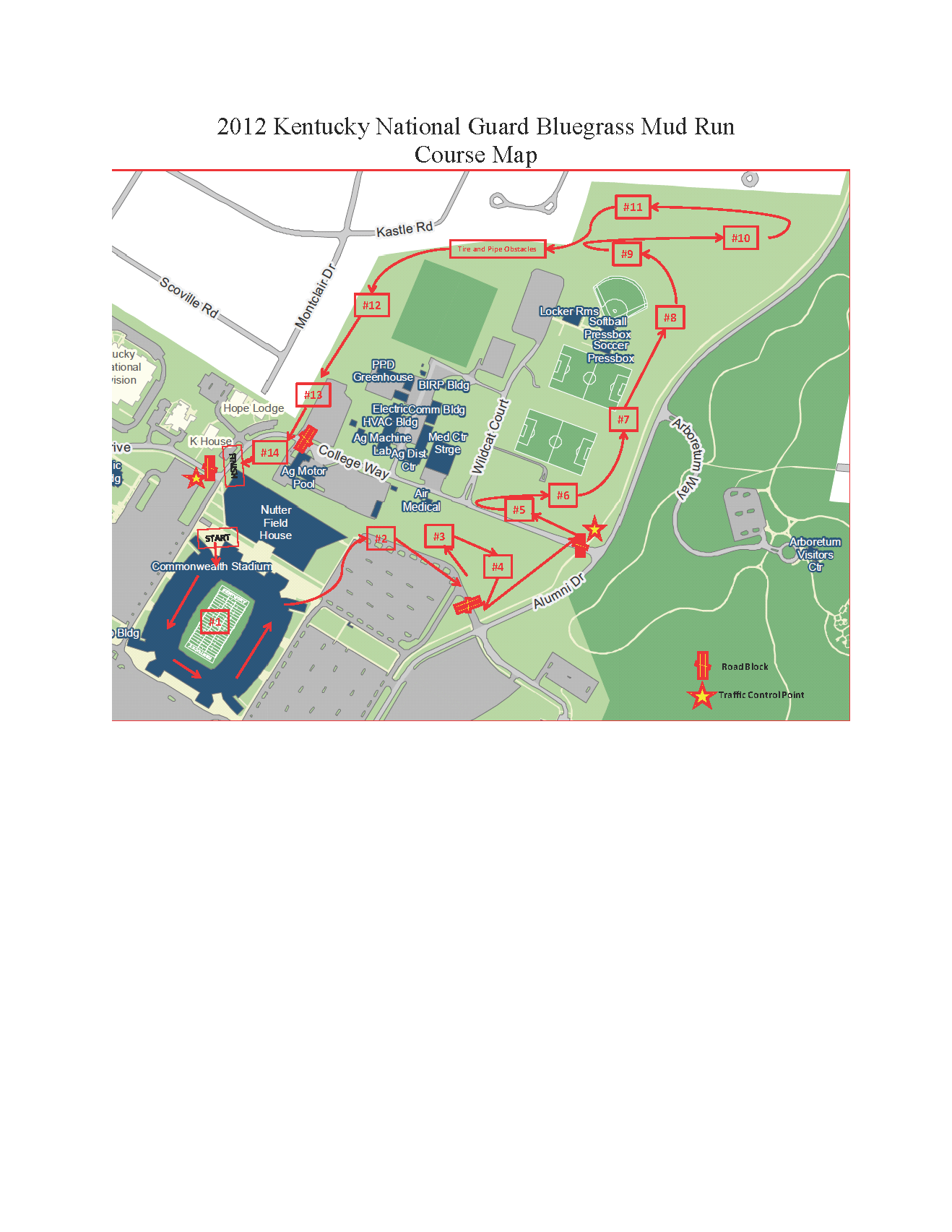
Bluegrass Mud Run

I’ve always loved fitness, exploration and outdoor adventure. Even so, I haven’t strapped on numbers and participated in an organized sporting event since high school. It was high time to change that, and The Inaugural Bluegrass Mud Run was a perfect opportunity.

In my usual fashion I lost track of dates and almost missed it until a friend reminded me they too were participating – I just managed to get signed up a day before the event. It was a blast from start to finish, and the entry fee going to support local charities makes the whole thing even better.

Naturally, the GoPro camera came along, and with it a full POV. Want to see what it’s like to run a military inspired obstacle course without getting yourself dirty? Well, here you are…

Photoshop CS5 Kelby Training

Kelby Down & Dirty Tricks With Photoshop CS5, Friday 09172010 @ Northern Kentucky Convention Center.

Most of the class seems fairly basic, covering knowledge I and nearly anyone else using Photoshop on a regular basis would already know. There are however new elements, particularly for features unique to CS5 and obscure key shortcuts. Following are general notes taken during seminar.

Adobe Photoshop

General

  1. Alt Drag to scale all points.
  2. Alt Shift Drag to scale all points with constrained proportions.
  3. Stylize->Find Edges = Line Art
  4. Ctl+i, toggle background black/white.
  5. Ctl + click new layer. New layer appears below current.
  6. Drag background over trashcan to unlock.
  7. Shift Ctl J cuts selection to new layer.

Puppet Warp

  1. Works like Pen Tool (add points and drag).
  2. Puppet warp may be applied as a smart filter (always should be!), warp cannot.
  3. Only works on contiguous objects.

Layer Masking

Black = Color hidden
White = Color 100%
Shift + Delete = Fill

  1. Hold Alt to constrain proportions.
  2. Use Ctl. 0
  3. Layer mask – Mask layer without modifying layer
  4. Hold Alt and click layer mask to place mask in main window.
  5. Hold shift and lick on mask to disable.
  6. Unlinked allows mask & layer to move independently
  7. Adjustment layer; mess with colors without messing with layers.

Blending

  1. Shift  +/- changes blend mode of a layer.
  2. Alt & Drag to move half of a split slider.

Selections

  1. Start with general selection.
  2. Select refine edge.

Clipping Mask

  1. Alt + Click between layers.

Mask from image:

Text

Basic

  1. Dash, Alt Dash, Shift Alt Dash
  2. Shift alt 5 to merge font
  3. Pro fonts are “smart”; auto merging.
  4. Superscript for @,Copyright, etc.

Path

  1. Pen, hold Shift to add points (same as Dreamweaver Polygons).
  2. Angle for curves.
  3. Text can then be added to stay in or on path.
  4. Drag finished text on path to far side to place text on inside of path.

Pen Tool

  1. Move pen over path, click to add control point. Click on previous control point to remove.
  2. Old Alt and drag to move only one side of curve.

Advanced

  1. Create path. Initializes vector from ext layer.
  2. Hold shift to deselect all points of vector object.
  3. Texture can be dragged while active.
  4. Alt drag FX icon to another layer – copies all effects.

3D Text

  1. 3d->Repousse’
  2. Internal constraints feature; holes, shape removal.

Smart Objects

  1. Manipulation (re-size) without re sample.
  2. Smart objects are linked. Changes in any smart object are reflected in all duplicated copies.
  3. Right click on smart object->Duplicate using new smart object; creates unlinked smart object.
  4. Filters added to smart object are recorded and can be adjusted/removed.
  5. Choose any smart object->right click->replace image. Image in all smart objects are replaced and maintain all adjustments.

Define Brush

  1. Select area/image, then define. Adds to brushes.

Content Removal

  1. Select area.
  2. Open Fill dialog (Shift+Backpace).
  3. Use->Content aware.

Adobe Illustrator

Preset Art

  1. Window->Symbol->Dot Vector Pack
  2. Illustrator to PS:  Copy from illustrator, select Shape, define custom shape. Shape now lives in Photoshop for later use.
  3. Paste from illustrator as Smart object, you can then edit in Illustrator by DB clicking layer.