
Contents
Introduction
This self-contained library is intended to aid in parsing common date and time values across differing incoming formats, then output the result in a uniform format of your choice.
The simple fact is that client-side inputs are notoriously unreliable. Even when using native date and time fields, you may not end up with uniform results across browsers – or even from the same browser. This happens because some browsers normalize valid datetime-local values by omitting seconds when they are zero. Code that expects Y-m-d H:i:s may reject fully legitimate browser-submitted values unless the server normalizes them.
Google Chrome, for instance, may send a different format depending on the seconds value. Even if you enforce seconds using the step attribute, Chrome will not include seconds as part of the submitted date/time string when the user chooses a seconds value of 00. Choose a seconds value of 01 or greater, and Chrome will include the seconds component. Same browser. Same version. Same field attributes. Entirely different submitted formats depending on perfectly valid user input.
Correct? Yes, from an engineering standpoint. Practical? Not when you are just trying to parse a simple input and keep your hair.
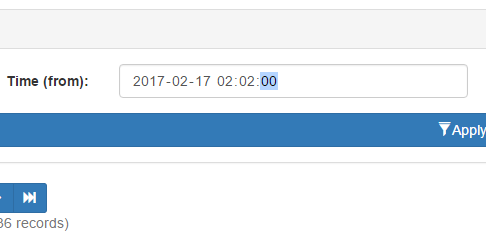
You could use text fields and invoke heavy JavaScript date/time pickers, but that can harm the mobile experience, where seamless date selection is already built in. You could also use a dynamic solution that checks for native date/time field support, but then you are right back to dealing with inconsistent formatting.
In a nutshell, failing to perform server-side validation may lead to unpredictable behavior in whatever code relies on the input. Databases are particularly finicky. Go ahead and send client-side dates directly to an RDBMS. Your results will be the same as Forrest Gump’s chocolate box.

Unfortunately, many forms of server-side validation are themselves rather persnickety. In the example above, a validator expecting seconds may reject input from Chrome, along with several mobile browsers. This is where my date and time library comes into play. By leveraging a layered approach and PHP’s strtotime() parsing, Chronofix can accept most valid time strings, verify them, and output a single uniform format for use.
Use
Simple – Object is initialized with default settings:
// Initialize object with default settings.
$dc_time 		= new dc\Chronofix();
Advanced – Initialize a settings object first, and apply it to the main object.
// Initialize settings object, and use it
// to set date format to Year-Month-Day only.
$dc_time_settings = new dc\Config();
$dc_time_settings->set_format('Y-m-d');

// Initialize time library with settings. $dc_time = new dc\Chronofix($dc_time_settings);
Once initialized the following functions are exposed. All examples assume default settings.
Settings Object
Again be aware settings are entirely optional.
// Outputs Y-m-d H:i:s
echo $settings->get_format();
Returns the format string currently in use.
$string = 'Y-m-d H:i:s';

$settings->set_format($string);
Replaces format in use with $string.
Time Object
$object = $time->get_settings();
Returns a reference to settings object in use by time object. By accessing the current settings object, you can modify settings at runtime.
// Outputs 2017-02-15 12:00:00
echo $time->get_time();
Returns the current date/time value as a string.
$string = '2017-02-15 12:00:00';

// Outputs TRUE if valid, or FALSE.
echo $time->is_valid($string);
For internal use, but exposed for possible utility purposes. Evaluates $string against current date/time format. If the formats match, TRUE is returned. Otherwise FALSE is returned.
// Outputs 2017-02-15 12:00:00
echo $time->sanitize();
Evaluates the current date/time value and attempts to convert its format to the current format setting. Leverages a combination of php’s strtotime and date object to handle nearly any format of dates and times. Outputs newly formatted date/time string, or NULL on failure.
$object = new dc\Config();

$time->set_settings($object);
Replaces current settings object with $object.
$string = '2017-02-15 12:00:00';

$time->set_time($string);
Replaces the current date/time string with $string. You will need to do this before performing any other operations.
Source