Finally finished Harley Quinn’s Revenge for Batman Arkham City. Finding the steel mill entrance kept me stuck for a while. What an anticlimactic ending though. I think Harley’s real revenge was suckering people into downloading and playing it. 😛
Category: Technology Temerity
The name says it all. New and old ways to occupy our oppositional thumbs.
Models – Tyris Flare
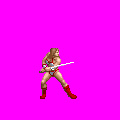 Tyris Flare model specific work log. Tyris is a primary player character and so requires a large variety of accessible technique.
Tyris will focus on magic and combining environmental use with advanced attack technique and magic. To place a somewhat more realistic and less cliched’ viewpoint on video game gender, she will not be “weak but quick”, and instead be inferior in all physical aspects (i.e. speed, constitution, strength and reach). But like any clever woman, Tyris has found ways to more than make up for these shortcomings. Advanced players will be able to segue graceful movement, sometimes using walls, allies and even opponents for footing to attack from all angles. This combined correctly with her superior magic abilities and reversal techniques can make Tyris virtually untouchable.
Completed:
2011_08_31
- Combo finish kick replaced with spin kick (inspired by Genesis Golden Axe III).
2011_09_01
- Add somersault to running jump animation (inspired by Genesis Golden Axe III).
- Upgrade running attack (dust, flash, jump/landing frames).
2011_09_02
- Dust effects.
- Projectile hit adjustments.
- Block flash.
2011_09_06
- Attack1 (Whiffed)
- Motion trail.
- Hair animation.
- More frames (Start up and recoil).
- All main entity .gif sprites replaced with optimized .png format.
2011_09_07
- Attack Chain
- Applied transparent motion trails.
- Most animations have additional frames and improved animation.
- Flash/Sound effects.
2011_09_13
- Attackbackward
- Motion trail.
- Sound effects.
- Flash.
- Hair .
2011_09_19
- Jump landings now have smooth hair animation.
- Jumpattack complete.
- Run Jumpattack complete.
- Jump now has looping hair flow.
- Run attack now has looping hair flow.
2012_01_11
- Rise attack replaced. Is now based on Millan Flare’s upward sword spin attack (Golden Axe The Duel).
- Flip attack replaced. Is now an inverted forward somersault using fully customized sprites.
- Forward Spin attack added (F+A against a wall during a run jump). Tyris rebounds off of wall (real walls only, not screen edge) while spinning weapon in a powerful flying attack. Based on Millan Flare’s horizontal sword spin attack.
- New rise animation. Now performs a cartwheel to feet. Based on Millan Flare’s rise animation.
- Fixed block animation (had accidentally included some jumping sprites).
- Added voice effects (Random voice taunts when knocking enemy down, attack shouts, pain grunts, etc.)
- Auto throw during short range combo is now a trip throw (based on rarely seen alternate throw in Genesis GA 3).
2012_02_07
- Finished Boomerang sword throw. It’s a convoluted mess of script, but works. Seems for projectiles, the engine will only run didhit event once.
- Fixed player control conflict with wall jump. Required reinstating script jump control in place of default engine control.
2012_08_27
- Fix Chicken Leg attack types and knockdown values.
- Set Chicken Leg jumpmove 0 1.
- Chicken Leg sidestep bbox removed.
- Fix Riseattack type.
To Do:
Boomerang sword throw for charge attack.- Pogo jump off of enemies.
- Team moves.
Fix wall jump/player jump control conflict.Double jump.- Counter throw on timed block.
- Replace counter attack (Special when being attacked).
Side step.- Magic.
- Normal grapple moves.
Backward dash.
Move-list Notes (finished only):
Combo (long range): Sword strike*2, Stab.
Combo (med-long): Sword strike*2, Spin kick.
Combo (med-short ): Sword strike*2, Pommel butt*2, Spin kick.
Combo (short): Sword strike*2, Trip throw (alternate throw from Genesis GA3)
Run + A: Flying kick.
A+J: Flipping kicks.
B, A: Back strike.
U, A (when knocked down, can use F or B to aim): Rising sword spin attack.
Hold A, release: Boomerang sword.
Jump, A: Downward strike.
Jump, D+A: Double kick (Genesis GA III J, D+A).
Running Jump A: Downward thrust.
Jump near wall, F+J: Wall jump
Running Jump near wall, F+A: Lunging sword spin attack.
Defense: Parry.

Running Jump

Stab (Combo Ender)

Spin Kick (Combo Ender)
Models – Ax Battler
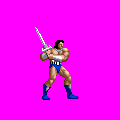 Ax Battler model specific work log. Ax is a primary player character and so requires a large variety of accessible technique.
Ax’s unique abilities will be somewhat pedestrian compared to the other characters. His statistics are good but not extraordinary and he lacks any sort of projectile or evasive capabilities. However, he is equipped with several effective sword techniques and is a proficient wrestler. Players can chain together throws one after another to cause extreme damage, and even grapple two enemies at once.
Completed:
2011_06_27
- Block animation tweaked. Can no longer hit opponents.
- Added A+J special, based on Uppercut/Jumpstrike from Golden Axe II (Genesis).
2011_06_28
- Updated binds to knock down opponents at correct point (see bind0010).
- Double Powerbomb attack added. It is a follow up to Powerbomb (D, F, A).
- Giant swing can be performed as a follow up to Double Powerbomb or Powerbomb.
- Proper turn animation added.
2011_06_30
- Upgraded Double Breaker to Spin Breaker. Instead of a simple repeat of Backbreaker, Ax now carries opponent through a short hop and spin into another backbreaker on his opposite knee.
- Rise and wake up from camping animation tweaked for smoothness.
- Several minor animation tweaks.
2011_07_06
- Added “Hun Suplex” as follow up to Backdrop and future air to ground throw.
2011_07_07
- Add “Melon Splitter” as follow up to Hun Suplex. Allows further follow up of Flying bomb.
2011_07_20
- Add “Ax Destroyer” air to air throw. Inspired by Zangief’s Siberian Blizard. Still needs splash damage effect.
- Minor animation and attack type tweaks.
2011_07_22
- Follow up series for Atomic Drop.
- Short stab.
- Align Shock/Burn flash effects.
- Smoke effect when landing from Shock/Burn fall.
2011_07_20
- Add stationary grabattack (Barbarian Fury, based on Stern Blade’s stun combo from Arcade Golden Axe II)
2011_07_26
- Add counter. If player defends against a running or jumping attack just as it hits, Ax will catch the attacking opponent and perform a Power slam, even from behind or if the attack could not be blocked normally.
2011_07_31
- Add Air to Ground throw (Python Drop – A swing DDT style throw).
2011_08_07
- Add Ground & Pound. Follow up for Powerslam and planned tackle.
2011_08_09
- Add tackle. Fwd or Back + Atk when running very close to opponent. Takes good timing but unblockable and allows follow up ground & Pound, possibly some others in the future.
2011_08_10
- Aesthetic improvement for Backdrop and some other minor sprite touch ups.
2012_08_21
- WALKOFF
- Backstep includes landframe and no longer acts as jump.
To Do:
Follow up for Backdrop. German whip? Rolling cradle?Follow up for Atomic drop.Follow up for jump slams.Mid air catch slam of some sort.Burn/Shock sparks play perpetually after KO.Shock flash is not aligned.Air to ground throw of some sort.- Splash damage for hard slams.
- Rolling cradle. Possible follow up for Backdrop or as an otg maneuver.
Catch and Powerslam when blocking non weapon attacks.- Wall alternate for Powerbomb.
Move for Grab, A command. Stunned enemy beating from Arcade GA II?- AI cancels and patterns.
- Re tool magic effects.
- Bored pose?
Move-list Notes (finished only):
Combo (long range): Sword attack*2, Uppercut punch (Arcade GA II long range combo)
Combo (Med-long): Sword strike*2, Thrust kick (Genesis GA II long range combo)
Combo (Med-short): Sword strike*2, Pommel butt*2, Stab (GA I med-short combo with end from Arcade GA II )
Combo (Short): Sword strike*2, Lift and throw – Can change direction of throw with Forward/Backward (GA I combo with end from Genesis GA II)
Run, A: Shoulder check.
A+J: Uppercut, turn and hop strike (Genesis GA II A+J)
D, F, A: Batter swing (Arcade GA II A+J)
B, A: Back strike (Arcade GA I A+J).
U, A (when knocked down, can use F or B to aim): Upper strike.
A (during Sidestep, Back strike, Batter swing, or Upper strike, can use F or B to aim): Second strike.
Hold A, release: Twirl weapon, hard down strike (Genesis GA III F+A+J)
Jump, A: Downward strike.
Jump, D+A: Dive strike (Genesis GA III J, D+A)
Run, Jump, A: Downward thrust.
Defense: Parry.
Defense (just as a run or jump attack hits): Powerslam (catch and counter opponent’s attack)
Defense (when grabbed or hit): Grab and hurl (GA I short combo end).
Defense (when grabbed or hit, opponent can’t be grabbed): Kick (GA I med-short combo end)
Grappling:
Atomic Drop (B+A with back to wall): 14
Ax Destroyer (F+A or B+A during jump when close to midair opponent): 15 + 20% of target’s remaining HP.
Backbreaker (U, D, A):6
Backdrop (B+A): 8
Barbarian Fury (A): 22
Body Press (Short range combo):NA
Body Throw (Automatic after Body Press, may use F or B to control direction): 10
Flying Bomb (D, F, A): 4
Giant Swing (D, U, A): 12
Ground & Pound (D, D, A): 20
Gutbuster (J): 5
Hun Suplex (D, B, A): 4
Melon Splitter (U, B, A): 4
Powerbomb (F+A): 8
Powerslam (Counter throw; Defense just as an incoming run/jump attack hits): 12
Piledriver (D+A):2 + 30% of target’s remaining HP.
Python Drop (F+A or B+A during jump when near standing opponent): 8
Spin Breaker: (F, U, A): 5
Tackle (F+A or B+A while running near opponent): 12
Throw (F+A or B+A): 10
- Atomic Drop
- Giant Swing
- Gutbuster
- Giant Swing
- Piledriver
- Throw
- Spin Breaker
- Giant Swing
- Gutbuster
- Giant Swing
- Piledriver
- Throw
- Backdrop
- Hun Suplex
- Melon Splitter
- Flying Bomb
- Giant Swing
- Spin Breaker
- Giant Swing
- Gutbuster
- Giant Swing
- Piledriver
- Throw
- Flying Bomb
- Melon Splitter
- Melon Splitter
- Flying Bomb
- Giant Swing
- Spin Breaker
- Giant Swing
- Gutbuster
- Giant Swing
- Piledriver
- Throw
- Flying Bomb
- Hun Suplex
- Body Press
- Backbreaker
- Giant Swing
- Spin Breaker
- Giant Swing
- Gutbuster
- Giant Swing
- Piledriver
- Throw
- Body Throw
- Backbreaker
- Gutbuster
- Giant Swing
- Piledriver
- Throw
- Powerbomb
- Flying Bomb
- Giant Swing
- Spin Breaker
- Giant Swing
- Gutbuster
- Giant Swing
- Piledriver
- Throw
- Giant Swing
- Gutbuster
- Giant Swing
- Piledriver
- Throw
- Spin Breaker
- Giant Swing
- Gutbuster
- Giant Swing
- Piledriver
- Throw
- Flying Bomb
- Python Drop
- Hun Suplex
- Melon Splitter
- Flying Bomb
- Giant Swing
- Spin Breaker
- Giant Swing
- Gutbuster
- Giant Swing
- Piledriver
- Throw
- Flying Bomb
- Melon Splitter
- Melon Splitter
- Flying Bomb
- Giant Swing
- Spin Breaker
- Giant Swing
- Gutbuster
- Giant Swing
- Piledriver
- Throw
- Flying Bomb
- Hun Suplex
- Powerslam
- Ground & Pound
- Tackle
- Ground & Pound
Models – Bitter
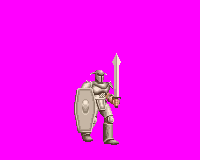
Lt. Bitter
Lieutenant Bitter enemy development. In the original game, character is presented as a slow moving but very quick striking armored knight. However, Bitter’s armor was entirely visual; the only defensive advantage he enjoyed over players was immunity to throws. As throws were simply a more appealing visual combo bookend, even this defense had little to no effect from a mechanics standpoint.
The remake Bitter will gain a slight mobility boost, with greater walking speed, ability to “run” (actually a faster walk), and attack on the move to catch unwary players. He will also be given very powerful defenses to match his armored appearance. Weak attacks of any type will not affect him at all, and bladed weapons will cause half their normal damage. As a last addition, Bitter will use his existing shield slam attack against projectiles… batting them back to potentially hit the originator.
2011_06_13
- Added running. Visually it is a hustled walk due to lack of running sprites. No where near as fast as most other characters true running capability, but still much faster then normal walk.
- Added RUNATTACK; a horizontal back stroke with same range as normal sword slash attack.
- New blocking sprite. Playable version can block indefinitely.
Models – Heartland
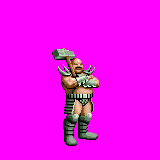
Heartland (Bad Bros.)
Heartland (a.k.a. Bad Brothers) enemy development. Original game version is a simplistic boss enemy with high range and damage but slow speed and practically no means to defend himself against player attacks.
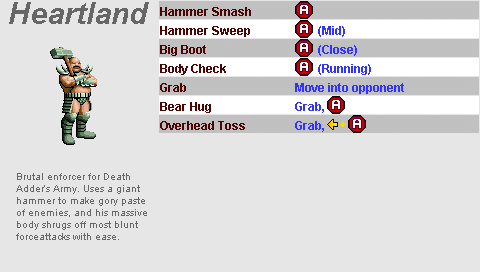
Updates are to include improved animation, standard upgrades to motion trails, and voice effects. Difficulty increased with slighter higher movement speed, an even longer reach, and near immunity against bludgeoning type attacks. Will also become more effective at close range, with a dangerous bear hug grapple that will severely damage targets.
2011_05_30
- Removed sprites:
- False transparency (replaced with true transparent motion blurs):
- a5
- a7
- a9
- Fall/Pain (replaced with standardized defense poses):
- p1
- p2
- p3
- thrown1
- thrown2
- thrown3
- thrown4
- b1
- b2
- b3
- s1
- s2
- s3
- New Sprites
- 0001, Jump/Land.
- 0002 – 0005, Decapitation.
- 0006, Kick blur.
Motion blurs added.
- Attack1 (Hammer strike) now steps forward for slightly more range.
-
Hammer smash attack now includes transparent motion trail and steps forward or extra range.
-
- False transparency (replaced with true transparent motion blurs):
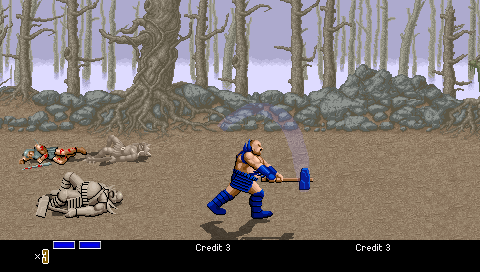
- Run attack includes landing/jumping frames and dust.
- Animation offsets tweaked for Kick, hammer Sweep and Hammer Smash. Rang settings also tweaked to ensure each one is used at proper distance.
- Defense settings added. Now takes .25 damage from bludgeoning attacks. Attackers attempting a bludgeon knockdown are paused briefly and laughed at.
2011_05_31
- Added grappling animations.
- Bear Hug.
- Toss.
2011_06_01
- In game profile:
Resolved animation issue with Heartland performing Bear Hug against another Heartland. Caused by order of damage/bind/flash calls.
2011_06_02
- Riseattack complete.
- Need to resolve Special and special2 for AI vs. Player control.
2011_06_03
- Special sequence completed. Will now toss opponents; a modified version of riseattack will be performed instead if target is immune to grabs.
2011_06_08
- Playable version can no longer perform “Special2”. It is identical in function to “Special” and intended for AI to break away from infinite combos.
Attack Types
Attack types for Golden Axe need rearranging to accommodate addition of fatalities. As of 2011_05_26 I have cataloged the following:
| Type | Pain | Fall | Death | Block | Notes |
| Attack1 | Normal | Normal | Normal | Bludgeoning | |
| Attack2 | Head knock while kneeling | Normal | Normal | Normal | Bludgeoning |
| Attack3 | Unused | – | – | – | – |
| Attack4 | Collapse to kneel | Normal | Normal | Normal | Cut |
| Attack5 | Normal | Normal | Normal | Normal | Ax Battler’s level 1, 2 and 3 earth magic. |
| Attack6 | Unused | – | – | – | – |
| Attack7 | Unused | – | – | – | – |
| Attack8 | Unused | – | – | – | – |
| Attack9 | Unused | – | – | – | – |
| Attack10 | Normal | Normal | Normal | Normal | All cutting attacks for playable characters. |
A Geek’s World Ending
I stumbled onto this article comparing the Mac OS X vs. Windows XP. Obviously outdated, but even so I thought it really stood out as the rarest of combinations; an every man’s view point on how OS X stacks up to XP and done so with a completely open mind. Worth a quick read for anyone interested.
I’ll leave my own MCSE tainted opinion out of it. For now. 😉
DC
Script Catalog
NOTICE (Updated 2018-02-23):
I no longer host scripts from this blog – they are now located at my github repository. Most of the scripts below have broken download links and nearly all of them are out of date. I am in process of re-writing them to match the latest OpenBOR engine updates.
In the list below, you will find several items already linked to the library that replaced them. If you do not see a replacement link, I would suggest browsing my my github – you will likely find what you’re looking for.
Thanks,
DC
Update log for common script and functions used by all modules. I have found that I often forget which script from identical working copies is the newest version. This should help track them.
License
A copy of or (preferably) link to this license is required for use of the materials below or any other resources provided by Damon Caskey.
Event Scripts
Self contained scripts run immediately in response to an engine event. Most will be used to call a user custom defined function.
z_ani
Generic animationscript event script.
- 2010_09_15 – Fatal Fury Chronicles
- Authored.
- 2011_02_25 – Golden Axe The Hackjob
- Import from Fatal Fury Chronicles.
z_blank
Blank script file. Allows @cmd tags with entities that do not need user defined functions.
- 2007_01_01 – Fatal Fury Chronicles
- Authored in Fatal Fury Chronicles.
- 2010_07_12 – Golden Axe The Hackjob
- Import from Fatal Fury Chronicles.
z_block
Universal didblockscript event script.
- 2010_09_11 – Fatal Fury Chronicles
- Authored.
- 2011_02_25 – Fatal Fury Chronicles
- Call reference updated to reflect name change of bloc0001 to z_block.
z_blocka
Universal onblockascript event script.
- 2010_09_12 – Fatal Fury Chronicles
- Authored.
z_datk
Universal ondoattackscript event script.
- 2010_12_31 – Fatal Fury Chronicles
- Authored.
- 2010_02_25 – Fatal Fury Chronicles
- Code moved to and replaced with call for z_datk function.
Functions
Custom predefined functions to be called by event scripts.
ani0009
Animation switching wrapper. Validates animation before a switch attempt is performed and allows quick use of both available animation switch methods. Handles basic animation switching needs for almost every other function.
- 2009_10_09 – Fatal Fury Chronicles
- Authored.
ani0012
Specialized animation switch; performs Grabattack2 if opponent is “Bad Brother”. I normally prefer more a more generic approach using parameters, but this is in place already and it does do the job.
Moved to Avalanche repository.
ani0014
If target can be grappled, caller is set to passed animation. Otherwise alternate animation is used if available. If not, nothing is done.
- 2010_04_03 – Golden Axe The Hackjob
- Authored.
- 2011_06_19 – Golden Axe The Hackjob
- Correct typo causing alternate attempt to take place when no animation was available.
ani0016
Perform alternate animation if target is rising or performing a rise attack.
- 2008_xx_xx – Golden Axe The Hackjob
- Authored. Exact date unknown.
- 2011_03_28 – Golden Axe The Hackjob
- #Defined constants.
- General cleanup.
ani0020
Wrapper to perform animation when triggered by key script.
- 2011_06_27 – Golden Axe The Hackjob
- Authored.
bind0010
Primary grapple binding function. Binds and sets target entity into desired pose, or sets position and releases.
- 2008_12_21 – Fatal Fury Chronicles
- Authored.
- 2011_04_21 – Golden Axe The Hackjob
- Minor touch up and commenting.
- 2011_06_29 – Golden Axe The Hackjob
- Added iState parameter to deal with various forms of falling and projectile status. This resolves issue where grappled target would not hit opponents or would unintentionally hit allies.
bind0017
Find preexisting entity with same name and warp to location. Primary use is to spawn self on top of old corpse. Creates effect of a “dead” character standing back up when player continues or has lives remaining; much less jarring then a new copy appearing out of nowhere.
- 2010_05_02 – Golden Axe The Hackjob
- Authored.
- 2011_06_08 – Golden Axe The Hackjob
- No longer attempts warping to location of previous entity that is off screen.
bind0021
Shunt self away from wall if bound entity is inside of it (wall). Prevents getting a bound entity stuck within areas meant to be inaccessible or bounced to infinity by wall functions.
- 2010_05_15 – Fatal Fury Chronicles
- Authored from remnants of wall fail-safe used in Golden Axe The Hackjob.
- 2011_07_22 – Golden Axe The Hackjob
- Add check to prevent loop freeze when inside a pit.
dama0004
Damage caller’s bound entity by index. Differs from dama0001 in that a mode is provided to allow non-lethal damage, and attack types are passed as integers rather than a string.
- 2010_02_02 – Fatal Fury Chronicles
- Authored.
- 2011_07_19 – Golden Axe The Hackjob
- iDam variant now initialized as 0. It seems OpenBOR will occasionally keep the value of a NULL initialized variant in a given script across multiple callings. Such a bug would be virtually impossible to find and eliminate, especially given its inconsistency; it is more pragmatic to simply adapt scripts accordingly. In the case of dama0004, retention of an iDam value of -1 could cause targets to have their hit points reduced to 0 immediately. In turn applied damage would always be lethal regardless of intended amount.
debug0001
A very messy but (to me) invaluable function to view and modify various system values in game. Its most powerful use is to edit grapple move poses during live game play and log the resulting command for use in a model text.
- 2010_09_07 (.pdf) – Golden Axe The Hackjob
- Authored.
- 2011_04_03 – Golden Axe The Hackjob
- Screen offset adjustment.
- Has received several other revisions since first version.
draw0001
Primary setdrawmethod() wrapper. Enables the classic pseudo 3D scaling and rotation effects when entities move about the screen as in many golden age arcade games, particularly the Neo-Geo.
- 2011_03_29 – Golden Axe The Hackjob
- 2012_08_30 – Golden Axe The Hackjob
- Spelling in comments. Link to catalog.
draw0002
Support function for draw0001. Applies ratio parameter to offset parameter, ensuring the result is always a whole number. Main use is to integrate zoom effect with binding (bind adjustments must be whole numbers).
- 2011_03_29 – Golden Axe The Hackjob
- Minor cleanup.
- 2012_09_01 – Golden Axe The Hackjob
- Spelling in comments. Link to catalog.
draw0003
Assign a group of draw method parameters to model, to be applied by draw0001.
- 2011_03_29 – Golden Axe The Hackjob
- Combined constant list.
- Minor cleanup.
ht0001
Returns entity’s current height, including current draw adjustment.
- 2010_12_15 – Fatal Fury Chronicles
- Authored.
jump0003
Enable double jumping, wall jumping, etc.
Replaced by Hansburg library.
jump0005
Enable Mario Brothers style jump height control.
Replaced by Hansburg library.
mode0001
Wrapper to switch entity’s weapon and model name.
- 2011_02_14 – Golden Axe The Hackjob
- Authored.
- 2011_02_17 – Golden Axe The Hackjob
- Options to only switch model or weapon. If “main” passed for model, folder name is used.
mode0002
Find out what weapon models (if any) players have and store them for placement into next level. Originally written to enable the feature in Golden Axe where an animal was retained from previous level, only to automatically run away during bonus stage.
- 2011_03_29 – Golden Axe The Hackjob
- Copied directly from “saveanimal” by Utunnels (contains a previous modification by myself to accommodate Joe & Alex). Will likely need a rewrite to take advantage of new string functions; it currently uses a limited static list and I am enabling playability for nearly every character in the game.
parr0001
Parry functionality. Check for Key timing and apply parry settings accordingly.
- 2011_01_01 – Fatal Fury Chronicles
- Authored.
- 2011_02_25 – Golden Axe The Hackjob
- Import from Fatal Fury Chronicles.
path0001
Returns full path of passed entity, minus file name.
- 2010_06_18 – Fatal Fury Chronicles
- Authored.
- 2011_02_14 – Golden Axe The Hackjob
- Import from Fatal Fury Chronicles.
- 2011_04_03 – Golden Axe The Hackjob
- Cleanup and commenting.
path0002
Returns folder of passed entity.
- 2011_02_14 – Golden Axe The Hackjob
- Authored.
rnd0001
Generate random numbers.
Replaced by Eggball library.
run0001
Simple “stop running” function useful for adding a controllable dash movement.
- 2007_11_03 – Fatal Fury Chronicles
- Authored.
soun0005
Sound catalog and player. Catalogs sounds by tiers and selects sound from group at random. :
- entity/sounds folder
- global sounds/throwdamage
- global sounds
May also play specific sound from group if needed.
- 2010_07_02 – Golden Axe The Hackjob
- Authored. Has received minor updates.
- 2011_04_03 – Golden Axe The Hackjob
- Comment updates.
soun0009
Sound effect wrapper. Verify sample and last play time, then play sample with location based stereo effect.
- 2010_07_02 – Fatal Fury Chronicles
- Authored. Has received several small updates.
- 2011_04_03 – Golden Axe The Hackjob
- Minor comment updates.
velo0001
Wrapper for velocity control.
- 2007_05_06– Illusion And The Falcon
- Authored.
wall0001
Primary wall function. Damages and bounces self in opposite direction of current X velocity when falling and obstructed by wall/platform. Also provides optional jumping/climbing onto an obstacle along Z axis for AI controlled entities. OpenBOR already allows optional Z jumping, but AI controlled entities always use their full jump height/length and may overshoot if the target platform is small. There are also cases where a custom animation would simply provide greater aesthetics.
- 2009_10_10 – Fatal Fury Chronicles
- Authored (wall bounce only). Optional climbing added later (unknown date).
- 2011_07_22 – Golden Axe The Hackjob
- Wall bounce velocity is now a % of original velocity instead of a static value. This adjustment adds nuance to the timing needed for wall juggles. It also improves visual appeal, as a harder impact is now rewarded with a harder bounce. Additionally, victims caught between two walls will no longer infinitely bounce and “climb” upward; the gradual loss of velocity means they will eventually lose momentum and fall as expected.
z_block
Universal ondidblock function.
- 2010_12_31 – Fatal Fury Chronicles
- Authored as bloc0001.
- Proximity blocking.
- Authored as bloc0001.
- 2011_02_25 – Fatal Fury Chronicles
- Rename from bloc0001.
z_datk
Universal ondoattack function.
- 2011_02_25 – Fatal Fury Chronicles
- Export from z_datk.c event script.
- Parry functionality.
- Export from z_datk.c event script.
z_spawn
Universal onspawn event function.
- 2011_03_14 – Golden Axe The Hackjob
- Export from z_spawn.c.
- 2011_03_15 – Golden Axe The Hackjob
- #defined constants.
- Logging commented out and some general cleanup.
Model Switching Caveats
Model switching is a concept I have used to centralize the model sheets for different types of the same character. Traditionally, a character in OpenBOR is represented as a player, enemy, or npc, each labled by the type parameter int heir model text files. Should an author desire to create a character that is both playable and an enemy ( a common example would be making enemy bosses playable as a bonus feature), the usual method is to copy the model text file, change type, and fix some header settings. The same holds true for adding an npc type.
The problem arises when models begin to get highly complex, and/or changes are made after the initial design. Every change must be copied over by hand, else-wise they won’t match. In some cases this may not be so noticeable, but if a major animation change or other redesign is made to one model and not the other, their differences will be glaringly obvious. Naturally maintaining two identical models can quickly get tedious and confusing, especially when scripts or other advanced features are involved.
The model switching concept is an attempt to somewhat alleviate the problem of maintaining multiple texts. Through the script command changeentityproperty({ent}, “model”, {model}, {ani flag}) OpenBOR allows any entity to switch over to another model text. This switch behaves in many ways like the built in weapon system:
- Animations from the new model replace those from the old.
- The model retains its original name and path, along with most header commands. A few are overridden or not retained, see below.
The initial model switching itself is an easy process; organization and ensuring the right model is always in use during game play events can get more involved, especially when combining with the default weapon system. Step by step, this is the process:
- Each character contains a single centralized model text of enemy type. This file contains every animation and header setting that is possible to share. The name header setting and file name must be identical to the folder it resides in (data/chars/example/example.txt).
- Each of the other types (player, npc) the character may represent are given their own model sheets, as in the traditional method. These models however, only contain the bare minimum of settings unique to a type or required by circumstance and serve as a staging model. They are labeled by a name plus type identifier. These are the models spawned into play by the engine.
- examplep: Player type.
- examplen: Npc type.
- When a staging model is spawned into play its onspawnscript immediately runs a model switch to the main model.
- No other steps are needed unless weapons are in use.
- If weapons are in use, the weaponframe command is replaced by a scripted alternate.
- Weapon removal in response to being killed or knocked down works normally. However, as this effectively sets the model back to it’s staging version, the switch from staging to main must be performed immediately afterward.
I have found this method to be effective and surprisingly stable. The slight complication with weapon use and issues below is more then made up with having with a few exceptions only one large set of animations to work with. It does however require paying careful attention to property behavior, as most properties are retained from the original model. The following is a list of these as I catalog them find them and a work around for any issues. Unless noted otherwise, these properties must be included in all model sheets.
- atchain
- bflash
- cancel
- Requires inclusion of the full animation, including cancel command, in original model.
- com
- combostyle
- dust
- gfxshadow (until new model moves on Z axis).
- jumpmove
- weaponframe
- When reverting to primary model (no weapon), scripts from weapon are retained in place of primary model.
- There is no true workaround. Solution is to replace weaponframe with scripted substitute.
Work Log
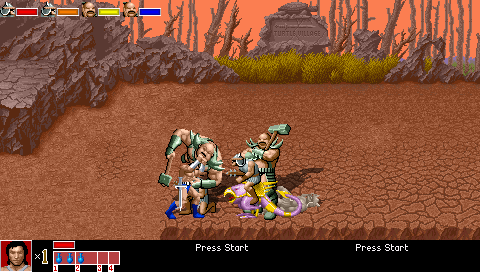
2010_07_12
- Start of work log. I cannot recall all of the changes I made today, thus the point.
- How To Play revamped. I’m not really satisfied due to limitations of the feature and preferably would remove it outright in favor of an in game replacement. Unfortunately the option itself is hard coded into engine’s start menu. Having it do nothing or lead to a blank file would be too unprofessional.
- Ax’s piledriver damage is now 30% of opponents remaining health + 5 (similar to Mike Haggar in Final Fight). This will make move useful for causing heavy damage to strong enemies without being the end all be all technique of choice.
- Ax’s powerbomb damaged reduced to 8 from 12.
2010_07_15
- All remnants of legacy sound players (soun0001(), soun0002()) removed from module and replaced with soun0005.
2010_08_07
2010_09_18
2011_02_13
- Name based model switching on spawn application in progress. This is to combine NPC, Enemy, and Player versions of a character into a single central model.
- Work Log separated from Bug & To Do List.
2011_02_20
- Fixed bflash for Ax Battler.
- Switched log dates to Big Endian form.
2011_02_21
- Removed all instances of “loop 0”.
- Defense pose moved from follow10 to follow51 to comply with standard from my other modules.
- RUNJUMP and range settings for JUMP added to ax.txt.
2011_02_22
- Ax’s sidestep is now a roll instead of a jump.
- Added dust setting to ac_pc staging model.
- Added extra frame to Ax’s rise animation.
2011_02_23
- Ax Battler:
- Removed Lateral High Jump from all models.
- Added jumpmove 0 1 to all models.
- Removed “Stats” entry.
2011_03_27
- ai0002
- ani0001
- Longmoan
- Successfully integrated single model concept. Longmoan is now player type in model sheet and selectable at start screen, but behaves like enemy as a level spawn.
- common/attack.h rolled into enemy.h
- Merging of animation scripts to enemy.c (enemy.c is to be moved and renamed).
2011_03_28
- enemy.h rolled into z_ani.c
- All slide {x} calls replaced with velo0001 {x} {y} {z}. Slide.h removed.
2011_03_29
- All remaining scripts from common folder removed. Some functions copied directly to z_ani.c and still need to be given individual files.
- bgs2 folder renamed to bgs, old bgs removed.
- scenes2 folder renamed to scenes, old scenes removed.
- levels folder renamed to levels.
- Individual constant lists consolidated.
2011_05_16
- Multiple enemy lifebar and icon display now takes advantage of sprite array feature. This solves issue of integration with conflict with player icons and also allows enemy icons to reflect status. Icons added to individual model sets:
- Amazon
- Bitter
- Henninger
- Longmoan
- Skeleton
2011_05_17
- Removed all instances of entity vars ADBLEND and ADREMAP. They are no longer needed for passing blend and map respectively to draw0001().
- Upgrade following effect models to Fatal Fury Chroniclesfolder layout.
- flash
2011_05_20
- All flash models now moved to ->misc->effects->models->flash->folder layout.
- Flash models now run spawn0002.c, with spawn0012 eliminated.
- Flash bugs (wrong size, palette, alpha) fixed and accurate effects added (sword vs. hand vs. blunt, etc.) as part of reorganization.
2011_05_24
- Fix complete for bind0023; dragon throws now use Defender’s custom flash if it has one.
- Bad Brother’s flat fall and fall on head added.
2011_05_25
- Menu text added.
- Backstep now mapped to Down + Defend (formerly Attack2). This cuts total action keys to four (Attack, Jump, Defend, Magic).
- Magic fail moved to keyall.c with generic code to work with all characters.
2011_05_27
- Resolved issue with Ax Battler’s Piledriver and Jump throw knocking himself down. Caused by landframe call being incompatible with engine’s updated landframe array.
- Added Ax battler’s “Second Strike” general purpose follow up swing to be canceled from several other animations. Still needs motion blur.
2011_05_29
- Completed Ax Battler’s Second Strike.
- Motion blur.
- Cancels.
- Backattack
- Riseattack
- Sidestep
- Power Swing
- Replaced all “switch_combo” calls to ani0012.
- Removed unused functions from z_ani.
- adjust_ftoss
- adjust_ftoss2
- ftoss
- ftoss2
- change_slam1
- change_slam2
- change_slam3
- Bone break medium sound (253_0) and model added (bonem).
2011_05_30
- See Heartland.
2011_05_31
- See Heartland.
2011_06_02
- See Heartland
2011_06_03
- Resolved issue with draw0001 crashing game on certain stages when an entity touched Z boundary. A simple typo was setting both the fMinZ and fMaxZ to = minimum Z boundary instead of min/max respectively.
- See Heartland.
2011_06_08
- Resolved issue with revive on spot system (see bind0017) when player lost lost all lives and continued with different character (thus leaving original character’s corpse behind). If any player later selected the left behind character, script would attempt to warp them to off screen corpse.
- See Heartland.
2011_06_13
- See Bitter.
2011_06_14
- Removed script functions/files:
- scripts\drain.c
- Used to gradually remove life when playing skeleton mode in GA Remake. Skeleton will be playable as normal bonus character without drain effect.
- data\levels\duel\sleep.c
- Cause crowd to attack by setting “sleep” global var to NULL(). A validation in each individual model’s looping SLEEP animation would then set model’s animation to IDLE and stealth property to 0.
- data\chars\skeleton\scripts\npc_ani.c
- Rolled into data\scripts\ z_ani.c
- scripts\drain.c
- Removed global variants.
- countdown
- cstring
- Support for drain.c.
- levelmaxz
- levelmaxz
- Replaced with openborvariant() calls.
- inscreen
- sleep
- See sleep.c above.
- Removed models.
- data\chars\gilius\g_npc.txt
- data\chars\tyris\t_npc.txt
- All versions (NPC/PC/ENEMY) to be rolled into single model.
2011_06_27
- Holdblock capable characters no longer use special unless they are actually in pain (see z-spawn and keyall).
- See Ax Battler.
2011_07_26
- Several minor script updates and fixes.
- See Ax Battler.
2011_07_31
- Added EX1 and EX2 defense poses to several models (will complete during individual model phases) to accommodate Golden Axe’s odd offsets when binding self to target instead of target to self.
- See Ax Battler.
2011_07_26
- Several minor script updates and fixes.
- See Ax Battler.
2011_07_31
- See Ax Battler.
2011_08_31
- See Tyris Flare.
2011_09_01
- See Tyris Flare.
2011_09_06
- See Tyris Flare.
2011_09_07
- See Tyris Flare.
2011_09_19
- See Tyris Flare.
2011_10_19
- Fixed wall0001 function.
- Replaced TLTDN with proper Tilted Down sprite for all characters. Old TLTDN (custom lift pose for Golden Axe) moved to EX3.
2012_01_11
- See Tyris Flare.
2012_02_07
- z_hit now calls function function hit0004, made from z_hit’s original code.
- soun0005 now includes a final entity check. This fixes bug where entity killed with killentity() would still send call to soun0005, which would then result in empty string call, and ultimately a shutdown by string functions.
- See Tyris Flare.
2012_08_21
- Chicken now releases opponent in FALL7 (Fall on head) pose.
- See Ax Battler.
- All remaining known instances of “openborconstant” in chars folder replaced with preprocessed constants from constans.h.
Ray McDougal Sprite Set Improvement
Animation and sprite color upgrade complete for Ray McDougal. Several improvements were required, as this sprite set is being used as a generic thug. It is imperative to have quality color, animation, and attack technique variety since it will be seen repeatedly.
- Sprite set was procured from second game, Fighters History Dynamite. This sequel was missing several animations and had lower quality animation in general then the already sub-par original.
- Solution: Missing animations and frames ripped from original Fighter’s History via MAME and Photoshop batching techniques.
- Sprite set featured almost no color separation. Identical shades of blue used for shirt, gloves, pants and shoes. This combined with other shortcuts by original artists such as liberal application of #ffffff and #000000 made alternate palette creation nearly impossible.
- Solution: Hand color entire sprite set (approximately 270 units) with individually dedicated colors for each portion of the sprite:
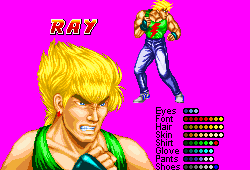
Ray's base palette. All major sectors of the sprite now have dedicated color sets.
- Solution: Hand color entire sprite set (approximately 270 units) with individually dedicated colors for each portion of the sprite:
- Even with all animations combined from both games, animation was still lacking overall. In particular, attack recoils are simply the strike frames played in reverse. This is very jarring when seen next to more painstakingly created sets from other sources.
- Solution: Combine hand drawing and franken-sprite techniques to create new frames for attack sequences. Most non attack sequences have satisfactory animation.
In addition to the above improvements, Ray also received a “rounding out” of available techniques. Effectively he is now a complete player character with weaker statistics. This is really somewhat overboard given the large number of basic moves available to players, but again as Ray will be seen quite often, I believe he should have a wide array of abilities and tactics to avoid repetition.
Owing to most of the work requiring hand drawing, the total time needed was just over a month. I am pleased with the results however. This should make an effective generic thug to oppose the players without boring them.
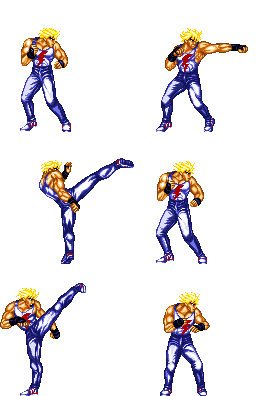
Ray's basic far and close attack chain pre improvement.
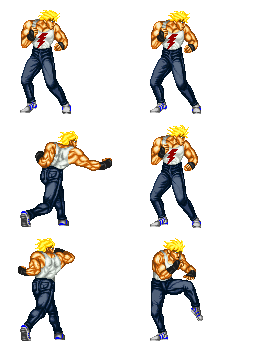
Ray's basic far and close attack chains as of 02092011.
Tutorial – Random Names
Random names may seem like a superfluous addition at first, but they can go a long way toward giving characters in any game a bit more variance and personality. This is particularly true for low level enemies that are reused repeatedly throughout an OpenBOR module. This tutorial will demonstrate how to apply random names to entities as they are spawned into play. It is meant primarily for level spawns, but can easily be applied to any other type of entity, including player characters.
Objectives:
- Apply a random name when entity is spawned from set of predefined choices.
- Easily edit name list without disturbing other models or modifying scripts.
- Support of both random and non-random names without need for time consuming edits or storing additional data.
- Fail over support if random name is called for but not available.
To accomplish this, I have put together a system that takes advantage of kbandresson’s text file stream reader. A single text file contains all the random names each model will use, allowing for quick edits. The entity’s starting alias determines if randomizing is applied or not, so that specific naming is not interfered with. Finally, should randomizing be called for but no names provided, the script will use that model’s default name.
This system has been in place since around November 2008, and has served well in all of my WIPs so far.
Getting Started:
You will need the following files before beginning. Download and unzip each of the following to the specified locations in your module’s data folder.
Note: These scripts are formatted in Allman Style and written with MS Visual Studio 2010. You can use other applications if you wish, but if you do, the formatting will not render correctly and you may find the code difficult to read.
index – data/scripts/vars
z_spawn – data/scripts
name0001 – data/scripts/com
rnd0001 – data/scripts/com
name – data/bin
Step by Step:
Once you have the files above unzipped to their respective locations, open the text file of any model. For testing, I would recommend a commonly occurring enemy. Add the following to its header:
onspawnscript data/scripts/z_spawn.c
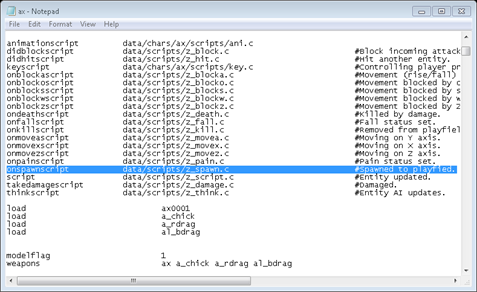
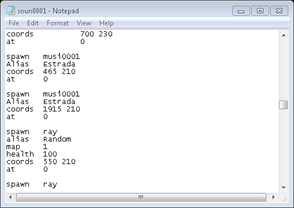
Next, open a level text file that contains spawns of the model you just modified. For every spawn instance you would like a random name, add or change the alias to “Random”.
All that is left now is to set the list of names up for your model to use. Open the name example file you unzipped earlier. It should look something like this:
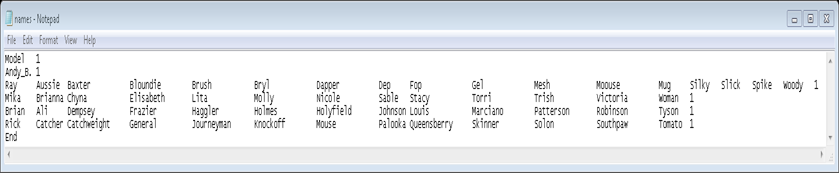
To add your model, just insert another row between Model and End, and add your model’s default name to the first column. Note the last column must always be “1“. Insert as many alternate names as you want in between, separated by at least one space (tip: I recommend tabbing so that names from each row line up, it makes the text easier to work with). For obvious reasons you cannot uses spaces in names, but remember that OpenBOR does not display underscores “_”, so you may use those instead, as with Andy B. above. When your model is spawned into play, it will be given one of the names from its row. You’ll notice for example, I am using a theme naming scheme similar to Streets of Rage.
Andy_B: Doesn’t have any alternates, so will always uses default name.
Ray: Hair Care
Mika: Famous female wrestlers from the WWE.
Brian: Famous real life boxers.
Rick: Common boxing lingo.
You are of course free to use whatever naming style you like. You can add as many or as few as you want, so have fun!
Congratulations, you have added random naming!
Extra Credit:
- Like any other function, name0001() can be called at any time. You can use it to rename characters at any point in the game. Try some things like changing names when life is low or when the entity is about to perform a certain attack.
- The overall concept isn’t limited to names. Try applying it to story narrative, character dialog (“Ouch, that hurt!”, “stop hitting me!”) or anything else you can think of.
- When I created this system, writing to the text file was not possible, but as of OpenBOR version 2.7111 that limitation no longer exists. With a little fine tuning, you could actually edit the name list in real time to create player name entry systems and other nifty game features.
- Why stop with text? Try things like random AI modes, or even different models entirely. Use your imagination!
DC
Work Log
This is a general work log for my Fatal Fury Chronicles module project. The goal is to replicate game play elements found within SNK’s Fatal Fury series in a side scrolling Final Fight style environment, while presenting the back story in a more cohesive layout. At the start of this log (11292010) the module is in a playable beta state.

11292010
- Start of work log.
- Project back under way after being idle for approximately one year.
- Resolved issue of crashing instantly during menu on newer revisions. Issue turned out to be nothing more then a leftover configuration save file. Module is in beta status; it has one fully playable stage and one test area, but I would like to add more content before releasing any kind of demo.
11302010
- Andy Bogard now uses randomized sound effect system. See soun0005() function.
12012010
- Merge old MS Word based work log.
12022010
- Andy Bogard model scripts converted to latest convention.
- Terry Bogard model scripts converted to latest convention.
- AI Ray McDougal model scripts converted to latest convention.
- Bug fixes.
12032010
- Cut JUMPDELAY from 18 to 8; too much of a pause before jump executes.
- Parked cruisers in Sound Beach stage now catch fire immediately when damaged (previously not until destroyed) and sink with scripted velocities instead of offset/base manipulation.
12052010
- Added entity verify to draw0001(). Previously it would cause immediate shutdown if called on non existent entity.
- Andy Bogard & Raiden sprite files converted to nameless serial convention.
- Bug fixes.
12062010
- All models and sprites in data/misc/effects updated to serial name convention.
12072010
- Function bind0010() merged from Golden Axe Hackjob.
- Function dama0004() merged from Golden Axe Hackjob.
- All models and sprites in data/misc/flash updated to serial name convention, cataloged in master sprite database and moved to data/misc/effects.
- All models and sprites in data/misc/dust updated to serial name convention, cataloged in master sprite database and moved to data/misc/effects.
12082010
- Terry Bogard and Ray sprites updated to nameless serial convention. This completes update of all primary models to date.
- Latest draw0001() and it’s support functions now use target’s current alpha setting instead of an entity var to get and store the blend parameter. Exact same functionality, but with one less wasted variable and one less script parameter to worry about initializing when entities are spawned. I should have spotted it two years ago.
- Flashes use MP as a sound constant in place of if/list based on alias.
- Flashes use Nodrop property as random rotation range.
- All previously uncatalogued sounds removed from main sound folder. Model specific sounds moved to their respective owners still need cataloging.
12092010
- Script removal. Several spawn scripts are no longer needed; they basically performed the same function with minor differences. Their functionality is now consolidated into spaw0002.c with sound cataloging and free variable application.
- spaw0003.c
- spaw0006.c
- spaw0007.c
- spaw0008.c
- spaw0009.c
- Ray and Raiden’s sounds cataloged. Both still need sound calls upgraded to soun0005.c function.
- Flash spawning function created (bind0022()).
12102010
- Flash spawning fully integrated. Required new functions (summ0002() and bind0023) see below.
- New function: summ0002(void <vEnt> char <cModel> char <cAlias> int <iMap> int <iBlend> int <iX> int <iY> int <iZ> int <iDir> int <iAni> int <iFrame> int <iKill>)
- Spawns an entity (usually a flash) by name unless <vEnt> has a custom flash defined by the flash model header command, in which case the defined custom flash will be spawned. Location is screen based.
- New function: bind0023(void <vTarget> char <cModel> char <cAlias> int <iMap> int <iBlend> float <fAX> float <fAY> int <iAZ> int <iDir> int <iAni> int <iFrame> int <iKill>)
- Spawns an entity (usually a flash) by name and binds to location of <vEnt>. If <vEnt> has a custom flash defined by the flash model header command, the defined custom flash will be spawned instead.
- Adjusted block push back (bloc0002(), called in z_hit.c). Previously multiple incoming hits could force the blocking character a ridiculous distance across screen.
- Merging bind0010() functionality:
- Andy Bogard
- Grabbackward
- Grabforward
- Andy Bogard
12132010
- Imported key0006() from Golden Axe Hackjob and finished updating keyall.c to latest standard. Had missed these earlier; debu0001() cannot work without them.
- Added font3.png (it’s a copy of font2 for now). Not normally needed in game, but is used by debu0001().
- Removed final frame from Andy Bogard’s taunts. Idle animations already include transition frames.
12142010
- Further progress for “bind to target” capability in bind0010(). Only needs velocity application.
12152010
- debu0001() now includes ability to toggle autozoom from draw0001().
- key0006() given new parameter <fQnt>. Allows increments/decrements by specified quantity instead of static 1.
- bind0010() modes rearranged (in progress). See function.
12162010
- New function: ani0012(void <ent>, int <iH>, int <iFrame>)
- Skips to <iFrame> if target’s Y axis position is <= <iH>. Allows jump animations to adapt to variable height (i.e. don’t start a full somersault during a short hop).
12172010
- Taunt/Poses now mapped to Special + Attack + (optional) Direction instead of Pose + (optional) Direction. This cuts action keys back to Attack, Jump, Special, and Backstep. A fifth action key dedicated to poses just seemed cumbersome and didn’t mesh well with the overall control scheme.
- bind0010() modifications complete. Now accommodates binding based on attacker or defender’s location and automatic adjustments to deal with larger/smaller characters without switching animations.
12182010
- Separated Work Log from Bug List/Notes. It was getting unwieldy to sift through, and separation will also allow tabbing between “to do” and current progress rather then scrolling. The Bug List/Notes article will probably need breaking down later as well.
- Updated dama0002() function:
- Grapple binds are now released correctly when taking damage.
- Updated pain0001() function:
- Hit level animation switching now verifies alternate pain animation before applying.
- Application of hit effects. See effe0001() function.
- Updated fall0001() function:
- Hit level animation switching now verifies alternate fall animation before applying.
- Individual checks broken down to separate if calls for readability.
12192010
- Updated kill0001() function.
- draw0001() no longer called to reset parent map for effect models (not needed as draw0001() is not used for standard mapping).
- Entity variable cleaning code replaced with vars0001() function.
- Updated spaw0002() function.
- Entity variable cleaning code was missing. Replaced with vars0001() function. Shouldn’t be needed since cleaning is done on entity removal by kill0001(), but adding it anyway in case an unforeseen engine glitch does not allow kill0001() to finish.
- Random name code replaced with name0001() function (function is identical to original name code).
- Updated fall0001() function:
- Application of hit effects. See effe0001() function.
- Adjusted Ray’s Burn animheight accommodate burn effect.
- Added SPAIN and SHOCK animation to Ray; shock effect works as designed.
- On death fatality adjustments in progress. Is komap setting open to script?
12232010
- New function: draw0006(void <vEnt> void <vMatch>)
- Enables matching of draw scale between two entities using their height settings. Replaces the “quick and dirty fix” that was in kill0001() for almost two years. Previously the fatality model spawned on burn death was given a static size adjustment of 75% as its sprites were over sized; the adjustment is now automated. An obvious added benefit is that it will also self adjust to match abnormally sized characters with any further amendments.
- Replaced burn fatality sequence with ball explosion and Komap switching. See kill0001(). A better solution would be to turn Komap off, but due to the engine’s layout this is not yet possible. An engine modification is needed to fix this issue long term, but in game everything works as needed.
- Look into using hmap property; if available to script, will remove need for static map constant when resetting Komap.
- 12262010 – property open to script and can be used to replace static map constant as described.
- Look into using hmap property; if available to script, will remove need for static map constant when resetting Komap.
12242010
- For whatever reason stupidity on my part jump0005() function was embedded in z_movez.h. Function moved to its own file.
12252010
- Setting for komap in deat0001() now uses hmapl property in place of MAPX constant.
- Function soun0003() (random KO sounds) removed. Functionality long since replaced by soun0005() and numeric based sound cataloging.
12262010
- Variables iRemap and iAlpha removed from draw0001() function. There is no need for them as the passing -1 to either as a parameter in setdrawmethod() allows target entity to use its own property setting. Previously setdrawmethod() would override entity’s map and alpha properties, meaning they had to be adjusted through draw0001().
- New function: targ0002(void <vEnt> int <iAni> int <iType> int <iSType> int <iTD>)
- Find nearest entity within range of a base entity’s animation range setting that matches type, subtype and throwdamage parameters. Intended use is to replace item based music change and similar Easter eggs, but is useful for finding any specific entity not otherwise detectable with global findtarget() function.
- Step 1 for replacing item based music switching; detects when user presses key in close proximity to music switching trigger obstacle.
- Script removal:
- dust0001.h
- Was a name based spawn function only used by Sound Beach cruiser to spawn water splash. Water splash can be replicated by another function. General use for script has otherwise long since been replaced by my dust model header additions.
- dust0002.h
- Similar to dust0001.h but with numerous parameters added. Functionality similarly replaced by recent additions to engine’s default dust system and was not in use at all.
- dust0001.h
12282010
- Andy Bogard’s palette sprites moved to <char>/pals folder and converted to nameless serial. Palette 0015 (black) retouched to match KOF2000.
- New function: file0001(int <iVar> char <cFile> char <cRow> int <iColumn>)
- Wrapper for basic text file reading; finds row by text passed through <cRow> and returns value located at column number <iColumn>.
- Step 2 for replacing item based music switching. Will locate music by by being passed music switch obstacle’s <aggression> value. Desired column will be passed as looping numeric cycle (not complete at this time).
12292010
- New function: musi0001(void <vEnt> int <iNotch>)
- Locates text file argument by using target entity’s aggression setting as row search and nodrop as column number. Argument is passed to global playmusic() command and <iNotch> is added to nodrop setting to determine column selected next time function is called on target entity. This allows use of obstacle as an interactive switch in general instead of music only. Furthermore, as aggression is a spawn parameter, the same item can be used for multiple sets of music with no modifications, variables, or additional scripts. Additionally, soun0005() is activated on use, passing the obstacle’s maximum health as sound group. In the same manor as aggression setting, adjusting the heath spawn parameter allows choice of sound effect group without any adjustments to model/scripts.
- Step 3 for replacing item based music switching; will be added to global keyall.c script.
- New entity: data/chars/misc/pickups/swit0001
- Is an inert obstacle made to replace item based music switching and other types of stage interactivity as noted above.
- Sound effects 100_0 and 100_1 (both are radio tuning sound effects) added, and moved to /swit0001/sounds folder.
- Music switching upgrade complete.
12312010
- New script: z_datk
- Called by most entities as their ondoattack script.
- Script updates:
- parr0001:
- Retool in progress to take advantage of engine features available as of version 2.955.
- Parry animation.
- Air Parry animation.
- Pause for Defender and Attacker
- Switch direction to face Attacker.
- 30% MP recovery for Defender.
- Engine default collision disabled.
- Remaining:
- Parry flash.
- 01012011
- On screen alert?
- Adjust timing threshold for parry command? Current timing of 0.3 seconds seems too easy at the moment, but test was in controlled environment with single opponent using a predictable attack.
- 01012011
- Parry flash.
- Retool in progress to take advantage of engine features available as of version 2.955.
- parr0001:
- Raiden:
- Added Drop Kick.
01012011
- New Entities:
- bflash: Block flash.
- pflash: Parry flash.
- fflash: Fire flash.
- eflash: Electric flash.
- iflash: Indirect flash.
- All flash models now located in folder data/chars/misc/effects/models/flash.
- Script updates:
- parr0001:
- Parry flash.
- Check for state (can’t be in pain or blockstun).
- Command mapping finalized: Press Special within 0.3 seconds or less before incoming attack makes contact.
- On screen prompt?
- parr0001:
- Ray:
- Old sound calls replaced with soun0005(). Now fully upgraded to self cataloging random sound system.
- Aggression speed increased from 130 to 0.
- Shock fatality.
- Andy Bogard:
- Minor bbox correcting in BLOCK animation.
01022011
- Andy Bogard
- Additional voice effects.
- 3_0
- 3_1
- 3_2
- 7_4
- 26_2
- 27_1
- 28_2
- 28_2
- 103_1 (Geki Hishoken 2)
- 111_0 (“hatz”)
- Additional voice effects.
01032011
- Andy Bogard
- Additional voice effects:
- 110_1 (Zaneiken 2)
- 112_0 (“zan”)
- 113_0 (Speaking to Tung Fu Rue)
- 114_0 (“Master Tung”)
- 115_0 (“Geese”)
- 116_0 (“san”)
- 117_0 (Max attack unleash)
- Additional voice effects:
- New entities:
- Hyper sparks:
- Hyper sparks separated back into individual models. Previously a single model (paus0001) contained animations and palettes for all hyper effects. The idea was to reduce memory consumption. While text files are minimal, each model loads its own copy of any given script. However, by separating each into their own models, the sound cataloging system can be implemented in the same manor as normal models (less confusion). Furthermore, this eliminates need for animation scripts within the hyper spark models; only a one time spawn script is needed. The overall result will be slightly greater memory consumption, but with better run time performance. The latter is of greater concern as this module will not run on a memory shy platform anyway due to sheer quantity of animation.
- hype0001
- hype0002
- hype0003
- Hyper sparks separated back into individual models. Previously a single model (paus0001) contained animations and palettes for all hyper effects. The idea was to reduce memory consumption. While text files are minimal, each model loads its own copy of any given script. However, by separating each into their own models, the sound cataloging system can be implemented in the same manor as normal models (less confusion). Furthermore, this eliminates need for animation scripts within the hyper spark models; only a one time spawn script is needed. The overall result will be slightly greater memory consumption, but with better run time performance. The latter is of greater concern as this module will not run on a memory shy platform anyway due to sheer quantity of animation.
- Hyper sparks:
- New sound files:
- /hype0001/11_0
- /hype0002/11_0
- /hype0003/11_0
01062011
- Revamp of projectile system in progress to take advantage of ondoattackscript:
- Projectile models are to be separated back into individual models (previously they were combined, see hyper sparks in 01032011 entry).
- Current projectile function proj0002 to be greatly simplified, it currently requires 33 parameters.
- Addition of numeric indexed global vars (see grapple binding) to track all projectiles?
- Engine modification:
- Script access to throwframewait property. It is another excellent candidate for Free Variable use.
- Script access to custom attack flash. Will greatly simplify and improve efficiency of spawning custom flash entities.
01112011
- New function: debu0002 void <vEnt>
- Uses script access of attack/bbox properties to display collision boxes during gameplay.
- Includes temporary sub function shap0001() to perform draw actions.
- Model updates:
- Andy Bogard:
- Updated collision boxes using new debug capability for following animations:
- attack2
- attack3
- attack4
- attack5
- attack6
- attack7
- attackbackward
- attackdown
- attackup
- block
- blockpain
- blockpain3
- blockpain4
- bpain
- burn
- cant
- charge
- chargeattack
- death
- duck
- faint
- fall
- fall3
- fall5
- fall6
- fall7
- fall8
- fall9
- follow1
- follow4
- follow5
- follow6
- follow7 (switched to editor)
- follow70
- follow71
- follow72
- follow8
- follow80
- follow81
- follow82
- follow83
- follow84 (Sidestep Up attack)
- follow85
- follow86
- follow87
- follow88 (check purpose)
- follow89
- follow92
- forwardjump
- freespecial
- Consolidated death animations; removal of following:
- death11
- death6
- death7
- deaht8
- Counter block impact remnant removal (long since replaced with dodge and parry).
- follow2
- Tall target alternate for Shiranui Spider Clutch removed. Updated bind allows auto adjusting to opponent’s height.
- follow3
- Updated collision boxes using new debug capability for following animations:
- Andy Bogard:
01122011
- Model updates:
- Andy Bogard:
- Updated collision boxes using new debug capability for following animations:
- freespecial10 (Shoryudan) *LF
- freespecial12 (Zaneiken)
- freespecial13 (Shippu Oken)
- freespecial14 (Gen’ei Shiranui)
- freespecial15 (Gen’ei Shiranui – Shimo Agito)
- freespecial16 (Gen’ei Shiranui – Uwa Agito)
- freespecial17 (Yami Abse Geri)
- freespecial18 (Cho Reppa Dan)
- freespecial19 (Bakushin)
- freespecial2 (Plane Force Up)
- freespecial21(Ku Bakushin)
- freespecial3 (Plane force Down)
- freespecial4 (Plane shift attack up)
- freespecial40 (Low Step Attack)
- freespecial41 (Low Dash Attack)
- freespecial42 (Low Step Attack II – Low side kick)
- freespecial43 (Low Step Attack III – Low palm strike)
- freespecial5 (Plane shift attack Down)
- freespecial6 (Hishoken)
- freespecial7 (Geki Hishoken)
- freespecial8 (Ku Ha Dan)
- freespecial9 (Zaneiken)
- get
- grab
- grabattack
- grabattack2
- grabbed
- grabup
- idle
- idle2
- idle3
- idle4
- jump
- jumpattack
- jumpsttack2
- jumpsttack3
- jumpdelay
- jumpforward
- jumpland
- Low Dash Attack is now shoulder ram. Old low dash attack (a lunging low palm strike) will be used for SDM attack.
- Updated collision boxes using new debug capability for following animations:
- Andy Bogard:
01132011
- Model updates:
- Andy Bogard:
- Updated collision boxes using new debug capability for following animations:
- pain
- pain2
- run
- runattack
- runjump
- runjumpattack
- runslide
- slide
- special2
- walk
- Sidesteps now have invincible start up.
- Updated collision boxes using new debug capability for following animations:
- Ray
- Updated collision boxes using new debug capability for following animations:
- attack1
- attack2
- attack3
- attack4
- attackbackward
- attackdown
- attackup
- blockpain
- blokcpain2
- blockpain3
- blockpain4
- bpain
- burn
- chargeattack (wheel kick)
- fall
- fall2
- fall3
- fall5
- fall8
- fall9
- slide
- Renamed follow40 to Slide.
- Updated collision boxes using new debug capability for following animations:
- Andy Bogard:
01172011
- Color separation in progress for Ray model. Original model used 16 color sprites with white as a highlight and inappropriate color sharing. New color layout provides 64 colors, separated into individual groups for hair, skin, shirt, pants, gloves and shoes.
- Complete:
- aapa0000
- aapa0011
- 0001 through 0035
- Complete:
02092011
- Ray McDougal color separation ballooned into overall animation and sprite improvement project and is now complete.
Free Variables
List of outdated or superfluous model and global level values used as script parameters in place of their intended purpose. The idea is simple enough: The variables exist in the engine anyway, so why not save a kilobyte or two and use them instead of adding more to a script?
*Used as normal otherwise.
- MP*
- Projectile priority for obstacle types. See prjo0001() function.
- Throwdamage
- Custom Subtype:
- 0 = Human Male.
- 1 = Human Female.
- 2 = Mechanical.
- 3 = Music change.
- 21 = Default value.
- Custom Subtype:
- Speed*
- Manual zoom adjustment for flash effects. See spawn0002.c script.
- Alpha*
- Function draw0001() reads in entity’s current alpha setting and uses it as alpha/blend parameter when applying settings to setdrawmethod().
- 12262010 – Removed. No longer needed as passing -1 to the alpha parameter of setdrawmethod() allows entity’s current alpha property to be used instead.
- Function draw0001() reads in entity’s current alpha setting and uses it as alpha/blend parameter when applying settings to setdrawmethod().
- Nodrop*
- Flash effects pass random number from 0 through <nodrop> to ADROTATE (results in single random rotation on spawn).
- Flash
- If <Noatflash> parameter is set ( != 0), Flash effects will spawn <Flash> model as a secondary effect. If <Noatflash> is not -1, the secondary model will have its animation set to follow+<Noatflash>. See spaw0002.c for details.
- Guardpoints
- Parameter to identify and differentiate one shot entities (flash & dust) from each other. This allows a single spawn script to deal with most one shot entities and still treat them uniquely (i.e. a dust entity uses a splash animation when out of Z bounds in a beach stage, but a flash entity does not).
- Nodrop
- Music Switching
- Music text file stream column position marker. See musi0001() function.
- Music Switching
- Aggression
- Music switching
- Music text file stream row position marker. See musi0001() function.
- Music switching
- Max Health
- Music switching
- Sound effect to play when music switch takes place. See musi0001() function.
- Music switching
Notes & Bug List
This is a general work log for my Fatal Fury Chronicles module project. The goal is to replicate game play elements found within SNK’s Fatal Fury series in a side scrolling Final Fight style environment, while presenting the back story in a more cohesive layout then the original. At the start of this log (11292010) the module is in a playable beta state.
Known Bugs/Issues:
Major
- Andy Bogard’s shadow trails are not palette matched during certain jump frames. This means sprite set as a whole needs re mastering to synchronize palette.
- 11302010 – All palettes are correct. Problem seems to be specific sprites are corrupted:
- 0044
- 0045
- 0046
- 0171
- 0174
- 0176
- 0177
- 0180
- 0181
- 0182
- 0240
- 12022010 – Fixed itself. After a year and numerous failed attempts on my part. Go figure.
- 11302010 – All palettes are correct. Problem seems to be specific sprites are corrupted:
- As of OpenBOR revision 2717 the reactive command has been removed due to bugs. This means music changing item in Sound Beach stage is now consumed on use. Possible solution is to replace with inert obstacle that triggers animation and music change via keyscript and proximity.
- 12292010 – Sound switching now based on keyscript according to proximity to obstacle matching certain parameters. See keyall.c and musi0001() function.
- Andy Bogard’s Bakushin visual flash has incorrect palette and does not disappear if Andy is interrupted during pose.
- 12052010 – Updated palette parameter. Failure to disappear and release defender on interrupt is result of a singular script binding Andy to defender. It is a temporary solution that will be replaced by complete throw system from Golden Axe Hackjob.
- Andy Bogard’s Hishoken caused instant shutdown on hit.
- 12052010 – Caused by removal of superfluous characters and execution of draw0001(). Andy did not have load command for proj0001. When called, projectile was not spawned since its model had not loaded. When draw0001() was subsequently called on non existent model, the use of setdrawmethod() produced error and shutdown. Fixed by verifying entity in draw0001() and adding load command for proj0001() to Andy.
- Missing back dash animation for Terry Bogard is causing shutdown. Obviously needs animation added, but also need to roll in newest ani0009 to module; this will verify a given animation before applying it and avoid unexpected shutdowns.
- 12052010 – Missing animation was actually for “power up”, and added to key script for testing. All known animations intended for game play use have verifying script. Testing line removed.
- Entities are not getting up more quickly when attacked while down.
- 12022010 – Staydown values had been adjusted out of playable bounds for testing. Readjusted.
- Nearly every core script has been updated and/or simplified during Golden Axe Remake project. These scripts need merging to Fatal Fury; will be a difficult undertaking to fundamental differences in modules but ease development in the long run.
- Use of KO Map feature (reduce variables).
- 12192010
- Retrieve and apply default color map without storing it in a variable.
- 12192010
- Verifying any animation before application.
- 12052010
- Debug system.
- 12132010
- Group based random sound effects.
- 12092010 – Some models still need adapting, but scripts are imported and all sound files cataloged.
- Grappling system:
- bind0010().
- 12172010
- Hit while bound.
- 12182010
- Run time grapple editor.
- 12172010
- bind0010().
- Use of KO Map feature (reduce variables).
- Lateral auto zoom not working on playable Ray.
- 12182010 – Playable Ray removed. May be added later using model swapping.
- Parry system is completely broken. Needs re tooling.
- Sound Beach stage needs editing at start; palm trees and house appear cut off.
- 12022010 – Added palm frocks and shorted trunks.
Minor
NA
To Do:
- Add How To Play images.
- Remaster music to .ogg format.
- Random personalities for AI characters.
- Fatalities
- Pit.
- Collapse (normal).
- Sound Beach Stage.
- Mr. T.
- Acid.
- Shock.
- Bleed out.
- Bisect.
- Decapitation.
- Incineration
- Spawn system needs parameters
- Victory animations.
- Taunt animations.
- Others, general.
- Add Block/Parry flash.
- Random names
- Shake effect during grab.
- Character Specific
- Andy Bogard
- Portrait fix.
- Zaneiken causing instant shutdown.
- 12022010 -Energycost script property now includes a {parameter} setting. Adding setting.
- Team attacks
- Zanei’ Reppa Super
- Roll, running roll, and rolling attacks.
- Spider clutch throw needs retuning.
- Instant shutdown when Cho Reppa Dan KOs opponent.
- Swept animation.
- Add dust to CHARGEATTACK animation.
- Bakushin (“facebomb”) throw, with alternate if opponent is in air.
- 12012010 – Using wrong voice effect. Visual flash palette incorrect.
- Ray McDougal
- Spawn Animations
- Land sound
- Covered by land flash
- Voices.
- 12012010 – Voices work, but need adapting to latest sound system.
- Raiden
- Finish move set.
- Terry Bogard
- Finish move set.
- Rising Tackle causes engine shutdown.
- 12022010 -Energycost script property now includes a {parameter} setting. Adding setting.
- Team attacks.
- Andy Bogard
- Need heavy ground impact flash.
- Scripts failing after repetitions. Memory leak?
- Special effects moved to onpain script, need attachment to onfall script as well.
- Stage Specific
- Sound Beach
- Estrada Music item needs longer offscreenkill setting.
- Sinking boat needs initial sound effect.
- Panels killed due to lack of offscreenkill setting.
- Gradual time based sunset should be slower.
- Boats have too many hit points. Needs destruction animation and prize for doing so.
- Sound Beach
- Lasthit x/y/z values are not erased until next real hit. This occasionally messes up throws. Need to add check.
- Special effects (beams, flame, etc.) are not being zoomed by Z axis on spawn.
- Proximity hit system needs completing with addition of normal/low/medium/high override support.
- Add “bounce effect” to screen and obstacles.
- Flash and dust entities occasionally lock in animation. This is an engine bug; add lifespan as a fail-safe.
- Finish Taunting system.
- 12012010 – Complete? Original log is marked finished, but I don’t recall doing so. Need to check.
- Taunting refers to taunting poses, not special effects on opponents. Taunting pose system is in fact completed and only needs the prerequisite animations for playable characters.
- CHARGEATTACK animation is canceled by alternate idle system. Possible solution would be script access to chargetime.
- Some special effects no longer use correct remap after 12062010 update to serial name convention. Palette parameters need updating.
- Create flash spawn function. Currently flash effects during grappling are spawned by generic spawn function. This works, but is somewhat ungainly and does not support custom flash effects certain defenders may use when taking hits.
- 12092010 – Created bind0022() function.
Work Log:
- 12182010 – Moved here.
Notes:
Hit Effects (as of 12012010, new system from GA should be merged)
- Defender’s onpain & onfall scripts evaluate incoming attack type and any self immunity. If effect is needed, effect function is called. Note this is done here instead of in the takedamage script to accommodate animation forced binding. While takedamage is running, the defender has not yet assumed reactive animation, and effect entity would be killed instantly upon spawn.
- Effect function checks BINDHE variable on defender for a previously bound effect entity.
- If an effect entity is found in step 2, and is a different model then what would be spawned in step 5, then it is killed.
- If an effect is found, but is the same as what would be spawned in step 5, nothing is done and the effect function exits immediately. This prevents pointless spawning/killing and also maintains smooth animation of the effect.
- A new effect entity is spawned and bound to caller.
- Effect entity’s onkill script clears the defender’s BINDHE variable.
Projectile handling (from old log and script comments. Probably needs separate article):
Default engine projectiles are extreamly limited. Projectiles are therefore scripted to allow following:
- Single entity acting as different projectiles.
- All types (enemy, NPC, player, etc) sharing the same projectile command/entity.
- Projectiles clash and both are destroyed.
- Projectiles clash and one simply smashes through the other.
- Projectiles clash and one overpowers the other but is weakened.
- Projectile is stopped with normal attack.
- Projectile is hit by normal attack but is not affected.
- Stationary projectiles/blasts (ex: Andy’s Geki Hishoken).
- Any combination of the above.
- Projectile is obstacle type. It can take hits but is immune to damage. This allows the themselves projectiles be hit, and have the result scripted based on particular needs.
- Animation and map is set at spawn. This means a single entity can be used for as many different projectiles as there are maps available.
- Candamage is set at spawn. This allows interchangeability between firing of projectile from player, enemy, npc, etc.
- Projectile attack box is “no reflect”, “no pause”, “no flash”, and “no damage”. This means unless a reaction is scripted, a hit detection will have virtually no effect.
Directly from script comments:
/*
Since the defender is an obstacle with MP, then it must be another projectile. To simulate projectile priority, we’ll use MP as a free variable.
When two projectiles collide, both must have 2 or more MP, else they will both be unaffected. Otherwise the one with lower MP looses 1HP for each point
of difference. If MP is equal, both take the equal MP amount as HP damage.
0 MP = Only true obstacles have 0 MP.
1 MP = Intangible and has no effect/does not affect other projectiles.
2+MP = Compare. If equal, both take the full MP as HP damage. Otherwise, looser
takes the difference.
Some examples of how to apply this system:
1. Flame (I) vs. Knife (II):
I = 1MP, 2HP.
II = 1MP, 1HP.
I & II collide. Both have 1MP, so neither takes any damage from the other.
In Game: A light knife meets a wave of fire, but the fire is immaterial and
so they simply pass through each other.
2. Hadouken (I) vs. Knife (II):
I = 2MP, 2HP.
II = 3MP, 3HP.
I & II collide. II has 1 more MP, so I looses the difference (1HP) and is destroyed. II is unaffected.
In Game: A light knife is no match for the Hadouken and gets
knocked cleanly aside while the Hadouken continues unscathed.
3. Hadouken (I) vs. Hadouken (II):
I = 3MP, 3HP.
II = 3MP, 3HP.
I & II collide. MP is equal, so both loose 3HP and are destroyed.
In Game: Classic projectile war. Hadoukens hit and negate each other.
4. Hadouken (I) vs. Shinku Hadouken (II):
I = 3MP, 3HP.
II = 3MP, 15HP.
I & II collide. MP is equal so both loose 3HP. I is destroyed, II continues
and may withstand 4 more similar collisions.
In Game: Ryu blasts through several enemy projectils with his Shinku Hadouken. It
plows over 4 lesser projectiles and negates head to head with a 5th.
5. Geki Hishoken (I) vs. Hadouken (II):
I = 20MP, 1000HP
II = 3MP, 3HP
I & II collide. I has greater MP by 17, so II looses 17HP and is destroyed. I is unaffected.
In Game: Andy’s short range energy attack is effectivly non negatable and easily stops most normal
projectiles while still hitting anyone nearby.
6. Geki Hishoken (I) vs. Haohshokoken (II):
I = 15MP, 1000HP
II = 20MP, 20HP
I & II collide. II has greater MP by 5, so I looses 5HP. I easily withstands the loss. II is unaffected.
In Game: Ryo’s Haohshoken and Andy’s Geki Hishoken hit each other with almost no effect. Both
continue unhindered; Andy is almost certain to be hit, but Ryo could be hit as well if he was
close enough to Andy.
7. Haohshokoken (I) vs. Haohshokoken (II):
I = 20MP, 20HP
II = 20MP, 20MP
I & II collide. MP is equal, so both loose 20HP. Both are destroyed.
In Game: One Haohshokoken projectile meets another. While both are capable
of overpowering and eliminating most other projectiles, they negate each other.
*/
Attack type handling:
Hit reactions are set using a combination of script and attack type.
- When attack hits but does not kill opponent, the appropriate reaction script (onblock/onpain/onfall) will reset the defender’s reaction based on the Y coordinate of impact (see pain/fall in chart) to visually represent an accurate reaction from hit location (face, gut, feet, etc.).
- Y coordinate can be overridden with a hitflag (see didhitscript) if desired.
- If the attack KOs defender, attack type determines default fatality animation. The resulting fatality may be modified based on Y coordinate, the stage, character and other conditions. See ondeathscript.
- Exceptions are attack 6+. If 6 or 7 cause a fall without killing defender, the defender’s animation is NOT reset. This is because resetting a defender’s fall animation does not change the rise type that will be used, and it would be undesirable to change the actual attack type.
- 8+ are for special purposes and not used under normal conditions.
| Type | Pain | Fall | Death | Block | Reset to this type (pain/fall/block) condition: | Notes |
| Default: | Normal | Normal | Normal | Normal | None (default). | Bludgeoning (hand to hand, clubs, sword hilts, etc.) |
| Attack 2 | Middle | Collapse | Bleed out | Middle | Hit up to 75% of height. | Piercing (daggers, arrows, thrown weapons, etc.) |
| Attack 3 | Low | Sweep | Bisect | Low | Hit below 30% of height and standing. | Slashing (swords, claws, saw blades, etc.) |
| Attack 4 | High | Normal | Decapitation | High | Hit 75%+ of height and attacker is airborne. | |
| Attack 5 | Normal | Flip over end (thrown) | Normal | |||
| Attack 6 | Spin or flip | Background fatality | ||||
| Attack 7 | Spin or flip | Mr. T fatality | ||||
| Attack 8 | Normal | Slammed on head | Normal | |||
| Attack 9 | ||||||
| Attack 10 | ||||||
| Shock | Shocked | Shock | Explode | Normal | ||
| Burn | Burned | Immolated | Incinerated | Normal |
Sound List (12012010 – no longer relevant due to numeric based sound system; sounds are in conversion process to new naming convention)
| Sound List | |
| Generic Sounds | |
| Sound001 | Horse Gallop. |
| Sound002 | Soft thump (jump landing). |
| Sound003 | High beep. |
| Sound004 | Electronic “selected” sound. |
| Sound005 | Echo slide (Hanzou slide). |
| Sound007 | Revenge of Shinobi box break. |
| Sound008 | Lighting strike. |
| Sound009 | Liquid spray. |
| Sound010 | NGBC super move start. |
| Sound011 | Blade launch (Hanzou Rekkozan). |
| Sound012 | Loud “raspy” whoosh sound. |
| Sound013 | Electrocution. |
| Sound014 | “Warp/blade”. |
| Sound015 | Fire burst. |
| Sound016 | WH head butt. |
| Sound018 | WH Body Whoosh. |
| Sound019 | Multiple wiffs. |
| Sound020 | Street Fighter 3 super burst. |
| Sound023 | Water splash. |
| Sound024 | Heavy metal klunk. |
| Sound025 | Hydraulic press/drill. |
| soun0001 | Fatal Fury 1 fall land. |
| soun0002 | Fatal Fury 1 jump. |
| soun0003 | Fatal Fury 1 coin. |
| soun0004 | Fatal Fury 1 hit. |
| soun0005 | BOR bike. |
| soun0006 | Fatal Fury 1 block. |
| soun0007 | SOR “gulp” food pick up. |
| soun0008 | SOR indirect hit. |
| soun0009 | Fatal Fury 1 confirmation. |
| soun0010 | World Heroes jump land. |
| soun0011 | WH choke. |
| soun0012 | Bone snap. |
| soun0013 | SF3 Hard ground impact. |
| soun0014 | World Heroes’ hard ground impact. |
| soun0015 | Real Bout maximum power strike. |
| soun0016 | Real Bout multi pitch power up. |
| soun0017 | KOF “catch”/hand clasp. |
| Assorted Voices | |
| Voic001 | DD2 Burnov laugh. |
| Voic002 | DD2 evil double laugh. |
| Voic003 | Female long alto yell (Kasumi high jump). |
| Voic004 | Female short alto yell (Kasumi short jump). |
| Voic005 | Canine growl 1. |
| Voic006 | Canine growl 2. |
| Voic007 | Canine bark 1. |
| Voic008 | Canine howl 1. |
| Voic009 | Horse neigh1. |
| Voic010 | Horse neigh 2. |
| Voic011 | Canine howl 2. |
| Voic012 | Horse neigh 3. |
| Voic013 | Joe Muashi yell with flame burst sound. |
| Voic035 | KOF Yamazaki Snake Hand |
| Voic036 | DD2 Abore Shoulder attack. |
| Voic037 | DD2 Abobo throw. |
| Voic038 | DD2 Ohara shoulder attack. |
| Voic039 | Unused |
| Voic040 | DD1 Abobo throw. |
| Voic041 | Canine howl 3. |
| Voic042 | Shadow Dancer spell scream. |
| Voic043 | Shadow Dancer Jump yell. |
| Voic044 | Shinobi3 Joe run attack. |
| Voic045 | Shinobi3 Joe death kick. |
| Voic046 | Shadow Dancer fire spell chanting with detonation sound. |
| Voic047 | Shadow Dancer wind spell chanting. |
| Voic048 | Shadow Dancer totem spell chanting. |
| Voic049 | Shadow Dancer spell scream with wind and tornado siren sound. |
| Voic050 | Shadow Dancer Yamoto poof, bark, and charge sound. |
| Voic051 | DD2 Chin jump kick. |
| Voic052 | DD2 Chin attack. |
| Voic053 | SO2 Shiva jump attack/throw. |
| Voic054 | SO2 Ninja throw. |
| Voic055 | Dragon roar (Hanzou Ko ryu ha). |
| Voic056 | DD2 Unknown attack. |
| Voic057 | Female soprano scream. |
| Voic058 | Female pain grunt. |
| Voic059 | Vendetta male burned. |
| Voic060 | Vendetta male burned with incineration sound. |
| Voic061 | Male choke. |
| Voic062 | Alto female scream. |
| Voic063 | SOR2 male death 1. |
| Voic064 | SOR2 male death 2. |
| Voic065 | SOR2 Axel death. |
| Voic066 | SOR2 female death. |
| Voic067 | SOR3 male death 1. |
| Voic068 | SOR3 male boss death. |
| Voic069 | SOR2 Max death. |
| Voic070 | Male scream with cut/bisect sound. |
| Voic071 | SOR2 Skate death. |
| Voic072 | Shadow Dancer boss death. |
| Voic073 | Vendetta male falling sound (“owww!!”). |
| Voic074 | Vendetta boss death. |
| Voic075 | Ninja Spirit PC death. |
| Voic076 | Male scream with dog mauling sound. |
| Voic077 | DD2 Burnov death. |
| Voic078 | DD2 Chin death. |
| Voic079 | Male multi-pitch scream. |
| Voic095 | Male “Tuhh!!” |
| Voic096 | Male “Ha!” |
| Voic097 | Male “Humph!” |
| Voic098 | Male “Uegh!” |
| Voic099 | Male “Ummph!” |
| Voic100 | Male “Yeeah!” |
| Andy Bogard | |
| vand0001 | “Seh!” |
| vand0002 | “Huah!” |
| vand0003 | Light exhale |
| vand0004 | “Gah” pain. |
| vand0005 | “Mrah” pain. |
| vand0006 | “Mowah” pain. |
| vand0007 | “Baby cry” pain. |
| vand0008 | Light attack |
| vand0009 | “Shoken!” |
| vand0010 | “Geki” |
| vand0011 | “Shoooooken!!” |
| vand0012 | “Ku ha dan!” |
| vand0013 | “Shoryudan!” |
| vand0014 | “Zaneiken!” |
| vand0015 | Super finish scream. |
| vand0016 | “Humph” |
| vand0017 | “Yoshi!” |
| vand0018 | Exhale. |
| vand0019 | “Sayaaa!” |
| vand0020 | “Cho reppa dan!” |
| vand0021 | Super finish scream 2. |
| vand0022 | “Shetz!” |
| vand0023 | “Namusan” |
| vand0024 | “Ienoash” |
| vand0025 | Prelude to Tung match. |
| vand0026 | “Tung Sensei!” |
| vand0027 | “Zengu Ikkyu!” |
| vand0028 | “Geese!” |
| vand0029 | “Sono tadoka.” |
| vand0030 | Short growl. |
| vand0031 | “Arryaaah!” |
| vand0032 | “Siiiiiiii!” |
| vand0033 | Wild Ambition overdrive initial attack. |
| vand0034 | “Shrureahh!” ***ERROR** Cannot be exported. |
| vand0035 | “Zanei Reppa!” |
| vand0036 | “Hutz!” |
| vand0037 | “Geki!” |
| vand0038 | “Juhn!” |
| vand0039 | “Metsu!” |
| vand0040 | “Son!” |
| vand0041 | “Baaak!” |
| vand0042 | “Meeetsu!” |
| vand0043 | KO 2 (“uhph.. gomen!”). |
| vand0044 | “Oniotaaaah!” |
| vand0045 | “Shuryahhh!” |
| vand0034 | “Shrureahh!” |
| sand0001 | Hishoken |
| sand0002 | Geki Hishoken |
| sand0003 | Special slash/whoosh |
| sand0004 | |
| sand0005 | Fire burst |
| sand0006 | Long whoosh |
| sand0007 | Strong fire burst |
| sand0008 | Cho Reppa Dan burst. |
| Hanzou (WH) | |
| Voic022 | WH Hanzou light attack. |
| Voic023 | WH Hanzou med. attack. |
| Voic024 | WH Hanzou heavy attack. |
| Voic025 | WH Hanzou “Nin!” |
| Voic026 | WH Hanzou “Victory.” |
| Voic027 | WH Hanzou “Double Rekkozan!” |
| Voic028 | WH Hanzou “Koh Ryu Ha!” |
| Voic029 | WH Hanzou “Lariat!” |
| Voic030 | WH Hanzou “Slash of Shimmering!” |
| Voic031 | WH Hanzou ‘Ninpo Korin Kazan!” |
| Voic032 | WH Hanzou “Rekkozan!” |
| Voic033 | WH Hanzou KO. |
| Voic034 | WH Hanzou “Come on!” |
| Kasumi (DOA) | |
| Voic014 | Attack 1. |
| Voic015 | Attack 2. |
| Voic016 | Attack 3 (waterwheel kick). |
| Voic017 | Attack 4. |
| Voic018 | Attack 5 (Hard throw). |
| Voic019 | Attack 6. |
| Voic020 | “I have no time to spare.” |
| Voic021 | “Farewell.” |
| Muscle Power | |
| Voic080 | WH Muscle Power “Number one!” |
| Voic081 | WH Muscle Power quick grunt. |
| Voic082 | WH Muscle Power “Dahhh!!” |
| Voic083 | WH Muscle Power “Gwaoow!” |
| Voic084 | WH Muscle Power “Hungah!” |
| Voic085 | WH Muscle Power pain 1. |
| Voic086 | WH Muscle Power Jab. |
| Voic087 | WH Muscle Power KO. |
| Voic088 | WH Muscle Power “Number onnnnne!” |
| Voic089 | WH Muscle Power “Hoawwww!” |
| Voic090 | WH Muscle Power medium grunt. |
| Voic091 | WH Muscle Power pain 2. |
| Voic092 | Real American sound clip. |
| Raiden (Big Bear) | |
| vrai0001 | “I’ll dance on your grave!” |
| vrai0002 | “Say your prayers wimp!” |
| vrai0003 | “You’re dead meat!” |
| vrai0004 | “Come on!” |
| vrai0005 | “Hum!” |
| vrai0006 | “Hyeee!” |
| vrai0007 | “Hey!” |
| vrai0008 | “Jurreahh!” |
| vrai0009 | “Jeeh!” |
| vrai0010 | “Oooowahhhooo!” |
| vrai0011 | “Nwaaoo!” |
| vrai0012 | “Huaah!” |
| vrai0013 | “Bomba! |
| vrai0014 | “Ready…” |
| vrai0015 | “Go!” |
| vrai0016 | “Dropkick!” |
| vrai0017 | “G…End!” |
| vrai0018 | “I am Raiden!” |
| vrai0019 | “Ichimon!” |
| vrai0020 | “Heh hahahaha!” |
| vrai0021 | “Gwah!” |
| vrai0022 | “Gwhaaaa!” |
| vrai0023 | KO. |
| Rainbow Mika | |
| vmik0001 | “Guh!” |
| vmik0002 | “Uggh!” |
| vmik0003 | “Nuuuh!” |
| vmik0004 | “Euuaggh!” |
| vmik0005 | KO with echo. |
| vmik0006 | KO. |
| vmik0007 | “Kuu!” |
| vmik0008 | “Huh!” |
| vmik0009 | “Uuuah!” |
| vmik0010 | “Bombaaah!” |
| vmik0011 | “Attack!” |
| vmik0012 | “Crush!” |
| vmik0013 | “Victory!” |
| vmik0014 | “Igamaaah!” |
| vmik0015 | “Morataaa!” |
| vmik0016 | “Kimatah!” |
| vmik0017 | “Uryou!’ |
| vmik0018 | “Shaah!” |
| vmik0019 | “Oraah!” |
| vmik0020 | “Yah!” |
| vmik0021 | “Kuu!” |
| vmik0022 | “Kona!” |
| vmik0023 | “Rainbow!” |
| vmik0024 | “Ikuze” |
| vmik0025 | Happy bounce. |
| vmik0026 | “Doshta.” |
| Ray McDougal | |
| vray0001 | “DDT!” |
| vray0002 | KO. |
| vray0003 | “Wheel Kick!” |
| vray0004 | “All right!” |
| Vray0005 | “Yeah!” |
| Retsu | |
| Voic093 | SF Retsu Grunt |
| Voic094 | SF Retsu Grunt 2 |
| Ryo Sakazaki | |
| Voic101 | Ryo Sakazaki attack 1 (heavy). |
| Voic102 | Ryo Sakazaki “Zanretsuken!” |
| Voic103 | Ryo Sakazaki “Hoah Sho Ko Ken!” (low pitched) |
| Voic104 | Ryo Sakazaki “Raijinsetsu!” |
| Voic105 | Ryo Sakazaki “Hoah Sho Ko Ken!” (normal pitch) |
| Voic106 | Ryo Sakazaki attack 2 (light). |
| Voic107 | Ryo Sakazaki attack 3 (light). |
| Voic108 | Ryo Sakazaki pain 1. |
| Voic109 | Ryo Sakazaki “Ko Oh Ken!” |
| Voic110 | Ryo Sakazaki attack 4 (Kohou). |
| Voic111 | Ryo Sakazaki attack 5 (heavy). |
| Voic112 | Ryo Sakazaki “Ora! ora! ora! ora! ora!” |
| Voic113 | Ryo Sakazaki “Ichi!” |
| Voic114 | Ryo Sakazaki “Hissestu” |
| Voic115 | Ryo Sakazaki attack 5 (heavy). |
| Voic116 | Ryo Sakazaki “Ora! ora!” |
| Voic117 | Ryo Sakazaki “Osu!!” |
| Voic118 | Ryo Sakazaki “Hien Shippu kakyu!” |
| Voic119 | Ryo Sakazaki charging. |
| Voic120 | Ryo Sakazaki KO. |
| Sho (Breakers Revenge) | |
| vsho0001 | Jab. |
| vsho0002 | “Mmpuh!” |
| vsho0003 | “Shwop!” |
| vsho0004 | “Hah!” |
| vsho0005 | “Shoo!” |
| vsho0006 | “Eyahh!” |
| vsho0007 | “Hup!” |
| vsho0008 | “Whuyeah!” |
| Vsho0009 | “YEAAHHH!” |
| vsho0010 | “Kureaaah!” |
| Terry Bogard | |
| vter0001 | FF2 KO. |
| vter0002 | CVS KO. |
| vter0003 | “Uuh!” |
| vter0004 | “Owughh!” |
| vter0005 | “Hey! Come on, come on!” |
| vter0006 | “Geese!” |
| vter0007 | “Hey you!” |
| vter0008 | “Okaaay!” |
| vter0009 | “Burn Knuckle!” |
| vter0010 | “Crack shoot!” |
| vter0011 | “Rising tackle!” |
| vter0012 | “Power wave!” |
| vter0013 | “Power dunk!” |
| vter0014 | “Power…!” |
| vter0015 | “Geyser!” |
| vter0016 | “Are you OK?” |
| vter0017 | “Buster wolf!” |
| vter0018 | “Hah!” |
| vter0019 | “Humph!” |
| vter0020 | “Heyyy!” |
| vter0021 | “Agggh!” |
| Tung Fu Rue | |
| vtun0001 | Roid rage. |
| Generic Female | |
| voif0001 | Long KO scream. |
| Generic Male | |
| voim0001 | High pitched “Ewwluah!” KO. |
| voim0002 | Midtone burst KO. |
| voim0003 | Vendetta on fire scream. |
| voim0004 | SOR3 male KO scream. |
| voim0005 | SOR2 male KO scream 1. |
| voim0006 | SOR2 male KO scream 2 (from sword of Vermillion). |
| voim0007 | Ninja spirit PC death. |
| voim0008 | Long large male KO. |
| voim0009 | Large male “erroooooo!” |
| voim0010 | Quick “Ya!” |
| voim0011 | Punisher male KO 1 |
| voim0012 | Punisher male KO 2 (high pitched OW!) |
| voim0013 | Punisher male KO 3 (“yeaahhhh!”) |
| voim0014 | AVP soldier KO 1. |
| voim0015 | AVP soldier KO 2. |
| voim0016 | Fatal Fury 1 “GO!” |
| voim0017 | MK Pain 1. |
| voim0018 | MK male long fall 1. |
| voim0019 | MK male long fall 2. |
| Generic Voice (robot, alien, etc) | |
| voig0001 | High pitch alien screech. |
| voig0002 | Crowd cheer. |
| voig0003 | MK crowd in awe. |
Reserved Maps
| Use | Map |
| Default | 0 |
| Death | 1 |
| Burn | 2 |
| Shock | 3 |
| Freeze | 4 |
| Poison | 5 |
| Reserved | 6 – 10 |
| Color selects | 11+ |
Reserved icons
| Icon | ID |
| Default | icon0001 |
| Death | icon0002 |
| Pain | icon0003 |
| Acquire | icon0004 |
| Weapon | icon0005 |
Variants List
Listing of known global variants used in Golden Axe Remake. Many of these are holdovers from Utunnels original scripts and can be eliminated or replaced with value retrieval.
Note this is not an accurate count, as some name strings are created by inserting a relevant index to simulate an array. Binding, shadow trails, and auxiliary damage system all operate in this manor. The door spawn system appears to use a similar technique, but it is a carry over from Utunnels coding that I have not yet viewed in detail. I would also like to convert the names to Hungarian Notation, but for now I think best to leave them be.
- corpse
- adder
- snake
- inscreen
- a_npc
- p
- dummy
- al_npc
- wake
- smallexp_count
- largeexp_count
- bbdelay
- g_npc
- “player”+index+”mp” (index = player index)
- darkone
- sleep
- levelminz
- levelmaxz
- t_npc
- doorindex
- “doortimer”+ind (ind = door index. Unknown how index is assigned).
- “doorspawn”+index
- “dooralias”+index
- “doormap”+index
- release
- pal
- maxpal
- sdx
- sdz
- addtime
- darkskeleton
- “trailer”+k+”.s”
- “trailer”+k+”.x”
- “trailer”+k+”.z”
- “trailer”+k+”.a”
- “trailer”+k+”.f”
- “trailer”+k+”.c”
- “trailer”+k+”.color”
- “trailer”+k+”.alpha”
- “trailer”+k+”.m”
- pot0
- pot1
- runanimal
- bbdelay
- countdown
- cstring
- player0mp
- player1mp
- player2mp
- “pot”+(c%100)
- doortimer1
- doorspawn1
- doormap1
- doortimer2
- doorspawn2
- dooralias1
- dooralias2
- doormap2
- switch
- etime
- time1
- time2
- vSelf + “.bind.” + iIndex (grappling binds)
- “hit”+i+”.a”
- “hit”+i+”.c”
- “hit”+i+”.t”
- “hit”+i+”.d”
- “hit”+i+”.k”
- “hit”+i+”.o”
- debug_bind0010_iMode
- debug_bind0010_iIndex
- debug_bind0010_iPose
- debug_bind0010_iX
- debug_bind0010_iY
- debug_bind0010_iZ
- debug_bind0010_iDir
- debug_bind0010_iFrame
- debug_bind0010_Rebind
Bind & Punishment
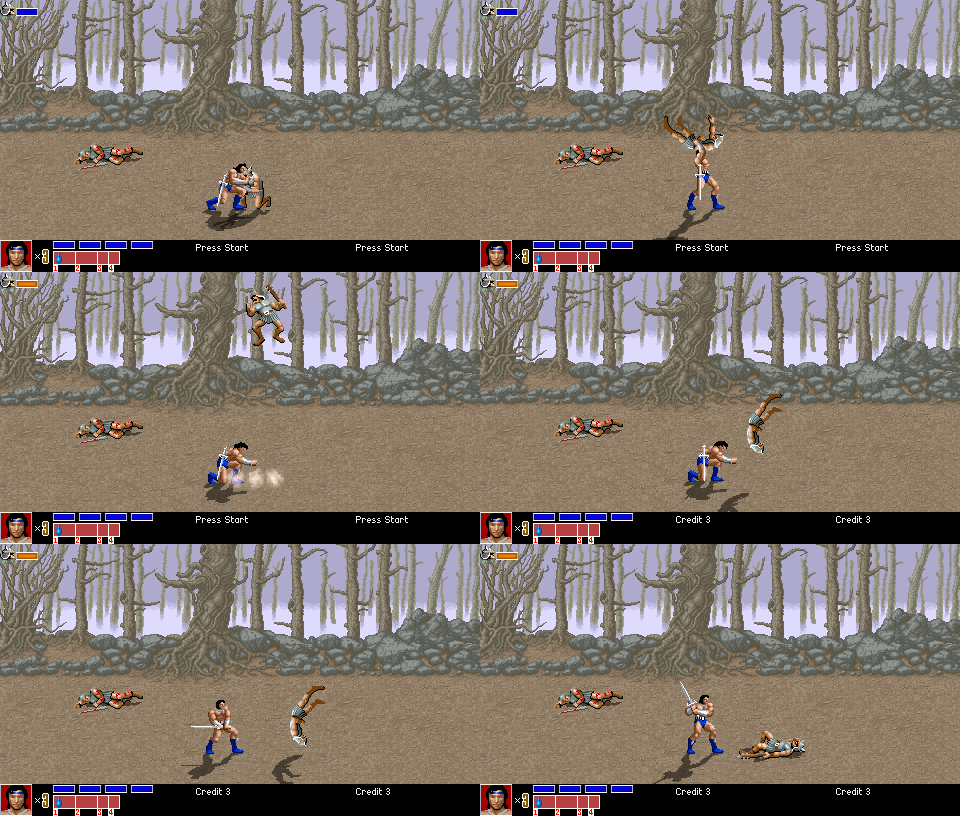
A last issue with my current throwing system was allowing the grappled entity to be attacked or otherwise affected by entities other then the one grappling it. While already possible, doing so caused an offset issue where characters would appear to teleport briefly when taking damage. In addition, it was important to immediately run the @bind0010 whenever attacker damaged defender.
The cause is due to OpenBOR overriding the current bound animation with whatever pain or fall animation an attack would result in. Only by manually reestablishing the bind could this be dealt with. Easy enough to take care of for the primary attacker (adding another @cmd bind0010 directly after the damage command as mentioned above). For outside interference however, the solution is a bit more involved.
My first attempt was to look for an existing bind and reapply it during the takedamagescript event. That effort was a complete failure. Further expermentation reveled something I already knew and had simply forgotten; takedamagescript runs before pain/fall animations are applied. this is in fact the very reason I had added onfallscript and onpainscript events to the engine.
After realizing this I knew it would be easy enough to reapply the bind using onpain/fall events, but it also meant bind offsets could not simply be calculated with math (they no longer exist and the entity has been moved). Ultimately, offsets and animation settings must be stored on the bound entity. So the bind0010 function was given needed modifications to perform the storage and a new function that reestablishes binds during pain/fall events was created.
Overall I am happy with the solution, except for having to establish more variables. I would much prefer to calculate the bind offset via formula and apply it. While theoretically possible to do that, at the very least the anchor entity and defender’s bound animation have to be stored, so best to go ahead and store the rest to ensure the bind will always be set as it was.
On a more disconcerting and extremely annoying note, MS Visual Studio no longer prints or exports code with color formatting . MVPS technicians tell us they didn’t have time to implement it. Funny thing, all previous versions had it. So what, they didn’t have time to not take something out? Adding insult to injury, the line numbers still print in color… really?
Photoshop CS5 Kelby Training
Kelby Down & Dirty Tricks With Photoshop CS5, Friday 09172010 @ Northern Kentucky Convention Center.
Most of the class seems fairly basic, covering knowledge I and nearly anyone else using Photoshop on a regular basis would already know. There are however new elements, particularly for features unique to CS5 and obscure key shortcuts. Following are general notes taken during seminar.
Adobe Photoshop
General
- Alt Drag to scale all points.
- Alt Shift Drag to scale all points with constrained proportions.
- Stylize->Find Edges = Line Art
- Ctl+i, toggle background black/white.
- Ctl + click new layer. New layer appears below current.
- Drag background over trashcan to unlock.
- Shift Ctl J cuts selection to new layer.
Puppet Warp
- Works like Pen Tool (add points and drag).
- Puppet warp may be applied as a smart filter (always should be!), warp cannot.
- Only works on contiguous objects.
Layer Masking
Black = Color hidden
White = Color 100%
Shift + Delete = Fill
- Hold Alt to constrain proportions.
- Use Ctl. 0
- Layer mask – Mask layer without modifying layer
- Hold Alt and click layer mask to place mask in main window.
- Hold shift and lick on mask to disable.
- Unlinked allows mask & layer to move independently
- Adjustment layer; mess with colors without messing with layers.
Blending
- Shift +/- changes blend mode of a layer.
- Alt & Drag to move half of a split slider.
Selections
- Start with general selection.
- Select refine edge.
Clipping Mask
- Alt + Click between layers.
Mask from image:
Text
Basic
- Dash, Alt Dash, Shift Alt Dash
- Shift alt 5 to merge font
- Pro fonts are “smart”; auto merging.
- Superscript for @,Copyright, etc.
Path
- Pen, hold Shift to add points (same as Dreamweaver Polygons).
- Angle for curves.
- Text can then be added to stay in or on path.
- Drag finished text on path to far side to place text on inside of path.
Pen Tool
- Move pen over path, click to add control point. Click on previous control point to remove.
- Old Alt and drag to move only one side of curve.
Advanced
- Create path. Initializes vector from ext layer.
- Hold shift to deselect all points of vector object.
- Texture can be dragged while active.
- Alt drag FX icon to another layer – copies all effects.
3D Text
- 3d->Repousse’
- Internal constraints feature; holes, shape removal.
Smart Objects
- Manipulation (re-size) without re sample.
- Smart objects are linked. Changes in any smart object are reflected in all duplicated copies.
- Right click on smart object->Duplicate using new smart object; creates unlinked smart object.
- Filters added to smart object are recorded and can be adjusted/removed.
- Choose any smart object->right click->replace image. Image in all smart objects are replaced and maintain all adjustments.
Define Brush
- Select area/image, then define. Adds to brushes.
Content Removal
- Select area.
- Open Fill dialog (Shift+Backpace).
- Use->Content aware.
Adobe Illustrator
Preset Art
- Window->Symbol->Dot Vector Pack
- Illustrator to PS: Copy from illustrator, select Shape, define custom shape. Shape now lives in Photoshop for later use.
- Paste from illustrator as Smart object, you can then edit in Illustrator by DB clicking layer.
Runtime Grapple Editor
Please note: The scripts in this post are depreciated and no longer supported. My grapple functionality is now handled by the DC Elmers library.
 OpenBOR is an extraordinarily powerful game engine, but one severe design flaw is the lack of any reasonable grappling support. Holding strikes and a horribly animated back toss are all it can really do out of the box.
Fortunately script support alleviates this problem, as one can simply script a throwing system for themselves. Quite some time ago I did just that and am pretty proud of it. It supports everything from simple hurling all the way up to multi part chain slams ala Tekken. It even supports one character grappling several opponents at once and/or tag team throws. The best part is by use of careful standardization, the defender does not need any additions beyond a standard set of animations given at creation time. Thus adding grappling moves to a character requires only modifications to that one character as opposed to every other entity in the game.
Even with those conveniences, adding a throw was still prohibitively time consuming. It required countless starting and restarting of the engine while tweaking the bind settings pixel by pixel. Creating a single simple throw could take a day or more. So even though I dreaded dealing with menu codes again, I decided to create an on the fly throw editing system.

The premise is simple: Edit the grappling poses at run time, record the resulting parameters, and copy/paste them into the model text. The code is such a mess I’m almost embarrassed to post it here, but ahh well. It desperately needs some cleanup, but from a functionality and stability standpoint works just as I had hoped:
- ESC + UP/DOWN: Toggles debug modes. Mode 4 is the grappling editor. Specific settings can be adjusted by holding an action key and using the direction control as follows.
- Jump
- Left/Right: Bind mode. Several types of binds are available to deal with various grapple maneuvers.
- 0: Standard – Defender is bound to Attacker by an adjustable X/Y/Z offset.
- 1: Standard w/Auto Height – Same as one, but Y offset is automatically adjusted to reflect difference between Attacker and Defender’s height.
- 2-4: Not used as of 2011_04_22.
- 5: Reverse – Attacker is bound to Defender by an adjustable X/Y/Z offset.
- 6: Reverse w/Auto Height – Same as 5, but Y offset is automatically adjusted to reflect difference between Attacker and Defender’s height.
- 7: Reverse w/Auto Height Float – Same as 6 with a tosstime addition to prevent premature landframe activation.
- Left/Right: Bind mode. Several types of binds are available to deal with various grapple maneuvers.
- Attack
- Left/Right: Toggles bind indexes. The throwing system allows for multiple opponents to be grappled at once, with each identified by an index.
- Up/Down: Toggles defender’s frames. Each character has a single identical animation with each frame representing one of its standardized “thrown” poses.
- Attack2
- Left/Right: X (horizontal) binding offset.
- Up/Down: Y (vertical) binding offset.
- Attack3
- Left/Right: Direction binding.
- Up/Down: Z (lateral) binding offset.
- Attack 4
- Left/Right: Attacker’s frame.
- Up/Down: Toggle “Rebind”. If off, the animation’s current binding (if any) won’t be overridden by debug version so comparisons can be made.
- Special: Prints completed function call to log, ready for copy/paste into grappling animation.
 Ultimately, this should cut creation time for a single throw from about a day to around 30 minutes. In turn, my module production time should decrease an order of magnitude, especially if I can find ways to modify and apply the concept to other areas.
Code Samples:
Select Screen Shenanigans
Original select screen in Golden Axe Remake was functional, but insufficient for needs of Golden Axe Hackjob. Primary concerns were the following:
- Main selectable characters each having to accommodate for the others colors within their palettes. This severely limited color choices. For example, Ax could not be given the 2p color palette from Golden Axe The Duel. Doing so required changing his weapon colors, which were shared with Tyris Flare’s clothing.
- No true carousel effect. While characters were displayed in a ring, they simply swapped location when cycled instead of rotating as in the arcade original.
- No name display. At no point are characters ever identified. While not a great issue for the the original characters, this is a problem when introducing others.
- No accommodation for extra characters. It would be rather jarring and unprofessional looking for alternate choices to be inserted into selection cycle when not appearing in “ring” of visible choices.
- Non selected characters are “burned” when a choice is confirmed. The fire effect used lacks transparency and thematically does not match the various improved effects used throughout the module.
To solve this problem, I decided to use a series of blank silhouettes to serve as the carousel. As characters are cycled, the blank silhouettes rotate in place, then the front silhouette is replaced by current selection. This would allow infinite addition of selectable characters while maintaining the theme.
The original plan was for the silhouettes to be displayed by a separate entity, with rotation direction determined by left/right key press. Unfortunately scripted spawns during the selection screen results in a shutdown. Attempts to make use of the summonentity/spawnentity command also proved unsuccessful; during selection screen these commands are ignored.
This only left having the silhouettes be part of main entity. Main issue was adding a color for the silhouettes to characters with palettes firmly established. I worked around the problem by using the entry 255 in each character’s palette as the silhouette color. In addition to getting around the laborious process of “inserting” a color to existing palettes, it also meant only the palette images needed modification as opposed to every single sprite.
Having the silhouettes displayed within main entity also solved any timing issues, though it did mean rotation would always be in same direction. I was worried unidirectional rotation would look jarring, but in practice it works quite well. The rotation itself is achieved by a “brute force” approach; a series of sprites drawn to give the illusion of a carousel are played as part of the “wait” animation. The memory consumption is minimum however, as the rotating silhouette sprites are reused by every selectable character.
Name display is also part of the main entity, and its color issue was solved in the same manor, except with use of color entry 254.
The burn effect was the last problem to overcome, but was easily solved. It is achieved by launching a non moving projectile on selection confirmation. While it would have been impossible to use this method for the silhouettes due to timing issues, it works perfectly for burning and allows use of transparency.
As a last touch, the location of each character was widened for more room and player 1 was placed in the center (this module allows 3 players). Player 2 is on the far left, player 3 on the far right. Along with improving aesthetics, by making these changes I have added yet another obstacle to any short sighted attempts at Dreamcast porting.
-
- Old select screen was functional, but crowded, incompatible with further expansion, and lacked the full visual appeal of arcade original.
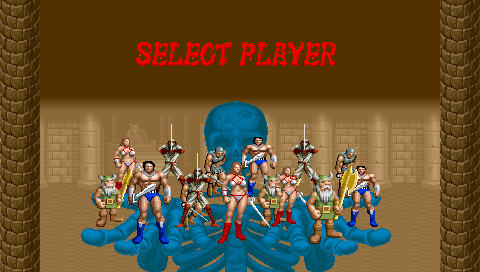
-
- Burn away of non selected characters did not match the improved particle effects throughout module.
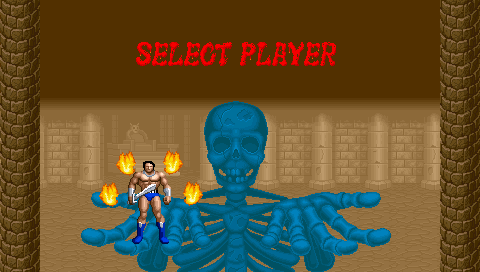
-
- Third player position demonstrates silhouettes rotating into place during character cycle.
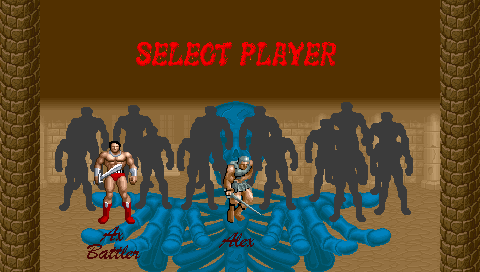
-
- By use of identical silhouettes, adding characters will not change selection dynamic.
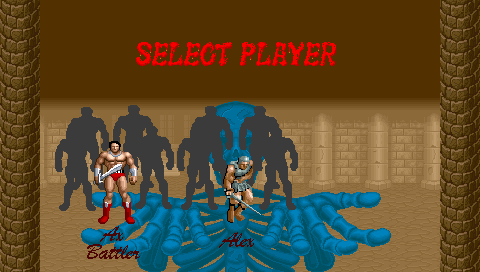
-
- New burn effect with smooth animation and transparency.