Introduction
This guide is written primarily for OpenBOR module builders, but the underlying principles apply anywhere you need to track recent history in a fixed-size structure. It assumes a basic understanding of OpenBOR script, arrays, and control structures.
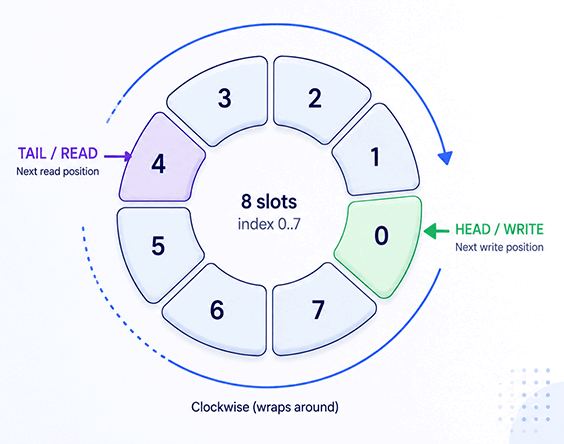
Ring buffers, also called circular buffers, circular queues, or cyclic buffers, are data structures where the end of the storage range wraps back around to the beginning. They are especially useful for First In, First Out (FIFO) patterns and continuous data streams. Ring buffers are a fundamental structure, and some early platforms even included hardware support for ring-buffer-style behavior.
You have probably seen ring buffers at work without realizing it. Device inputs, such as keyboards and touch screens, often queue commands through a ring buffer. Output streams use them too. Games commonly use ring buffers for player input history, internal state tracking, visual effects, and mechanics such as:
- Serpentine or segmented entities
- Clone power-ups, such as Ninja Gaiden II on NES
- Slaves, options, and satellites in shoot ’em ups
In Action
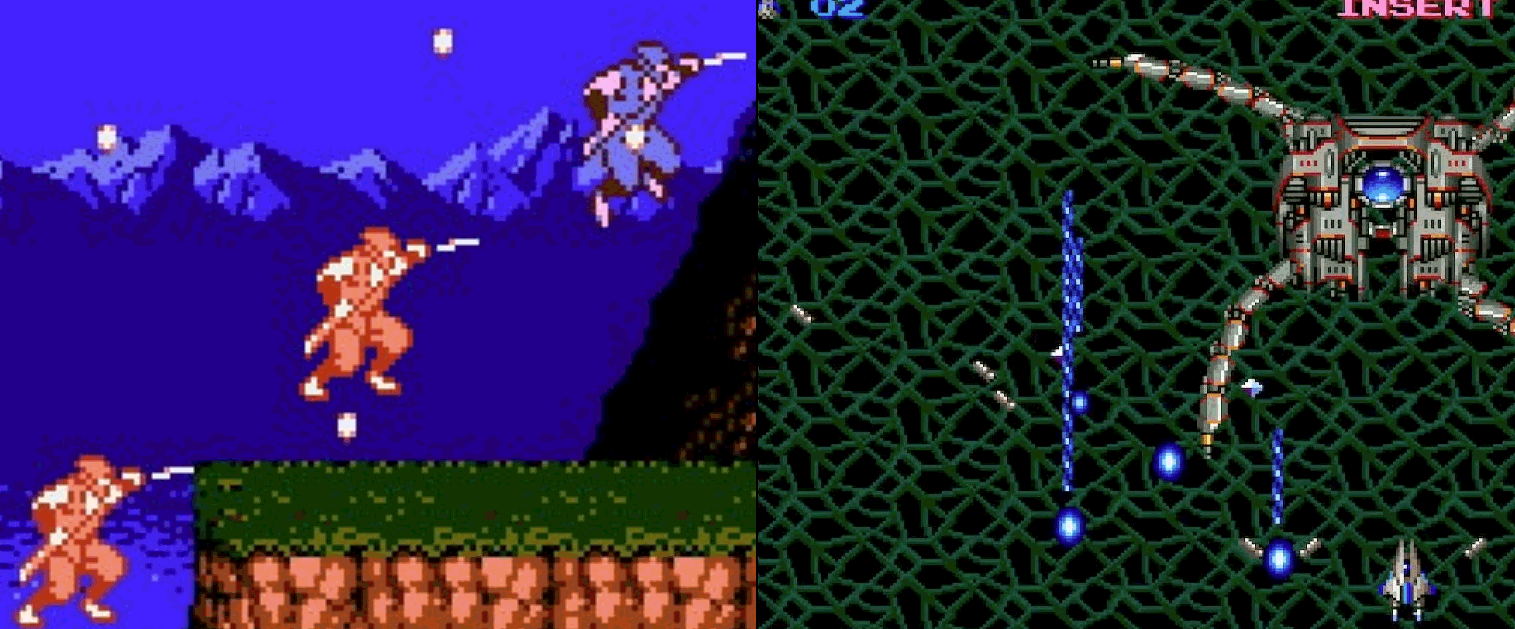
Ninja Gaiden II gives us a good practical example. In this classic NES title, one standout feature is the clone power-up, allowing the main character, Ryu, to manifest one or two immortal clones that trace his movements and mimic his attacks.
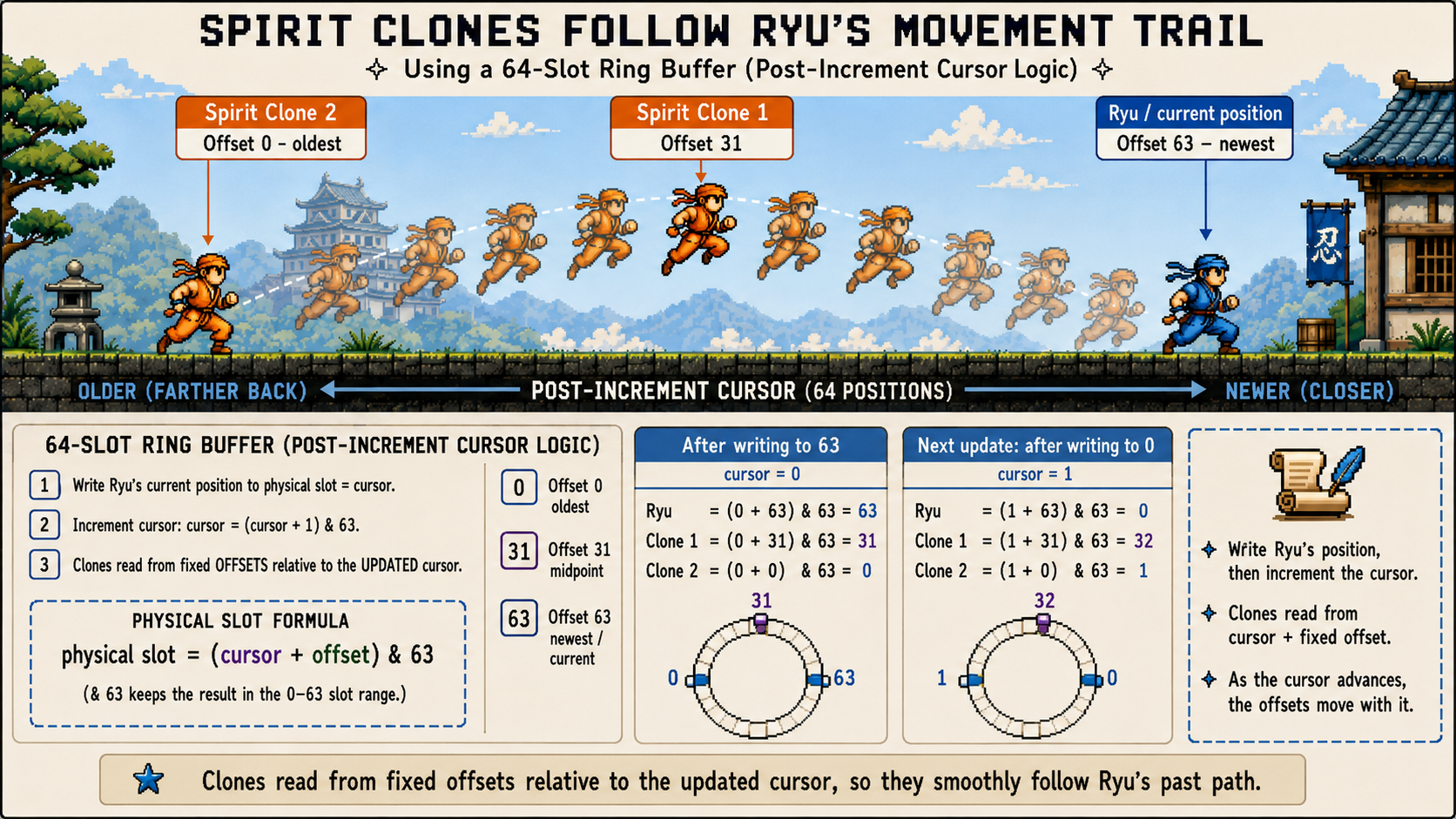
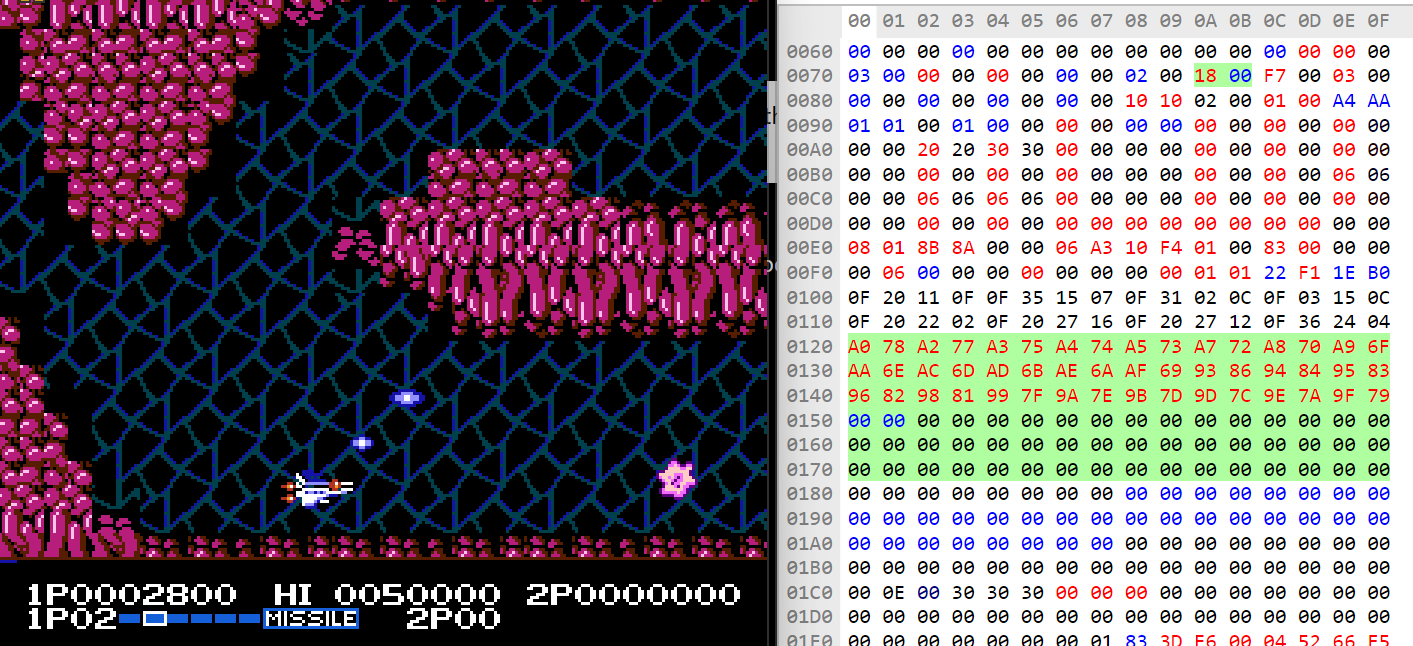
Here’s what Ryu doesn’t want you to know: those spirit clones aren’t ninja magic, just clever engineering. During gameplay, Ryu’s position and status (facing, on wall, etc.) are recorded into a 64-slot ring buffer as he moves. Each game update writes Ryu’s current position and status at the active cursor, then advances the cursor from 0 to 63 before wrapping back to 0. This happens continuously, whether or not the player has any spirit clone power-ups.
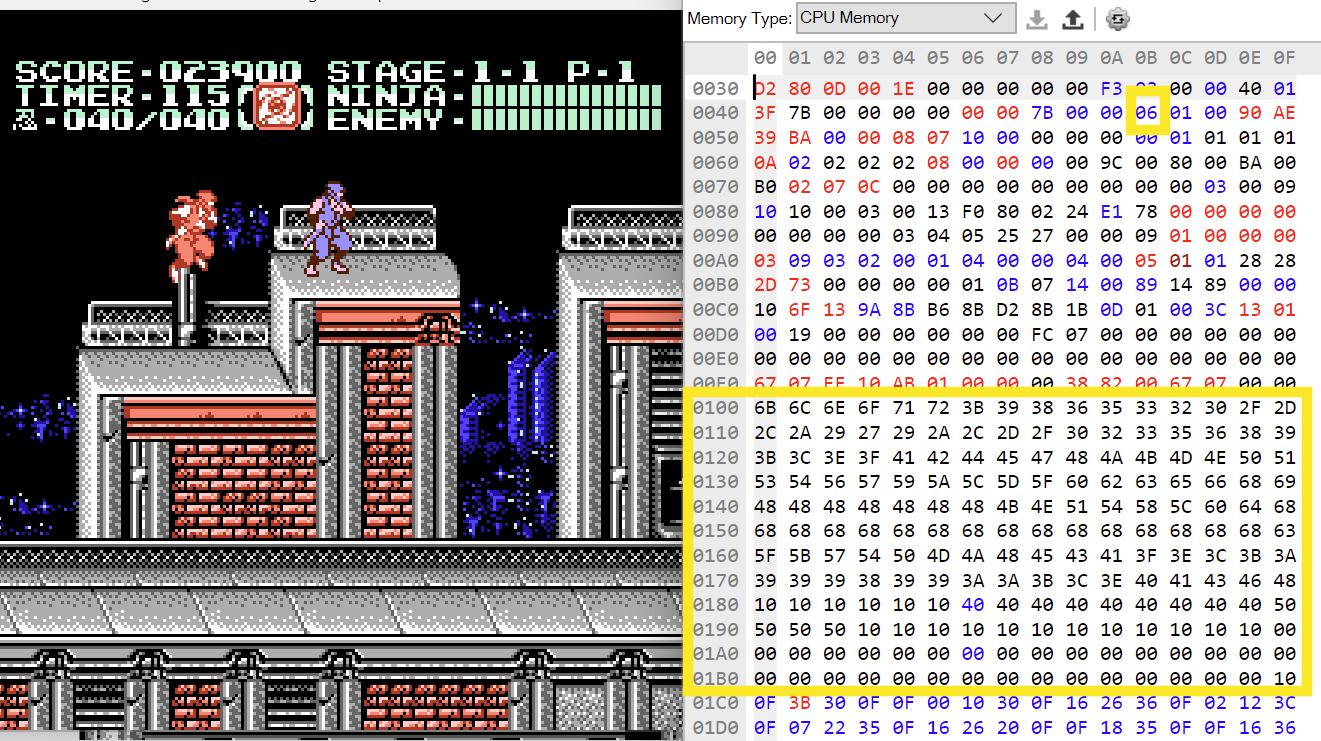
When present, the spirit clones read from fixed offsets relative to the active cursor. The first clone reads from an offset of 31, keeping it closer to Ryu, while the second clone reads from offset 0, placing it at the oldest point in the trail. As the cursor advances, those offsets move through the buffer with it.
Once the game writes to slot 63, the cursor increments to 0. The next buffer write will be to slot 0, and each clone reads its position from the updated cursor plus its fixed offset.
Ryu     = (0 + 63) & 63 = 63 // Current position.
Clone 1 = (0 + 31) & 63 = 31 // Midpoint away.
Clone 2 = (0 + 0)  & 63 = 0  // Farthest away.
On the next update, the buffer writes to slot 0, the cursor moves to 1, and the cycle continues.
Ryu     = (1 + 63) & 63 = 0  // Current position.
Clone 1 = (1 + 31) & 63 = 32 // Midpoint away.
Clone 2 = (1 + 0)  & 63 = 1  // Farthest away.
On screen, this creates the convincing illusion that the clones are tracing Ryu’s movement.
That might sound complex and expensive, but in practice it is simple to code, minimal in footprint, and blazing fast to run. The NES CPU performs only a handful of simple operations – more on that below – and each trail entry only needs X, Y, and status (one status byte can carry up to eight individual flags).
Add it all up and the entire buffer occupies 193 bytes: cursor + (64 slots * 3). That’s less than this paragraph, and only about 9% of the NES’s two-kilobyte work RAM – not bad for a signature feature of the game!
// 1. Write current position and status.
buffer[cursor] = ryu_data;

// 2. Advance cursor.
cursor = (cursor + 1) & 63;

// 3. Read fixed offsets relative to the updated cursor.
clone2_data = buffer[(cursor + 0)  & 63];  // oldest / farthest back
clone1_data = buffer[(cursor + 31) & 63];  // midpoint
That’s the whole pattern. No shifting, no searching, no expensive math – just write, wrap, and read from fixed offsets. It works for movement trails, input logs, controller reads, keyboard buffers, touchscreen samples, and plenty of other time-ordered data. You can take advantage of this old-school goodness in your own projects too.
Why Not a Loop?
At first glance, a ring buffer can look like a fancy loop. Both involve moving through a fixed range and wrapping back to the beginning. The difference is purpose.
Loops are control structures. They tell the program to repeat a block of code. Ring buffers are data structures. They store values over time, one entry at a time, while reusing the same fixed block of memory.
Loops usually process a whole set right now: update every enemy, draw every sprite, check every projectile, or scan every active effect. Sometimes that is neither efficient nor desired.
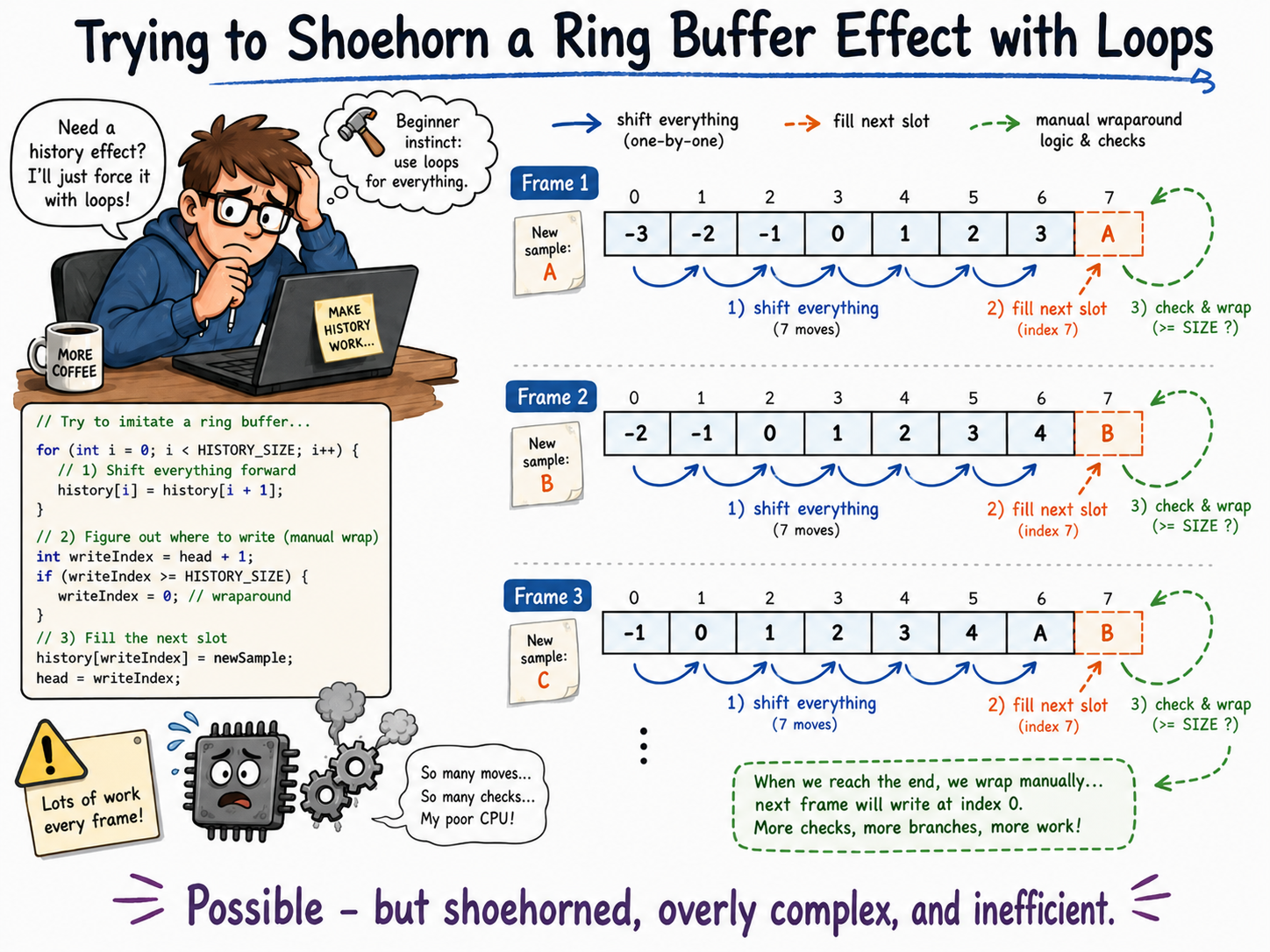
Again, consider the Ninja Gaiden II use case. You don’t want to fill the whole history on every game cycle. That would not just be wasteful – it would also be pointless. The clones would both end up right on top of Ryu at all times. Instead, you want to populate one slot, then another on the next update, and so on, like a conveyor belt.
You could, in theory, write a loop with complicated logic to assess which slots to fill, shift them around, and build your own conveyor belt. Congratulations – you just reinvented a ring buffer, only far more complex and resource intensive. So why not use the real thing?
Completing, Not Competing
In reality, ring buffers and loops often work together to build functionality. The ring buffer records the data. Later, a loop reads through that data to draw shadows, replay positions, process delayed inputs, or clean up expired entries.
So the question is not really “ring buffer or loop?” In practice, the answer is usually both: the ring buffer organizes the history, and the loop consumes it.
OpenBOR
In OpenBOR, ring buffers are built from indexed arrays. It is technically possible to construct ring-buffer-like behavior from linked lists, or even through concatenated variable names, but those are anti-patterns and we will not cover them here.
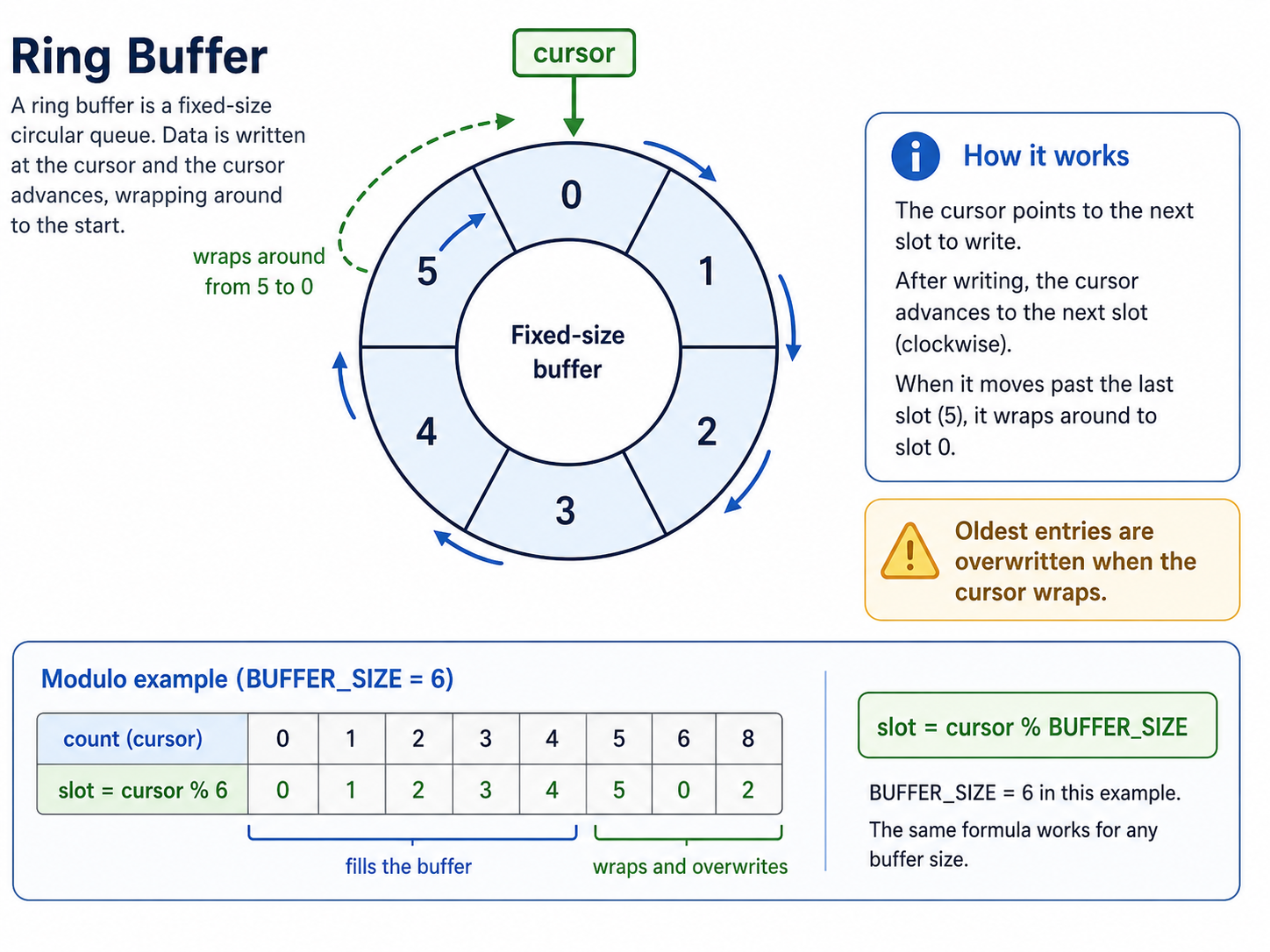
The secret sauce is an incremental cursor combined with modulo. Sometimes the cursor is an internal clock, but it is often simpler to keep a manual counter and increment it whenever the buffer updates. On each update, divide the cursor by the ring buffer size and keep the integer remainder. That remainder becomes the ring buffer index.
Sounds complex? It is not. The whole operation is one short line using the modulo operator (%). Modulo returns the integer remainder after division, giving us a simple way to wrap numbers into a fixed range.
int slot = cursor % BUFFER_SIZE; // Wrap cursor into valid buffer range.
If BUFFER_SIZE is 6, then cursor % BUFFER_SIZE can only return values from 0 through 5.
To illustrate, we’ll assume an external cursor. Here is what happens as cursor value increases:
| Cursor | Calculation | Resulting Slot |
|---|---|---|
| 0 | 0 % 6 | 0 |
| 1 | 1 % 6 | 1 |
| 2 | 2 % 6 | 2 |
| 3 | 3 % 6 | 3 |
| 4 | 4 % 6 | 4 |
| 5 | 5 % 6 | 5 |
| 6 | 6 % 6 | 0 |
| 7 | 7 % 6 | 1 |
| 8 | 8 % 6 | 2 |
| 9 | 9 % 6 | 3 |
| 10 | 10 % 6 | 4 |
| 11 | 11 % 6 | 5 |
| 12 | 12 % 6 | 0 |
Notice how the slot wraps back to 0 after it reaches 5. That is the “ring” in ring buffer. The cursor may continue counting upward, but modulo keeps the actual storage index inside the valid array range.
In most ring buffer patterns, we own the cursor, and may safely wrap its value. Typical ring buffer logic follows this pattern:
#define BUFFER_SIZE 6

/* Get existing cursor value and initialize to 0 if needed. */
int cursor = get(data, DATA_CURSOR);

if(typeof(cursor) != openborconstant("VT_INTEGER")) {
    cursor = 0;
}

/* Wrap the cursor itself to the valid buffer range. */
cursor = cursor % BUFFER_SIZE;

/* Write data to the current cursor position. */
set(data, DATA_START + cursor, value);

/* Advance, wrap, and store the cursor. */
cursor = (cursor + 1) % BUFFER_SIZE;
set(data, DATA_CURSOR, cursor);
Each time this runs, the script writes to the next slot. Once it reaches the end of the buffer, it wraps around and starts overwriting the oldest entries. The full shadow trail example below uses this same pattern to record and draw position history.
Tip: There’s no reason the cursor can’t live inside the ring buffer array. In fact, that’s usually the cleanest approach. This is how our shadow trail example above works, and it is why the flattened layout uses a start offset. The first array element stores the incremental cursor count, while the remaining elements hold the ring buffer data. Everything stays packaged together, avoids an external variable lookup, and keeps the structure organized.
[cursor][x0][y0][z0][sprite0][time0][x1][y1][z1][sprite1][time1]...Advanced
If you want to get really cocky, constrain your buffer sizes to a power of two:
2, 4, 8, 16, 32, 64, ... Then you can use a bit mask instead of modulo.
#define BUFFER_SIZE 8
#define BUFFER_MASK (BUFFER_SIZE - 1)

/* Get existing cursor value and initialize to 0 if needed. */
int cursor = get(data, DATA_CURSOR);

if(typeof(cursor) != openborconstant("VT_INTEGER")) {
    cursor = 0;
}

/* Ensure the cursor is within the valid buffer range. */
cursor = cursor & BUFFER_MASK;

/* Write data to the current cursor position. */
set(data, DATA_START + cursor, value);

/* Advance, wrap, and write the cursor. */
cursor = (cursor + 1) & BUFFER_MASK;
set(data, DATA_CURSOR, cursor);
Why would you do this? Speed! Speeeeeeed!
Ring buffers are already fast, but bitwise AND is cheaper than division, and modulo is often implemented as division unless the compiler or runtime can optimize it away. On modern hardware, the difference is usually tiny. In a scripting environment like OpenBOR, it may not matter at all unless the operation is happening thousands of times per frame.
Still, on older systems this could be a vital optimization. The Ninja Gaiden II example above uses 64 slots, which is exactly the kind of buffer size you would choose for this trick. A 64-slot buffer can be wrapped with a mask of 63:
index = cursor & 63;
The NES 6502 CPU has no native multiply or divide instruction, so tricks like this mattered. Instead of performing a costly software modulo operation, the code can use a simple bitwise AND – exactly the kind of operation CPUs are built for.
Just remember the catch: this only works when the buffer size is a power of two. If your buffer size is 10, 20, 30, or any other non-power-of-two value, use modulo instead.
Considerations
Advantages
- Fast – When built from an indexed array, ring buffers are extremely light. The modulo and array operations are simple enough for hot-path logic such as player input tracking, position history, and visual effects. Even more so with power of 2 bounding and a bit mask.
- Light – Well-designed ring buffers can use less memory than other structures performing the same task. Their memory cost is also predictable.
- Simple – Ring buffers are easy to assemble once you understand the pattern. You do not need much script to make them work.
- Expandable – Need smoother trails, more afterimages, or longer history? Increase the controlling buffer size constant and the same structure still works.
Drawbacks
- Static – Ring buffers do one job well, but they are not flexible general-purpose containers. When data needs to grow dynamically, another structure is usually a better fit.
- Resident – Ring buffers are light, but what resources they do use are constant. The storage is reserved whether every slot is currently useful or not.
- Specialized – Ring buffers are ideal for certain tasks and poorly suited to many others. They shine when you need predictable, repeating access to recent history.
3 Comments