Introduction
OpenBOR Script includes array support, but despite the C-like syntax, OpenBOR arrays have their own behavior, strengths, and quirks. They are not scoped data structures in the usual sense, but instead behave much more like heap-allocated objects you access through handles. This gives OpenBOR arrays tremendous flexibility, but also means they require active care and cleanup.
To make things more interesting, OpenBOR arrays are really two storage systems sharing the same API. One is a true indexed array straight out of C – close to the metal and built for raw performance at the cost of flexibility. The other is a doubly linked list with hash acceleration – not as fast as an indexed array, but more human-friendly to use and open to unstructured data. Which one you use depends entirely on the type of key you pass to functions like get(), set(), delete(), and related helpers.
Which one is best depends on your needs in the moment. After reading this guide, you should have a stronger understanding of which one to employ and when.
Defining Terms
Before getting into specifics, it helps to understand what arrays and lists are in general programming terms. OpenBOR supports both concepts, but exposes them through the same “array” interface. We will use code samples suited to OpenBOR, but the basic principles explained here are mostly universal.
Array
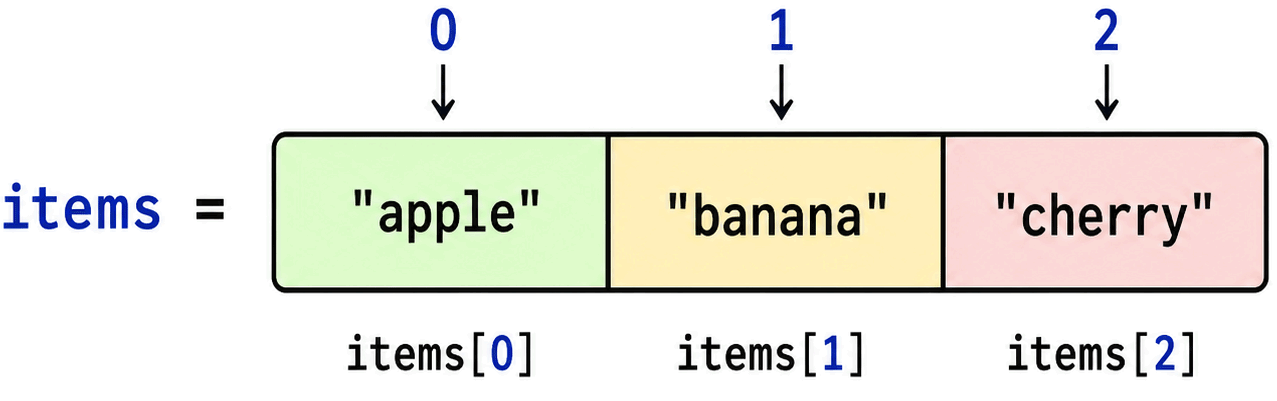
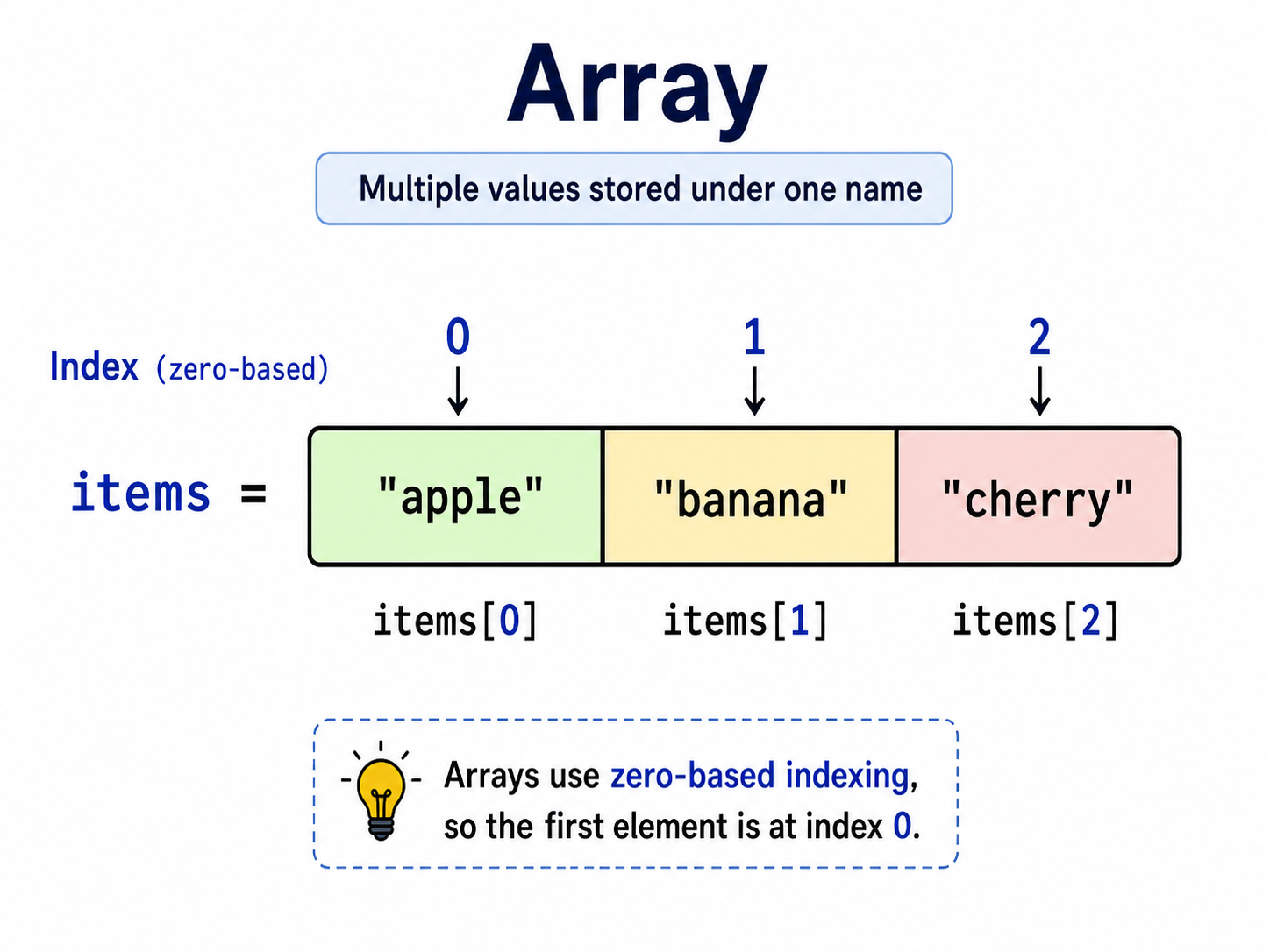
An array is a container that stores multiple values under one name. Instead of creating separate variables for every related value, you store them together and access each one by position.
For example, instead of this:
void item_0 = "apple";
void item_1 = "banana";
void item_2 = "cherry";
you could use an array:
void items = array(3);

set(items, 0, "apple");
set(items, 1, "banana");
set(items, 2, "cherry");
Then you can retrieve a value by its index:
void item = get(items, 1); // banana
The number used to access the value is called an index. Most programming languages, including OpenBOR Script, use zero-based indexing, which means the first element is index 0, the second is index 1, and so on.
High Performance, Poor Flexibility
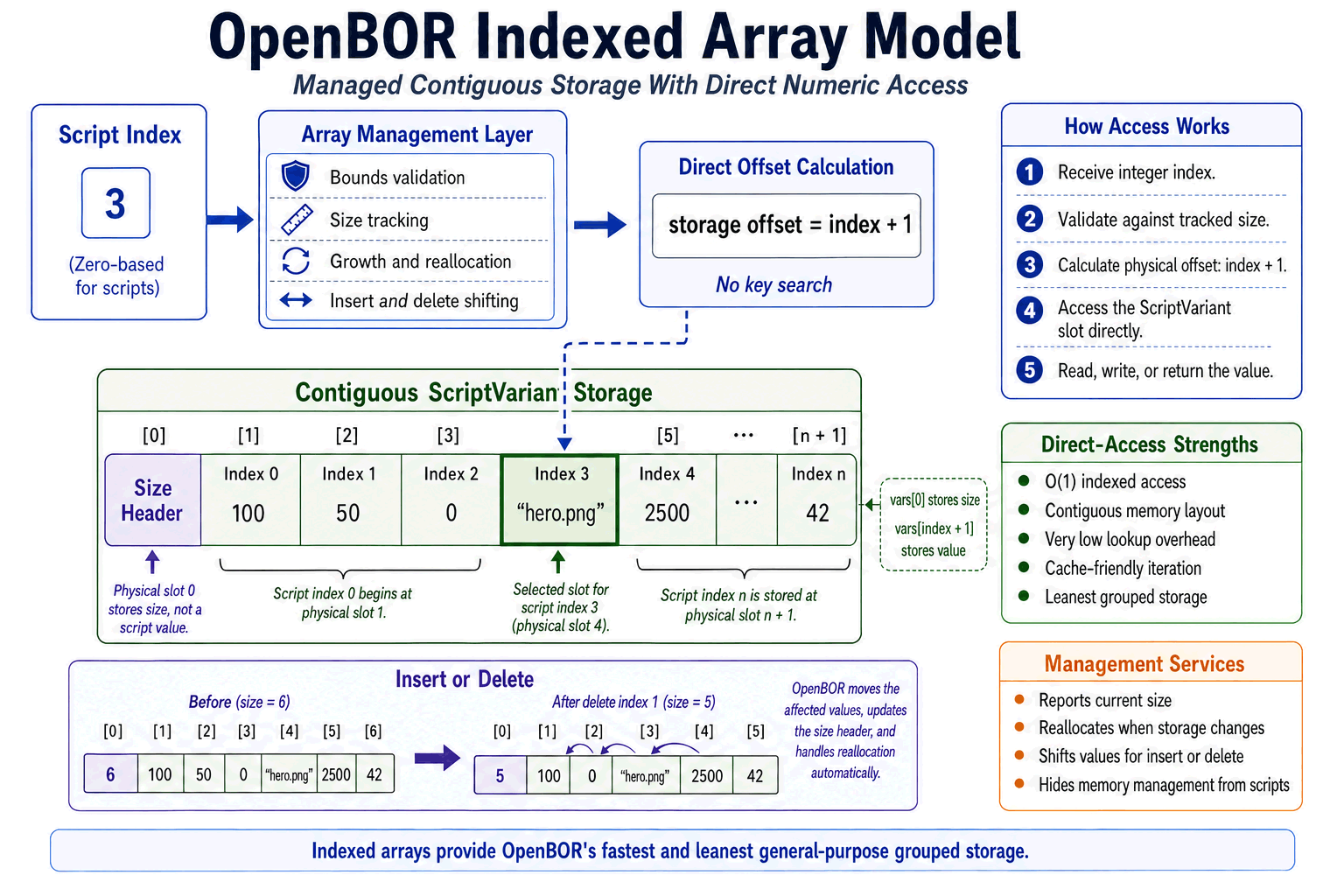
Traditional arrays are a lot like drag racers – they offer maximum performance at the cost of flexibility. Array elements occupy a single contiguous block of memory, which allows hardware-level acceleration 1 and direct access by index. Once the engine knows the starting location of the array and the index you asked for, it can calculate exactly where that element lives.
This means arrays are not just fast, but consistently fast. It doesn’t matter how many elements are in an array or which element you are looking for. Finding that element always takes the same amount of time. We call this constant time complexity, or O(1).
void baby_bear = array(100);
void mama_bear = array(10000);
void poppa_bear = array(100000);

/* Same access time for each. */
set(baby_bear, 99, "apple");
set(mama_bear, 9999, "banana");
set(poppa_bear, 99999, "cherry");

/* Still same access time. */
void some_value_a = get(baby_bear, 99);
void some_value_b = get(mama_bear, 9999);
void some_value_c = get(poppa_bear, 99999);
The tradeoff is that arrays do not grow or shrink freely. Adding or removing elements requires creating a new array of the correct size and copying the old contents over. That is why arrays are extremely fast when their size and layout are known ahead of time, but less convenient when the structure needs to change constantly.
Think of looking for a set of books about one subject. An array is like having every book on the same shelf, lined up in order. Once you know the shelf and the book number, you can go straight to it. Separate variables are more like having those books scattered across the library – easier to shelve, much harder to find.
OpenBOR Arrays
OpenBOR’s array implementation is very similar to C-style arrays, but with a management layer that allows growth, inserts, and size reflection. These features are useful, but they can also be a double-edged sword. We’ll get to the details further below, including how they work and when you should or shouldn’t use them.
The important takeaway for now is that OpenBOR indexed arrays behave like traditional single-dimension C-style arrays from the script writer’s perspective. They share the same advantages of O(1) access speed and efficient indexed storage.
Lists
Lists are another kind of container, but they are built differently from arrays. Instead of storing every value in one contiguous block of memory, a list stores values in individual structures, called nodes. Each node contains the value, plus one or more pointers that tell the engine where to find the next node.
Doubly linked lists go one step further. Each node points both forward and backward, so the engine can move to the next node or the previous node.
High Flexibility, Lower Performance
Lists are a lot like a train. Each car is separate, but linked to the cars before and after it. Adding or removing a car does not require rebuilding the entire train. You just connect or disconnect the nearby cars.
That flexibility is the main advantage. Lists can grow naturally, and inserting or removing entries is usually less disruptive than resizing an array. Lists are also able to use non-integer keys, and they don’t require identifiers to be numeric, contiguous, or sequential. Again think of a train. It doesn’t matter where the grain car or box car is, nor what their names are, as long as the links are present.
The tradeoff is lookup speed and memory overhead. Because each node is a separate object, values are scattered around memory instead of packed together. To find a specific entry, the engine may have to walk through nodes until it finds a match. Each node also needs extra memory for its links.
Unlike arrays, lists are affected by their size. Because finding a node requires walking the list, the more nodes you have to walk through, the more time is needed. This is called linear time complexity, or O(n), where n is the number of nodes checked before reaching the target.
OpenBOR Lists
OpenBOR Lists
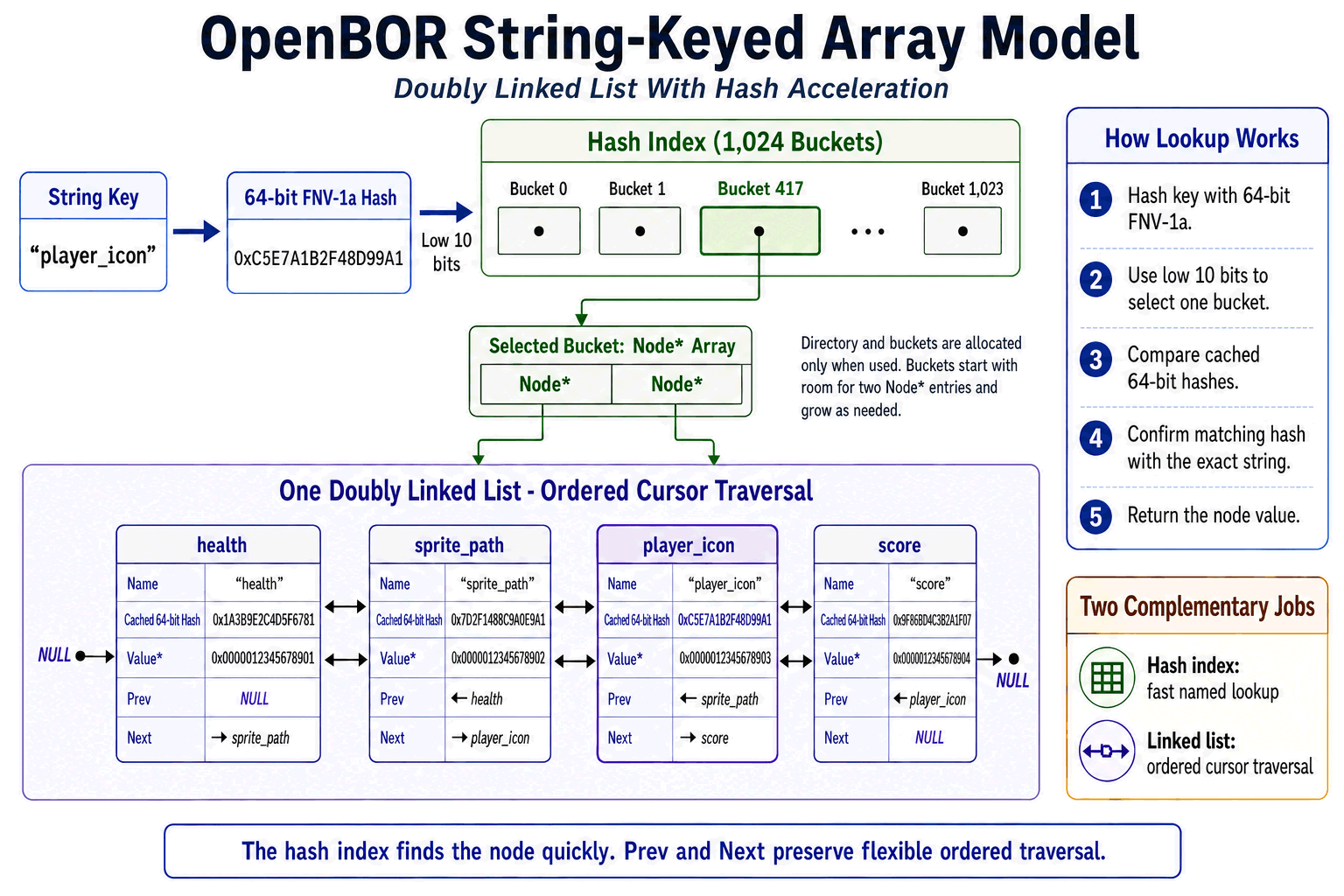
OpenBOR uses a doubly linked list when you access an array with a string key. From the script side, it still looks and behaves like an array:
set(my_array, "health", 100);
set(my_array, "sprite_path", "data/chars/player/icon.png");
Under the hood, OpenBOR creates named nodes instead of writing the values into the array’s numeric storage block. Each node stores its string name, a cached 64-bit hash, a pointer to its value, and links to the previous and next nodes.
All named entries belong to one doubly linked list. The list also maintains a cursor, allowing functions such as reset(), next(), previous(), key(), and value() to walk through its entries in order.
Hash Acceleration
Each string-keyed list maintains its own independent hash index. Global variables, local variables, individual arrays, and other lists do not share one combined lookup table.
When a list receives its first named entry, OpenBOR allocates a directory containing 1,024 possible buckets. Individual buckets are allocated only when used. Each bucket begins with room for two node pointers and doubles its capacity whenever more room is required.
OpenBOR performs a named lookup with the following process:
- The string key is converted to a 64-bit hash using the FNV-1a algorithm.
- The low-order 10 bits select one of the 1,024 buckets.
- OpenBOR searches the selected bucket by comparing the requested hash with the complete 64-bit hash cached on each referenced node.
- When the complete hashes match, OpenBOR performs a final string comparison to confirm the exact name.
- The matching node’s value is returned by
get()or replaced byset(). When no match exists,get()returnsNULL(), whileset()creates a new named node.
String-keyed lookup therefore does not require walking the complete linked list. OpenBOR normally visits one very small bucket, performs cached 64-bit comparisons, and compares the actual string only after finding a matching hash. This gives string-keyed arrays near-constant O(1) lookup performance in practical use while retaining the flexibility of ordered linked-list traversal.
The important takeaway is that string-keyed OpenBOR arrays are essentially turbocharged doubly linked lists. While indexed arrays are still the leanest and fastest grouped storage available, linked lists provide unmatched flexibility and enable ordered cursor traversal – while hash acceleration makes named lookup extremely fast in its own right.
String keys are ideal for associative data, descriptive names, and collections that do not fit naturally into fixed numeric positions.
Why Use an Array?
Arrays and lists give you organizational and performance advantages when working with groups of related values. Instead of managing a pile of separate variables, you can keep related data together under one handle and access each value by key or index.
In the case of indexed arrays, you also get extra speed from hardware acceleration – an important consideration when working in hot paths.
Example:
#define PLAYER_DATA_HEALTH 0
#define PLAYER_DATA_MP     1
#define PLAYER_DATA_SCORE  2

/* Define an array with three elements. */
void player_data = array(3);

/* Populate elements. */
set(player_data, PLAYER_DATA_HEALTH, 100);
set(player_data, PLAYER_DATA_MP, 50);
set(player_data, PLAYER_DATA_SCORE, 0);

/* Get values from elements. */
int health = get(player_data, PLAYER_DATA_HEALTH);
int mp     = get(player_data, PLAYER_DATA_MP);
int score  = get(player_data, PLAYER_DATA_SCORE);
This gives you one organized structure instead of three unrelated variables. Note use of named constants for indexes. This isn’t required, but it is best practice.
Arrays are especially useful when you need to iterate or scan a collection of data, and even more so when you need to handle multidimensional structures (like a grid).
As a practical example, consider a shadow trail (after-images) script. While active, you’ll want to store n sets of locations along with current sprite in use as the entity moves and animates. Then you play them back to the screen to create a trail of after-images.

In its simplest form, that means at least two functions resident in hot paths. One running on each entity you want shadow trails enabled to record data. Then another in the global update run against each entity present to get the recorded data for drawing after-image sprites on screen.
Let’s assume you want six shadow trail after-images. You could do something like this (don’t worry if it looks like we’re jumping to the deep end, the following is just a bit of illustration to demonstrate the point):
void shadowtrail_store_bad(void acting_entity) {

    /* Guards */
    if(!acting_entity
        || typeof(acting_entity) != openborconstant("VT_PTR")) {
        shutdown(1, "\n\n ERROR: shadowtrail_store_bad(" + acting_entity + ") - Missing or invalid parameter.\n");
    }

    /* We'll need elapsed time + sprite duration.*/
    float expire_time = openborvariant("elapsed_time") + 100;

    /* Get entity properties */

    void current_sprite = getentityproperty(acting_entity, "sprite");
    float x_pos =   getentityproperty(acting_entity, "x");
    float y_pos =   getentityproperty(acting_entity, "y");
    float z_pos =   getentityproperty(acting_entity, "z");


    /* Get ring buffer index, initialize to 0 if necessary */

    int key_index = getentityvar(acting_entity, "shadowtrail_key_index");

    if(key_index == NULL()) {
        key_index = 0;
    }

    key_index = key_index % TRAIL_COUNT;

    /* Store sprite and position in entity vars with generated string keys. */

    setentityvar(acting_entity, "trail_x_"      + key_index, x_pos);
    setentityvar(acting_entity, "trail_y_"      + key_index, y_pos);
    setentityvar(acting_entity, "trail_z_"      + key_index, z_pos);
    setentityvar(acting_entity, "trail_sprite_" + key_index, current_sprite);
    setentityvar(acting_entity, "trail_time_"   + key_index, expire_time);

    /* Increment the ring buffer index for the next trail frame. */

    key_index++;
    setentityvar(acting_entity, "shadowtrail_key_index", key_index);
}
Then in a global update, we loop over entities and draw any active shadow trails like this:
void shadowtrail_draw_bad(void acting_entity) {

    /* Guards */
    if(!acting_entity
        || typeof(acting_entity) != openborconstant("VT_PTR")) {
        shutdown(1, "\n\n ERROR: shadowtrail_draw_bad(" + acting_entity + ") - Missing or invalid parameter.\n");
    }

    /* Draw each trail sprite from the ring buffer with appropriate offsets. */
    int i = 0;
    void trail_sprite = NULL();
    float trail_x = 0.0;
    float trail_y = 0.0;
    float trail_z = 0.0;
    int expire_time = 0;
    int sort_id = 0;
    int elapsed_time = openborvariant("elapsed_time");

    /* Scan indexes for valid trail segments */
    for(i = 0; i < TRAIL_COUNT; i++) {

        /*
        * Get the trail sprite for this segment.
        * Make sure it's a valid pointer before
        * trying to draw. If it's not valid, this
        * segment is either uninitialized or cleared,
        * so we skip it.
        */

        trail_sprite = getentityvar(acting_entity, "trail_sprite_" + i);

        if(!trail_sprite || typeof(trail_sprite) != openborconstant("VT_PTR")) {
            continue;
        }

        /*
        * Check time. If expired or not set, clear the trail
        * segment and skip to next iteration.
        */

        expire_time = getentityvar(acting_entity, "trail_time_" + i);

        if(typeof(expire_time) != openborconstant("VT_INTEGER")
        || expire_time <= elapsed_time) {

            setentityvar(acting_entity, "trail_time_" + i, NULL());
            setentityvar(acting_entity, "trail_sprite_" + i, NULL());
            setentityvar(acting_entity, "trail_x_" + i, NULL());
            setentityvar(acting_entity, "trail_y_" + i, NULL());
            setentityvar(acting_entity, "trail_z_" + i, NULL());
            continue;
        }

        /*
        * Retrieve the position and whatever other data
        * we need for this trail segment.
        */

        trail_x = getentityvar(acting_entity, "trail_x_" + i);
        trail_y = getentityvar(acting_entity, "trail_y_" + i);
        trail_z = getentityvar(acting_entity, "trail_z_" + i);

        /*
        * Older trails go further back, all go one step
        * behind the current entity z to prevent overlap.
        */

        sort_id = i - 1;

        /*
        * Draw the trail sprite at its position.
        */

        drawsprite(trail_sprite, trail_x, trail_y, trail_z, sort_id);
    }
}
Doesn’t look too bad, right? It’s simple, straightforward, and works. We assemble some variable names, store data, and then iterate back over them to draw the sprites on screen that make up our shadow trail of afterimages. In actuality however, this common method is an anti-pattern with some severe issues. Chiefly, the live name assembly.
Every time the functions run, we have to assemble variable names like "trail_x_" + i and "trail_sprite_" + i piecemeal, and each one incurs an expensive multi-step process.
- Convert numeric values into strings.
- Concatenate strings to a single larger string.
- Hash the finished string.
- Use the hash to locate the named variable entry.
That’s a lot of extra work running in the hot paths.
Not only that, but because each variable is assembled separately, the shadow trail drawing function has to constantly check every afterimage slot for every entity whether or not it uses shadow trails, all while performing those expensive string operations to do it. We could add an “active” flag, but that’s just one more bespoke string to deal with. Finally, the example here is quite minimal. Real shadow trails will need a lot more properties for visual effect elements, palettes, etc., each one adding more and more to the complexity and runtime load.
The Better Way
Instead of all the extra overhead, why not use functionality designed specifically for these sorts of use cases? Let’s try again with an array. We’ll store one array handle on the entity, then keep all trail data in the array’s elements using a technique called flattening, with named constants to identify the elements (again, we’ll go over all of these methods in detail later, this is just an example):
#define SHADOWTRAIL_VARKEY_DATA       "shadowtrail_data"
#define SHADOW_TRAIL_DURATION        100 // Duration for each trail segment in centiseconds.

#define SHADOWTRAIL_COUNT             6 // Number of trail segments to store and draw (ring buffer size).

#define SHADOWTRAIL_DATA_CURSOR       0 // Ring buffer cursor/index.
#define SHADOWTRAIL_DATA_START        1 // Offset in the data array where trail segment entries begin.

/*
* Element offsets from SHADOWTRAIL_DATA_START.
*/
#define SHADOWTRAIL_ENTRY_X          0  // X position of the stored trail segment.
#define SHADOWTRAIL_ENTRY_Y          1  // Y position of the stored trail segment.
#define SHADOWTRAIL_ENTRY_Z          2  // Z position of the stored trail segment.
#define SHADOWTRAIL_ENTRY_SPRITE     3  // Sprite of the stored trail segment.
#define SHADOWTRAIL_ENTRY_TIME       4  // Expiration time of the stored trail segment.
#define SHADOWTRAIL_ENTRY_SIZE       5  // Size of each entry in the data array.

void shadowtrail_store_good(void acting_entity) {

    /* Guards */
    if(!acting_entity
        || typeof(acting_entity) != openborconstant("VT_PTR")) {
        shutdown(1, "\n\n ERROR: shadowtrail_store_good(" + acting_entity + ") - Missing or invalid parameter.\n");
    }

    /*
    * Retrieve the trail data array from the entity.
    * If it doesn't exist yet, initialize it with the
    * appropriate size and structure, then store it back
    * in the entity variable.
    */
    void trail_data = getentityvar(acting_entity, SHADOWTRAIL_VARKEY_DATA);

    if(!trail_data || typeof(trail_data) != openborconstant("VT_PTR")) {

        /*
        * No trail data array found for this entity, so we
        * need to initialize it.
        */

        /*
        * Calculate the total size of the trail data array
        * based on the number of segments and entry size.
        * Full explanation below in the code comments where
        * we store the data.
        */
        int list_size = SHADOWTRAIL_DATA_START + (SHADOWTRAIL_COUNT * SHADOWTRAIL_ENTRY_SIZE);

        /*
        * Allocate the trail data array with the calculated
        * size and store its pointer in the entity variable.
        */
        trail_data = array(list_size);
        set(trail_data, SHADOWTRAIL_DATA_CURSOR, 0);
        setentityvar(acting_entity, SHADOWTRAIL_VARKEY_DATA, trail_data);
    }

    /* We'll need elapsed time + duration. */
    int expire_time = openborvariant("elapsed_time") + SHADOW_TRAIL_DURATION;

    /* Get current sprite and position of the entity. */
    void current_sprite = getentityproperty(acting_entity, "sprite");
    float x_pos = getentityproperty(acting_entity, "x");
    float y_pos = getentityproperty(acting_entity, "y");
    float z_pos = getentityproperty(acting_entity, "z");
    int entry_index = 0;

    /* Get ring buffer index, initialize to 0 if necessary. */
    int cursor = get(trail_data, SHADOWTRAIL_DATA_CURSOR);

    if(typeof(cursor) != openborconstant("VT_INTEGER")) {
        cursor = 0;
    }

    cursor = cursor % SHADOWTRAIL_COUNT;

    /*
    * Flatten the grid data into a singular array
    * through index offset math.
    */
    entry_index = SHADOWTRAIL_DATA_START + (cursor * SHADOWTRAIL_ENTRY_SIZE);

    set(trail_data, entry_index + SHADOWTRAIL_ENTRY_X, x_pos);
    set(trail_data, entry_index + SHADOWTRAIL_ENTRY_Y, y_pos);
    set(trail_data, entry_index + SHADOWTRAIL_ENTRY_Z, z_pos);
    set(trail_data, entry_index + SHADOWTRAIL_ENTRY_SPRITE, current_sprite);
    set(trail_data, entry_index + SHADOWTRAIL_ENTRY_TIME, expire_time); // Store expiration time

    /* Increment the cursor for the next trail segment. */
    cursor++;
    set(trail_data, SHADOWTRAIL_DATA_CURSOR, cursor);
}
Then draw with this function.
void shadowtrail_draw_good(void acting_entity) {

    /* Guards */
    if(!acting_entity || typeof(acting_entity) != openborconstant("VT_PTR")) {
        shutdown(1, "\n\n ERROR: shadowtrail_draw_good(" + acting_entity + ") - Missing or invalid parameter.\n");
    }

    /*
    * Retrieve the trail data array from the entity.
    * If it doesn't exist or is invalid, we can't draw
    * any trails, so we just exit.
    */
    void trail_data = getentityvar(acting_entity, SHADOWTRAIL_VARKEY_DATA);

    if(!trail_data || typeof(trail_data) != openborconstant("VT_PTR")) {
        return;
    }

    int i = 0;  // Main loop index for iterating through trail segments.
    int j = 0;  // Inner loop index for clearing expired trail segments when we find them.
    int entry_index = 0;
    void trail_sprite = NULL();
    float trail_x = 0.0;
    float trail_y = 0.0;
    float trail_z = 0.0;
    int sort_id = 0;
    int expire_time = 0;
    int elapsed_time = openborvariant("elapsed_time");

    /* Scan through all possible trail segments in the ring buffer. */
    for(i = 0; i < SHADOWTRAIL_COUNT; i++) {

        /* See store function for index calculation. */
        entry_index = SHADOWTRAIL_DATA_START + (i * SHADOWTRAIL_ENTRY_SIZE);

        /*
        * Get the trail sprite for this segment.
        * Make sure it's a valid pointer before
        * trying to draw. If it's not valid, this
        * segment is either uninitialized or cleared,
        * so we skip it.
        */

        trail_sprite = get(trail_data, entry_index + SHADOWTRAIL_ENTRY_SPRITE);

        if(!trail_sprite || typeof(trail_sprite) != openborconstant("VT_PTR")) {
            continue;
        }

        /*
        * Check if the trail segment has expired.
        * If it has, we clear the data for this
        * segment and skip to next iteration.
        */

        expire_time = get(trail_data, entry_index + SHADOWTRAIL_ENTRY_TIME);

        if(typeof(expire_time) != openborconstant("VT_INTEGER")
            || expire_time <= elapsed_time) {

            /* Clear the trail segment data for this entry. */
            for(j = 0; j < SHADOWTRAIL_ENTRY_SIZE; j++) {
                set(trail_data, entry_index + j, NULL());
            }

            continue;
        }

        /*
        * Retrieve the position and whatever other data
        * we need for this trail segment.
        */

        trail_x = get(trail_data, entry_index + SHADOWTRAIL_ENTRY_X);
        trail_y = get(trail_data, entry_index + SHADOWTRAIL_ENTRY_Y);
        trail_z = get(trail_data, entry_index + SHADOWTRAIL_ENTRY_Z);

        /*
        * Older trails go further back, all go one step
        * behind the current entity z to prevent overlap.
        */

        sort_id = i - 1;

        /*
        * Draw the trail sprite at its position.
        */

        drawsprite(trail_sprite, trail_x, trail_y, trail_z, sort_id);
    }
}
At first glance these functions look a lot more complex, and they do require freeing an array when the entity is removed (more on that later), but that’s only because the code is explicit. This pattern will execute many times faster, consume less memory, and also be simpler to maintain.
Why It’s Better
Using an array gives us several advantages before we even consider the array’s own performance.
To start, we’re polling just one string-keyed entity variable to find the trail data array, and there’s no concatenation at all:
#define SHADOWTRAIL_VARKEY_DATA "shadowtrail_data"

void trail_data = getentityvar(acting_entity, SHADOWTRAIL_VARKEY_DATA);
After that, all repeated work happens inside one indexed array using integer offsets. Instead of inventing a new variable name for every trail value, the script calculates where each record begins. Because we are working with integers and not strings, these calculations are already faster by an order of magnitude. Then we are able to minimize that work even more by splitting its logic into smaller parts and only repeating the necessary components to get each element’s index:
entry_index = SHADOWTRAIL_DATA_START + (i * SHADOWTRAIL_ENTRY_SIZE);

trail_sprite = get(trail_data, entry_index + SHADOWTRAIL_ENTRY_SPRITE);
trail_x = get(trail_data, entry_index + SHADOWTRAIL_ENTRY_X);
trail_y = get(trail_data, entry_index + SHADOWTRAIL_ENTRY_Y);
trail_z = get(trail_data, entry_index + SHADOWTRAIL_ENTRY_Z);
This keeps related data together, avoids repeated string concatenation, avoids scattering values across many entity variables, and gives the engine direct numeric indexes to work with.
Now consider the array itself. Since we used indexed keys, OpenBOR can store the data in a traditional C array-like container. So not only have we eliminated extra overhead, we enabled hardware-level acceleration to boot.
Lastly, the array pattern makes maintenance and expansion easier. When it’s time to add delays, alpha, scale, palette, or drawmethod data to each trail segment, you add another field constant and increase SHADOWTRAIL_ENTRY_SIZE. The layout stays centralized instead of spreading more generated variable names through your code.
Walk-through
No matter which type of array you use, or where you use it, there are only four basic things you can do to an array and its individual elements during the array’s lifecycle.
- Create
- Read
- Update
- Delete
Anyone with a database background will recognize that immediately as CRUD. That’s it, that’s all. Just those four actions. Everything above and below is just mixing and matching CRUD. Not so scary right?
All we really need to do is decide when and how we run those actions. Let’s walk through the steps for each type of array, in (C)reate, (U)pdate, (R)ead, (D)elete order.
Indexed
Indexed arrays, or simply arrays, rely on a few core functions:
add()– Insert an element.array()– Create an array.delete()– Delete an element.free()– Delete an array.get()– Read an element value.set()– Write to an element value.size()– Get current number of elements in the array.
That makes them simple on the surface, but you should still plan around the lifecycle carefully to get the most out of them.
Remember the earlier mention of OpenBOR’s double-edged sword? This is where it matters. If you set an out-of-bounds index, or use add(), OpenBOR resizes the array for you. That sounds convenient, and it is, but real arrays cannot resize in place. Under the hood, the engine allocates a new array of the required size, copies the old data into it, and smooths the process over through the API.
That is useful when building or adjusting a structure, but it is not something you want happening in a hot path.
CRUD Steps
1. Create
If you don’t create an array, you don’t have an array. To establish one, use the following function:
void array_pointer = array(int size);
OpenBOR will create a new array and return its pointer. Don’t lose the pointer! You will need it for all subsequent steps.
Size is the initial number of elements the array starts with, and by extension, the block of memory allocated for storage. This is an important factor to consider, and it is a big part of using arrays to optimize data structures. Best practice is to figure out exactly how many elements you need and allocate that amount before use.
Consider the shadow trail example above used to demonstrate iteration. We want six after-images, and each needs its own location, timing, etc., plus a cursor slot to serve as our ring buffer index (more on ring buffers later). We’re using an indexing technique called flattening to keep everything in one array (more on that later too), so it’s going to look something like this.
- 1 cursor slot
- 6 X values
- 6 Y values
- 6 Z values
- 6 sprite values
- 6 expire time values
That means we need a total of 31 elements for our array, which we can allocate one time and then access quickly:
31 = 1 ring buffer cursor + (5 values per trail entry * 6 shadow slots)
If you do not allocate sufficient space and later attempt to populate an index that doesn’t exist, OpenBOR will resize the array. On the other hand, you don’t want to allocate some arbitrary number either, because that wastes both memory and CPU time. Plan carefully – there is usually a static number to find if your design is correct. If the array absolutely must grow dynamically during live gameplay, you may need to consider a string-keyed array instead.
2. Update
You wanted to put things in your array, right? Newly allocated arrays begin with all elements set to NULL(). To initialize a value or modify an existing value, use the set() function.
set(array_pointer, index, value);
This instantly overwrites the value at the target index, simple as that. However, if the index does not exist, OpenBOR will resize the array to accommodate it, and then write to that index. That’s where you need to be careful.
// set() replaces the value at an index.

void items = array(3);

/*
After:

0 = NULL()
1 = NULL()
2 = NULL()
*/

set(items, 0, "apple");
set(items, 1, "banana");
set(items, 2, "cherry");

/*
After:

0 = "apple"
1 = "banana"
2 = "cherry"
*/

set(items, 1, "orange");

/*
After:

0 = "apple"
1 = "orange"
2 = "cherry"
*/

// set() will resize the array to fit an out-of-bounds index.
set(items, 6, "mango");

/*
After:

0 = "apple"
1 = "orange"
2 = "cherry"
3 = NULL()
4 = NULL()
5 = NULL()
6 = "mango"
*/
You may also clear a value back to NULL().
set(array_pointer, index, NULL());
This doesn’t remove the element, but does clear its value.
Inserts
OpenBOR supports inserting values into arrays with the add() function.
add(array_pointer, index, value);
This differs from set() in that it does not overwrite the target index. Instead, it creates a new element at that index and shifts all existing elements from that index upward by one. The add() function will also accept an index one greater than the last existing index, in which case it appends an element to the end of the array.
// add() inserts a new value at an index.

/*
Before:

0 = "apple"
1 = "banana"
2 = "cherry"
*/

add(items, 1, "orange");

/*
After:

0 = "apple"
1 = "orange"
2 = "banana"
3 = "cherry"
*/

// Add will accept the array size (one past the last valid index) and append.
int array_size = size(items);
add(items, array_size, "mango");

/*
After:

0 = "apple"
1 = "orange"
2 = "banana"
3 = "cherry"
4 = "mango"
*/
Aside from inserts, add() can be useful when building or reordering an ordered list. When you want to append to an array, add() may also be safer than set(), because add() only accepts indexes from 0 through size(array_pointer). That means it can append one element at the end, but it will not accidentally create a huge gap of NULL() elements the way set() can. You should still pay attention to your indexes of course.
In all cases, add() forces a resize, so avoid it in hot paths unless you specifically need insertion behavior.
3. Read
There is only one way to read values from an indexed array – the get() function.
void result = get(array_pointer, index);
You can safely use get() on an out-of-bounds index. It will simply return NULL(). That makes get() useful for checks, but don’t confuse “safe” with “free.” If you are repeatedly reading nothing in a hot path, this likely points to an anti-pattern. You should still keep your indexes valid and try to avoid unnecessary lookups.
// The get() function returns the value at the requested index.

void items = array(3);

set(items, 0, "apple");
set(items, 1, "banana");
set(items, 2, "cherry");

void fruit = get(items, 1);

/*
Result:

fruit = "banana"
*/

// If you request an index that does not exist, get() returns NULL().
void missing_fruit = get(items, 9);

/*
Result:

missing_fruit = NULL()
*/
4. Delete
If you want to delete an array, see Cleanup.
To remove an element, you can use the delete() function.
delete(array_pointer, index);
The delete() function accepts an in-bounds index, removes that element, and shifts any subsequent indexes left by one. As with add(), this is generally an action to avoid in hot paths. In most cases, it is more prudent to clear the value with set(array_pointer, index, NULL()) and then free the entire array when it is no longer needed.
String-Keyed / Lists
String-keyed arrays, or simply lists, rely on the same basic CRUD functions as indexed arrays:
add()– Create or update a named element.array()– Create the container.delete()– Delete a named element.free()– Delete the entire container. See Cleanup.get()– Read a named element value.set()– Write to a named element value.size()– Get the number of elements in the list.
In addition, lists have a set of cursor-based functions to aid with iteration. We will cover these in greater detail after the basics.
reset()– Move the cursor to the first named element.next()– Move the cursor to the next named element.previous()– Move the cursor to the previous named element.key()– Read the current cursor key.value()– Read the current cursor value.isfirst()– Check whether the cursor is at the first element.islast()– Check whether the cursor is at the last element.
CRUD Steps
1. Create
To create a string-keyed array, use array(0).
void list_pointer = array(0);
The 0 matters. String-keyed entries do not use the indexed storage block. They are created as named nodes when you populate the list. Allocating a larger size only creates indexed storage you do not plan to use. Always allocate 0 for string-keyed arrays.
2. Update
Updating a list (string keyed array) is simple. Use either add() or set() and pass a string for the key. Both will behave identically, though set() is recommended for consistency across code,
// set() replaces the value assigned to a key.
void items = array(0);

/*
The array starts empty. When the first string key is assigned,
OpenBOR initializes the list structure internally.
*/

set(items, "fruit_a", "apple");
set(items, "fruit_b", "banana");
set(items, "fruit_c", "cherry");

void fruit = get(items, "fruit_b");

/*
Result:

fruit = "banana"
*/
Depending on the array state, OpenBOR takes one of the following actions:
- No existing list – Initialize the list and create a node with key => value.
- Existing list, key not found – Create a node with key => value at end of list.
- Existing list, key found – Update node key with new value.
Because string keyed arrays use a doubly linked list, there is no true positional insert in the indexed-array sense. Either an existing node is updated, or a new node is added to the end of the list.
3. Read
Lists offer two ways to read data: direct access and cursor access.
Direct
Direct access works just like indexed arrays. Use get(), and pass your key.
void fruit = get(items, "fruit_b");

/*
Result:

fruit = "banana"
*/
Cursor
OpenBOR also keeps an internal cursor for string keyed arrays. The cursor points to one node in the list and is primarily intended for iteration.
Cursor functions operate from the cursor’s current position. Use reset() to move the cursor to the beginning of the list, then next() and previous() to move through the collection. At any cursor position, key() returns the current key, and value() returns the current value.
Calling get() or set() with a string key also moves the cursor directly to the matching node. This can be useful, but it also means direct reads can change the cursor position during iteration.
/*
Move the cursor directly to fruit_b. Calling get() with a string key
locates that node and leaves the cursor there.
*/
void fruit = get(items, "fruit_b");

/*
Read from the current cursor position.
*/
void fruit_key = key(items);
void fruit_value = value(items);

/*
Results:

fruit_key = "fruit_b"
fruit_value = "banana"
*/

/*
Iterate through the list.
*/

int at_next = 0;

/* Reset the cursor to the beginning of the collection. */
reset(items);

do
{
    /* Get key and value from the current item. */
    void item_key = key(items);
    void item_value = value(items);

    /*
    Work with item_key and item_value here.
    */

    /*
    Advance cursor to the next item in the collection.
    Returns 1 if there is a next item, 0 otherwise.
    */
    at_next = next(items);

} while(at_next);
4. Delete
4. Delete
delete() safely removes an entry and releases its associated storage. When supplied a string key, the function first locates the named node, temporarily moving the cursor to it. Removal then repositions the cursor according to the node’s location:
- When another node follows, the cursor moves to that next node.
- When deleting the final node, the cursor moves to the previous node.
- When deleting the only node, the cursor becomes empty.
The deleted key is removed from both normal iteration order and the internal string hash index. Subsequent calls to get() treat it as a missing key rather than returning stale data.
Take care when deleting nodes inside a cursor loop. Since deletion already moves the cursor to the next node when possible, calling the normal cursor-advance function immediately afterward will skip that node.
Setting a node’s value to NULL() remains useful when you want to preserve the list’s size and iteration order. The node continues to exist, so cursor loops should test for NULL() and skip empty entries when appropriate.
/*
* Delete node from list.
*/
set(items, "fruit_b", NULL());
delete(items, "fruit_b");

/*
* delete() changes cursor state. Reset before iterating again.
*/
reset(items);
/*
* Clear the value without removing the node.
*/
set(items, "fruit_b", NULL());

/*
Check the node later.
*/
if(typeof(get(items, "fruit_b")) == openborconstant("VT_EMPTY"))
{
    /*
    Treat fruit_b as empty.
    */
}
Cleanup
Always put your toys away when you are done playing with them! Arrays are global objects and persist even when the function or object that created them is destroyed. This makes arrays powerful for structures and state tracking, but it also means you need to be mindful of cleanup.
In addition to wasting memory, orphaned arrays make OpenBOR complain in the log on shutdown to warn you about possible memory leaks. You don’t want your projects looking unprofessional, right? You certainly don’t want memory leaks either!
The first step in cleanup is maintaining access to the array pointer. Remember, we said don’t lose it! If you create an array inside a function and only store its pointer in one of that function’s local variables, then the moment the function completes, your array is orphaned. The pointer is gone, but the array remains. It will hang around like Oliver Twist until the engine finds it on shutdown and whines over the mess.
So to reiterate – don’t lose the pointer!
The next step is cleaning up. To remove an array from memory, use the free() function.
free(array_pointer);
This destroys the array and releases its memory. Don’t forget to clear any variables that were storing the array pointer.
// The free() function destroys the array and releases its memory.

void items = array(3);

set(items, 0, "apple");
set(items, 1, "banana");
set(items, 2, "cherry");

// Free the array.
free(items);

// Clear the variable that stored the array pointer.
items = NULL();

/*
Result:

items no longer points to the destroyed array.
Future checks can safely detect that the pointer is empty.
*/
In the case of a multidimensional nested array (see below), you will need to free the children before freeing the parent.
/*
* Free each child array first. In this example, each indexed
* slot of parent_array is expected to contain another array.
*/
for(index = 0; index < size(parent_array); index++) {

    /*
    * Get child array and verify it is
    * a pointer before attempting to free it.
    *
    * In 4.x we can use isrray() to check if
    * the slot contains an array, but in 3.x
    * we must check if it is a pointer.
    */
    child_array = get(parent_array, index);

    if(typeof(child_array) == openborconstant("VT_PTR")){

        /* Free the child array. */
        free(child_array);

        /*
        Clear the parent slot so it no longer contains
        a pointer to freed memory.
        */
        set(parent_array, index, NULL());
    }
}
Watch out for dangling pointers. This is a common and unwanted state in coding where an object is destroyed, but a pointer to it remains. At best, the pointer no longer points to anything useful. Worse, the engine might later reuse that memory space for something unrelated. If your script tries to use the stale pointer, the result can be corrupted behavior, an engine error, or a segmentation fault. If a true segmentation fault happens, there’s no coming back. The OS will instantly terminate your application.
OpenBOR attempts to avoid the segmentation fault by throwing an error first and shutting itself down, but that still leaves you staring at the desktop with only a vague log trace to work from. Here’s an example of how it happens:
// WARNING: Do not use a pointer after free().

void items = array(3);

set(items, 0, "apple");
set(items, 1, "banana");
set(items, 2, "cherry");

free(items);

/*
Danger - Dangling pointer

The items variable still contains the old pointer address, but that address
no longer belongs to a valid array.
*/

// Downstream mistake:
void fruit = get(items, 1);

/*
Result:

ERROR - The script is trying to read from a destroyed array pointer.
OpenBOR will kick you to the desktop to avoid a segmentation fault crash
from the operating system.
*/
The solution? Lose the pointer. 🙂
// Clear the variable that stored the array pointer after freeing.
items = NULL();

// Any time you use the pointer, verify it.

void fruit = NULL();

if(items && typeof(items) == openborconstant("VT_PTR")) {

    /*
    * Runs only when pointer is not NULL. Works in
    * conjunction with setting pointer NULL after free.
    */

    fruit = get(items, 1);
}
Advanced
You can do a lot more with arrays than allocate, set, and get values. The following techniques are not required for basic use, but they are where arrays start becoming powerful tools for larger systems.
Multidimensional
Flattened
Flattening is a technique used to house multidimensional, table-shaped data sets in one physical array.
Nested
OpenBOR supports nesting arrays, meaning storing one array’s pointer as a value inside another array. This creates a parent -> child relationship, where the parent array acts like a table of handles to child arrays. For example:
void grid = array(3);

void row_0 = array(4);
void row_1 = array(4);
void row_2 = array(4);

set(grid, 0, row_0);
set(grid, 1, row_1);
set(grid, 2, row_2);

set(row_1, 2, "selected");
This gives you a structure that behaves like:
grid[1][2] = "selected"
In OpenBOR syntax, you access it in two steps:
void row = get(grid, 1);
void value = get(row, 2);
This is useful for grids, tables, menus, per-animation data, and any case where one index naturally leads to another. Child arrays may themselves host child arrays, and virtually any combination is possible, including nesting string-keyed and indexed arrays. One common example is a string-keyed parent acting as the gateway to an indexed child structure.
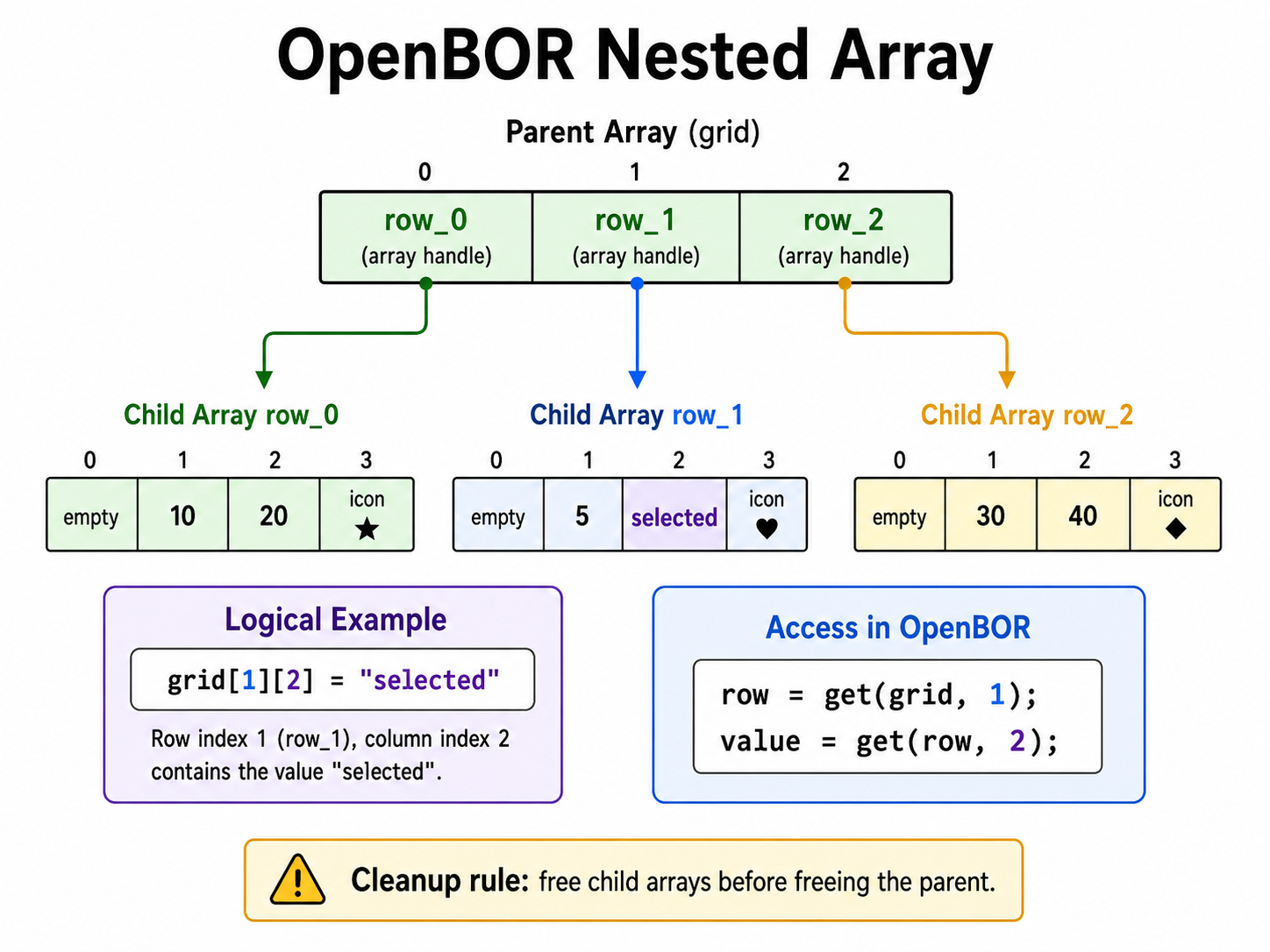
You pay a nominal cost for each “jump” from parent to child, but it is still just another array lookup. There is no practical engine-level limit to how far you can nest, but each new dimension multiplies the complexity, and it is easy to get overwhelmed. For simpler table shaped data sets, a flattened indexed array may be faster and simpler to clean up.
Also remember ownership. If a parent array stores child array pointers, free the child arrays before freeing the parent. Once the parent is gone, you may lose the handles you need to clean up the children.
Ring Buffer
Ring buffers are circular queues used to handle inputs, logs, helper entities, shadow trails, and other repetitive data.
Decisions
Still not sure what to do? here’s a quick reference chart that might help.
| Need | Prefer |
|---|---|
| Fixed-size, hot-path data | Indexed array |
| Named, flexible data | String-keyed array |
| 2D grid with known dimensions | Flattened indexed array |
| Hierarchical records | Nested arrays |
| Append/insert during setup | add() acceptable |
| Frequent mutation during gameplay | Avoid resizing/shifting |
Still not sure? Visit the support community and ask us. We’ll be glad to help.
Reference
The following is a list of OpenBOR’s array and support functions.
add
void key = 0; // Int or string.
void value = 0; // Any type.

add(void array_pointer, key, value);
- Indexed – Inserts value at
key. Key must be from0throughsize(array_pointer). Resizes the array by one and shifts all indexes fromkeyupward. - String-Keyed – Creates a named entry for
keywithvalue, or updatesvalueifkeyalready exists. Same behavior asset().
Avoid using indexed add() during active gameplay unless you really need insertion behavior. It resizes and shifts elements.
array
void array_pointer = array(int size);
Allocates an array with int size initial indexed elements and returns the array pointer.
- Indexed – Allocate the number of elements you expect to use.
- String-Keyed – Use
array(0), because string-keyed entries are stored separately from the indexed block.
delete
void key = 0; // Int or string.

delete(void array_pointer, key);
- Indexed – Deletes the target element, resizes the array, and shifts all higher indexes down.
- String-Keyed – Removes the named entry for
keyfrom iteration order.
Avoid using delete() during active gameplay. For indexed arrays, delete() causes resizing and shifting of the entire array. For string-keyed arrays, it may leave stale state where the cursor is located at former node and still returns value, while and get() likewise returns the previous value.
free
free(void object_pointer);
Not an exclusive array function. Use to remove an array from memory.
Caution: As this is a general freeing function, make sure you pass it a valid array pointer. If you pass it a pointer to some other object, free() will destroy that object instead. Also, free() only frees the target array – not any sub arrays or objects the target array referenced. Make sure you free() those first if you want to remove them.
get
void key = 0; // Int or string.

void result = get(void array_pointer, key); // Any type.
Returns value at key, or NULL() if the entry does not exist.
- Indexed – Retrieves by integer index.
- String-Keyed – Retrieves by string key.
isarray
int is_array = isarray(void object_pointer);
Version 4.0+ only. Returns 1 if pointer is an array. 0 otherwise.
isfirst
int first = isfirst(void array_pointer);
String-keyed only. Returns 1 if the internal cursor is at first node. 0 otherwise.
islast
int last = islast(void array_pointer);
String-Keyed only. Returns 1 if the internal cursor is at last node. 0 otherwise.
key
void string_key = key(void array_pointer);
String-Keyed only. Returns the string key at current cursor position.
next
int success = next(void array_pointer);
String-Keyed only. Attempts to move cursor to next node in order. Returns 1 on success, 0 if already at last node.
previous
int success = previous(void array_pointer);
String-keyed only. Attempts to move cursor to previous node in order. Returns 1 on success, 0 if already at first node.
reset
int success = reset(void array_pointer);
String-Keyed only. Attempts to move cursor to first node in order. Returns 1 on success, 0 if array has no nodes.
set
void key = 0; // Int or string.
void value = 0; // Any type.

set(void array_pointer, key, value);
- Indexed – Sets target
keyto value. Ifkeydoes not exist, resizes array to accommodatekeybefore setting value. - String-Keyed – Creates a named entry for
keywithvalue, or updatesvalueifkeyalready exists. Same behavior asadd().
For indexed arrays, prefer set() over add() when you already know the slot you want to write.
size
int array_size = size(void array_pointer);
- Indexed – Returns current number of elements in the array.
- String-Keyed – Returns number of named entries.
Caution: If you mistakenly allocate >0 entries to an array you intend for string keys, size() will return that allocated number of elements until you add or set a string-keyed node. Always allocate 0 for string-keyed arrays, and never mix key types.
value
void array_value = value(void array_pointer); // Any type
String-Keyed only. Returns value at current cursor position.
- Hardware acceleration – In this case, hardware acceleration does not literally mean routing work to some dedicated chip or special pathway on the machine. What it does mean is that a contiguous memory block allows both cache locality and direct CPU access to indexed data without pointer chasing. Not hardware accelerated by strict definition, but effectively the same thing in practice. ↩︎